
A ChatGPT Twitter setup takes one plugin: connect ChatGPT to X, then ask it to write your posts and threads, save them as drafts, schedule them and tell you how they did, all from the same chat. It takes about 2 minutes, and you don’t need an X developer account.
I’m Anton, founder of PostHero. I built our connector so any AI agent can run your socials, ChatGPT included. This guide shows how to set up ChatGPT for X, what it can actually do there, the X rules that matter when an AI posts for you, how the options compare, and the prompts worth copying.
How to connect ChatGPT to X
- Create a PostHero account and connect your X account.
- On chatgpt.com, open Plugins, click +, and choose Add custom MCP server.
- Paste https://mcp.posthero.ai/mcp as the server URL, choose Create as a plugin, then install it and sign in to PostHero.
- Start a chat, mention @PostHero and ask: “list my connected accounts”.
What you need for ChatGPT X posting
- Your regular X account. Free or Premium, both fine. You link it to PostHero through X’s own sign-in page, so ChatGPT never touches your password.
- No X developer account. PostHero handles the connection to X’s API. The DIY route (a script or custom GPT action calling X directly) means creating your own developer app and paying X for API usage.
- ChatGPT on the web for setup. Custom MCP servers are added on chatgpt.com, not in the mobile app. If you don’t see Add custom MCP server under Plugins, your plan or workspace doesn’t allow custom servers yet, so check with OpenAI’s help center or your workspace admin.
Posting from more than one X account? Connect each of them in PostHero. ChatGPT sees them all and can write a separate version for each, which X effectively requires (more on that below). And if you’re on other platforms too, the same plugin covers them, the setup is identical to connecting an AI to all your social media.
Can ChatGPT post to Twitter?
Not by itself. Out of the box, ChatGPT writes a tweet and you copy it into X. With PostHero installed as a plugin, ChatGPT can save that tweet as a draft, schedule it, or publish it when you tell it to, then pull the numbers afterwards.
Here’s what ChatGPT can do on X through PostHero:
- Single posts of up to 280 characters, or up to 25,000 on X Premium.
- Threads, saved as one draft and split into separate posts.
- Media: up to 4 images or one video per post. They have to be public links, so upload your files to the PostHero media library first and then point ChatGPT to them.
- Scheduling for any date and time you name.
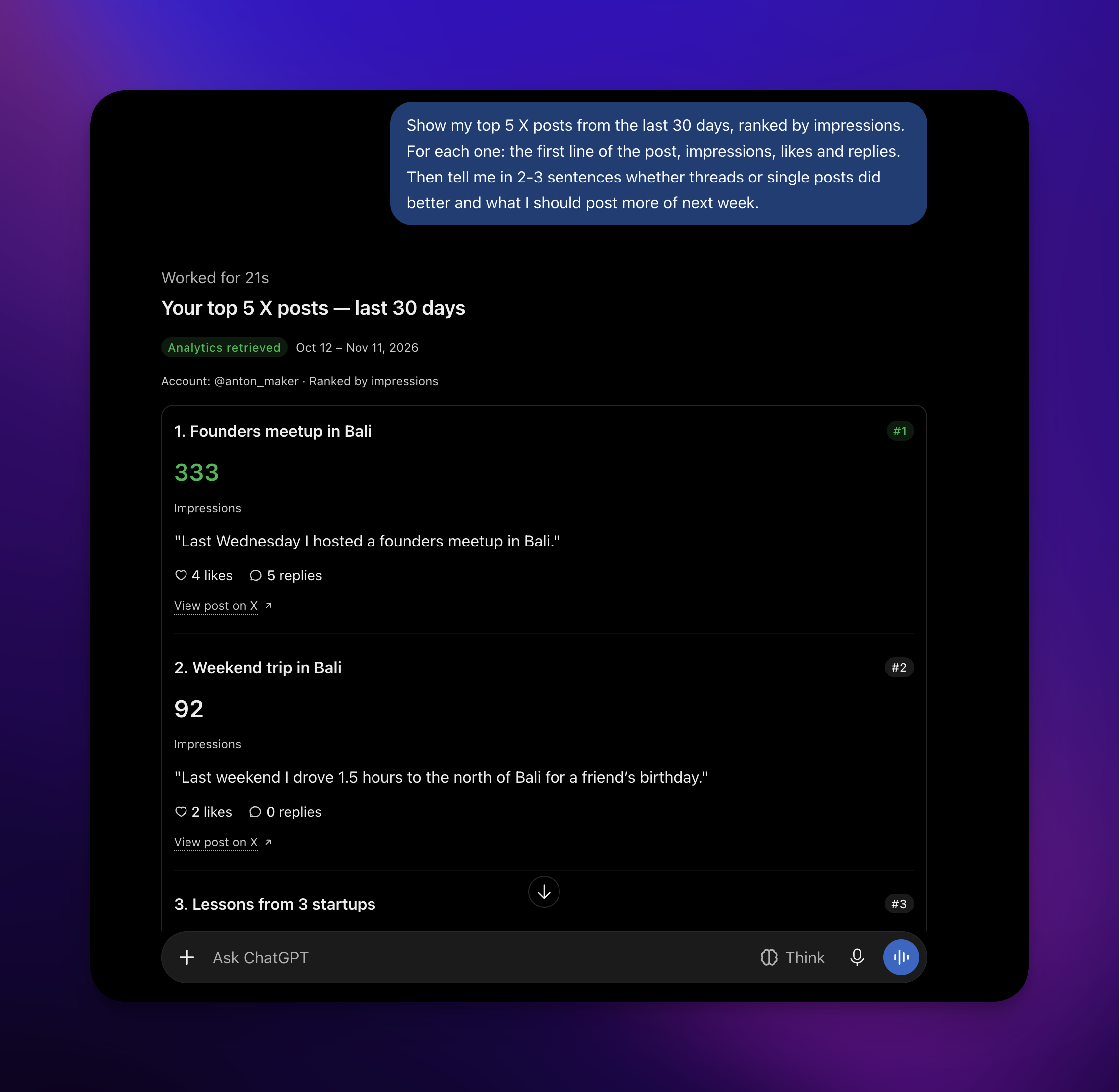
- X analytics: impressions, likes, replies, reposts and follower numbers over a period, plus your top posts ranked by whichever metric you choose.
- A separate version per account when the same idea goes out on several X accounts.
A note on length: free X accounts are limited to 280 characters per post, so ChatGPT should keep each post under that or split it into a thread. On X Premium you can post up to 25,000 characters, and PostHero doesn’t cap it, so long posts go through as written.
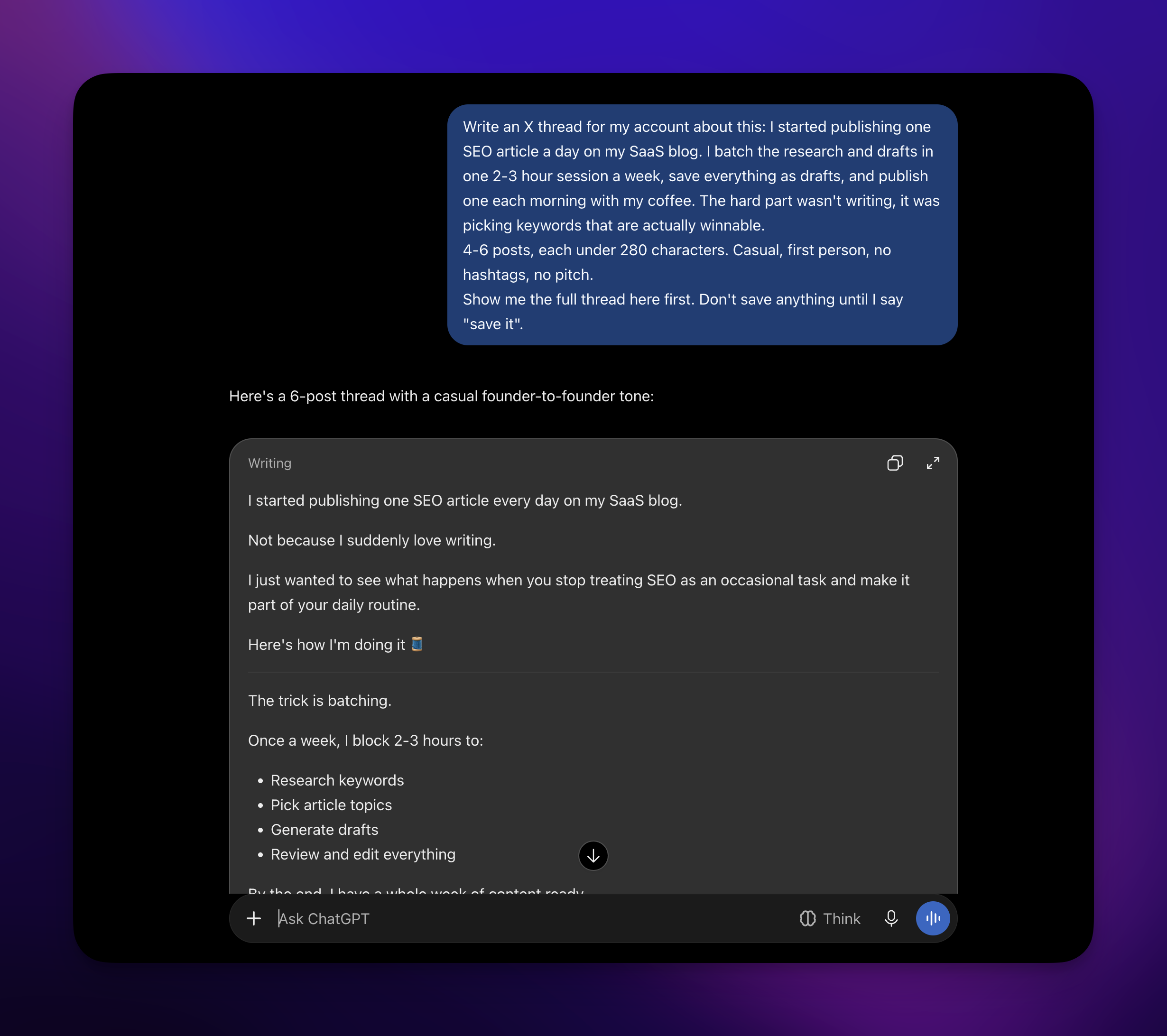
How I use AI for my X posts
I do my X writing in ChatGPT or Claude. It’s not glamorous. I hand over a rough idea and ask for a tweet, or I paste something I already wrote and ask for a language check before it goes out.
Where it actually earns its keep is ideas. A chat that knows your work, because you talk to it about your week, can suggest posts from things that really happened to you: a tough client call, a number you hit, a decision you argued about. That beats any tweet generator, which only knows your niche. On X, what happened to you is the content.
I also mix formats. Some days a single post, some days a thread. Trying one idea in two formats before picking takes a minute in chat.
Where ChatGPT tweets go wrong
- Generic topics in, generic tweets out. “Write a tweet about productivity” gets you a tweet nobody asked for. Give it a real event, a number or an opinion you hold.
- LinkedIn posts chopped into 280-character pieces. It’s still a LinkedIn post, and on X it reads stiff.
- The expert voice. Polished “7 lessons” posts sound like a press release on X. People reply to humans.
The one instruction that fixes most of this: write for X, casual, and don’t pitch anything. No product plugs, no “follow for more”, no hashtags.
Write this for X like I’m talking to a friend. Casual, no pitch, no call to action, no hashtags, no emojis unless I use them. Keep my own words where they sound like me. Show me the draft before you save it.
X rules for posting with ChatGPT
X is stricter about automation than most networks, and a few rules hit AI workflows head on.
Same text on several accounts isn’t allowed. X’s automation rules prohibit posting identical content across multiple accounts. So “post this to my personal and company account” is the one request you shouldn’t make as is. Ask ChatGPT for a separate version per account instead:
Turn this idea into posts for both my X accounts, but give each account its own version: first person and casual for my personal account, shorter and factual for the company account. Save both as drafts.
Use the official X login. Some ChatGPT Twitter tools and browser extensions work off your logged-in browser session instead of X’s API. That’s unofficial access, and it’s how accounts get flagged. PostHero connects through X’s own sign-in.
You approve, ChatGPT drafts. Everything ChatGPT creates in PostHero starts as a draft. It schedules only when you give it a time, and publishes right away only when you say so and confirm once more. An AI that tweets on its own from your account is a risk you don’t need.
Ways to connect ChatGPT to X, compared
There’s no built-in X integration in ChatGPT, so every option is a third-party plugin, an automation or something you build. They differ in what else they cover and how much setup they need.
| Option | How it connects | X developer account | Drafts and scheduling | Best for |
|---|---|---|---|---|
| PostHero | ChatGPT plugin (MCP) | ✅ Not needed | ✅ Yes, draft first | X plus 7 other platforms, with analytics |
| OpenTweet | API, custom GPT action | ✅ Not needed | ✅ Yes | X-first posting via API key |
| Composio | ChatGPT plugin | ✅ Not needed | ❌ Posts right away | Broad X actions: DMs, lists, search |
| IFTTT | Automation applets | ✅ Not needed | ❌ Trigger-based | Auto-posting from RSS or other apps |
| DIY with the X API | Your own script or GPT action | ❌ Required | If you build it | Full control |
Based on each vendor’s own pages, checked 10 November 2026.
The honest version:
- Pick OpenTweet if X is your only platform and you’re happy wiring up an API key.
- Pick Composio if you want ChatGPT to do many kinds of X actions (DMs, lists, search) and don’t need a draft or schedule step.
- Pick IFTTT if you want hands-off posts triggered by something else, like a new blog post.
- Pick PostHero if X is one of several platforms you post on, and you want drafts you approve, scheduling and analytics in the same ChatGPT chat. That’s what I built it for.
ChatGPT prompts for X
Replace the parts in brackets.
Find post ideas in your own week
From what I’ve told you about my work recently, suggest 5 things I could post on X. Each must come from something that really happened to me, not general advice. One line each.
One idea, two formats
My idea: [idea]. Write it as a single X post under 280 characters, and as a thread of 4-6 posts. Casual, no pitch. Show me both and I’ll pick one to save as a draft.
Fix the language, keep the voice
Fix grammar and anything that sounds off in this tweet, but keep my wording and tone. Don’t make it more polished than it has to be: [tweet]
Schedule the week
Schedule today’s X drafts: the single post on [day] at [time], the thread on [day] at [time], my time zone.
Read your X analytics
Show my top 5 X posts from the last 30 days by impressions. Did threads or single posts do better, and what should I post more of next week?
Using Claude instead?
Same connector, same X accounts, same drafts. In Claude you add it as a custom connector rather than a plugin. The full walkthrough, with how I use it day to day, is in the guide to connecting Claude to X. Why PostHero works with any AI agent is explained in PostHero goes agentic.
Why isn’t ChatGPT posting to Twitter?
- The plugin isn’t in this chat. Mention @PostHero in your message, or pick it from the + menu, so ChatGPT uses it.
- ChatGPT says it posted, but nothing happened. Without the plugin active, ChatGPT can describe posting without doing anything. Check the plugin is on and ask it to list your accounts first.
- No X account found. You likely signed in to a different PostHero account than the one with X connected. Reconnect the plugin with the right login.
- Draft saved, but won’t publish. On a free X account, usually one post is over 280 characters. Ask ChatGPT to shorten it or make it a thread.
- Image won’t attach. ChatGPT can’t hand chat attachments to PostHero. Upload the image to your PostHero media library and give ChatGPT its link.
FAQ
Can ChatGPT post to X on its own?
No. ChatGPT has no built-in X connection. It writes the text, and a plugin like PostHero saves, schedules or publishes it.
Can ChatGPT write Twitter threads?
Yes. Ask for a thread and it writes separate posts under 280 characters each, saved as one thread draft you can edit before scheduling.
Can I connect ChatGPT to X on my phone?
You add the custom server on chatgpt.com. After that, your drafts and schedule live in PostHero, so you can review them from any device.
Will ChatGPT post without asking me?
No. Everything starts as a draft, and publishing needs your go-ahead plus one confirmation.
Can I run several X accounts from ChatGPT?
Yes. Connect them all in PostHero and tell ChatGPT which one to use. For the same idea on several accounts, it writes a different version for each, since X doesn’t allow identical posts across accounts.
Does it cover my other platforms?
Yes: LinkedIn, Threads, Instagram, Facebook, YouTube, TikTok and Bluesky through the same plugin. See the social media connection guide for what works on each.
PostHero for ChatGPT
Run your X account from ChatGPT
Connect in 2 minutes. Turn real ideas into posts and threads, and approve each one before it goes live.
7-day free trial. Everything starts as a draft.
Leave a Reply