
An Instagram audit with Claude takes one prompt once Claude can read your account. The harder part is what most guides skip: deciding what to change, and then checking whether the change worked.
I’m Anton, founder of PostHero. I built our Claude connector, and in this guide I walk through a real audit of my own account, @_antoncherkasov: what it found, what I changed (and where I messed up), and how Claude now checks every new post against it. All the numbers below come straight from that audit.
How to run an Instagram audit with Claude
- Connect PostHero to Claude and link your Instagram Business or Creator account.
- Ask Claude: “Audit my Instagram @[handle]”.
- Read the formats, hooks and recommendations it returns.
- Act on the top one or two recommendations only.
- A week later, ask Claude how your posts since the audit compare with your usual numbers.
Before you start: add PostHero to Claude
- Create a PostHero account and connect your Instagram Business or Creator account.
- In Claude, open Customize > Connectors and add a custom connector.
- Name it PostHero and paste https://mcp.posthero.ai/mcp, then sign in.
- Turn it on in a chat and ask: “list my connected accounts”.
If you want the long version with screenshots and troubleshooting, it’s in my full Instagram setup guide.
What a Claude Instagram audit covers
A prompt like “audit my Instagram” is only as good as the data behind it. Claude on its own can’t open Instagram, so without a connector it guesses from whatever you paste in. With PostHero connected, the audit runs on your real recent posts (mine covered 72 days), and you get two layers back.
The numbers.
- Each format (reels, carousels) with median views, reach, likes, saves and shares, plus saves and shares per 1,000 views.
- Your top and weakest posts, with their hooks and full captions.
- Cadence: posts per week, your longest gap, days since your last post.
- Timing: median views by weekday and by hour.
- Caption length buckets and follower change.
The written audit. A summary, four scores (consistency, engagement, growth and format mix), strengths, weaknesses, a verdict per format, the hooks that worked and the ones that didn’t (with the reason for each), prioritized recommendations, and five content ideas built from your own winners.
The audit also lives in PostHero, so you can open it outside the chat. And it keeps one more thing that matters later: a baseline. Every post you publish afterwards gets compared with it. More on that below, because it’s the part I actually use every week.
My real audit: what Claude found on @_antoncherkasov
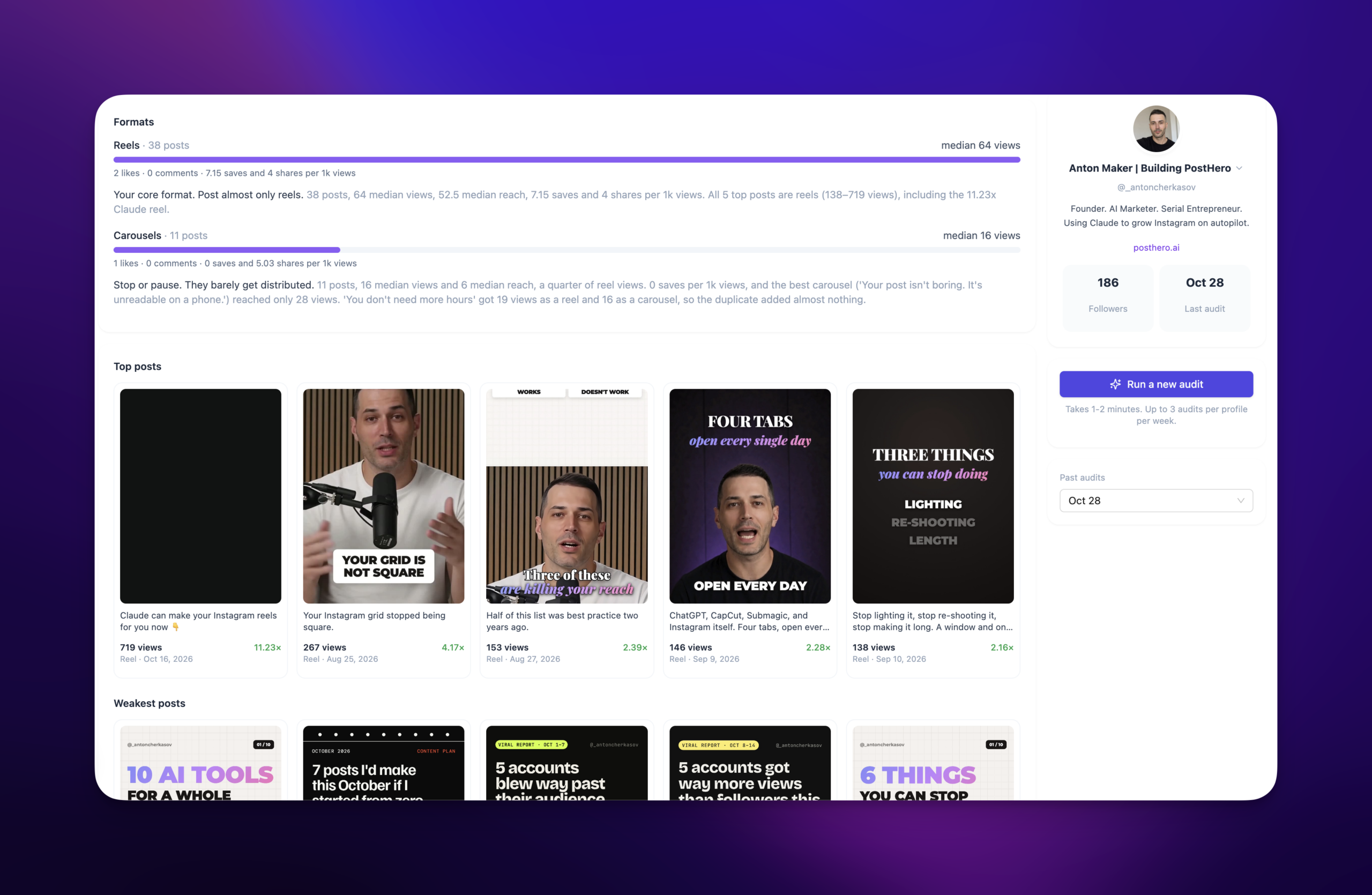
I ran the audit on October 28. It covered 72 days, August 16 to October 28: 49 posts, 38 reels and 11 carousels, about 4.7 a week. I thought I knew what was working. Some of it I did. Some of it I’d been avoiding.
Finding 1: carousels lost every single time
This was the one that surprised me most, even though the signs were there for weeks. My reels had a median of 64 views and 52.5 reach. My carousels: 16 views and a median reach of 6. Six people.
None of my 11 carousels passed 28 views. All five of my weakest posts were carousels, between 12 and 16 views each. I even had one idea (“You don’t need more hours. You need fewer habits.”) posted both ways: 19 views as a reel, 16 as a carousel. The format barely got distributed at all, whatever I put in it.
The audit’s verdict was blunt: stop or pause carousels, rebuild those ideas as short reels. I’d kept making them because they felt like “value” posts. The numbers said nobody was seeing the value.
Finding 2: the same topic got 719 views and 21
My best reel ever, “Claude can make your Instagram reels for you now 👇” on October 16, got 719 views. That’s 11.2x my reel median, with 14 saves, 7 comments and 7 shares. (The story of how I made it is in my guide to making Instagram reels with Claude.)
Here’s what I hadn’t noticed. Two other reels on the same topic, “Claude can now make your Instagram reels for you 🎬” and “Plug Claude into your Instagram in 2 minutes 👇”, got 21 and 19 views. Same subject, a fraction of the result.
The audit pointed at the difference: the winner had three numbered steps in the caption and a concrete payoff (“Comment REELS and I’ll DM you the viral prompt”). So it wasn’t the topic that worked. It was the structure. And the audit turned that into a template I could reuse:
Claude can [specific task] for you now 👇 Then 3 numbered steps in the caption, then what Claude produces, then “Comment [KEYWORD] and I’ll DM you the prompt”.
Finding 3: a list of my own hooks, sorted into worked and didn’t
This is my favourite part of the audit, and the one I reuse most. Instead of generic hook advice, you get your own hooks with their numbers and the reason each one worked or flopped.
What worked for me:
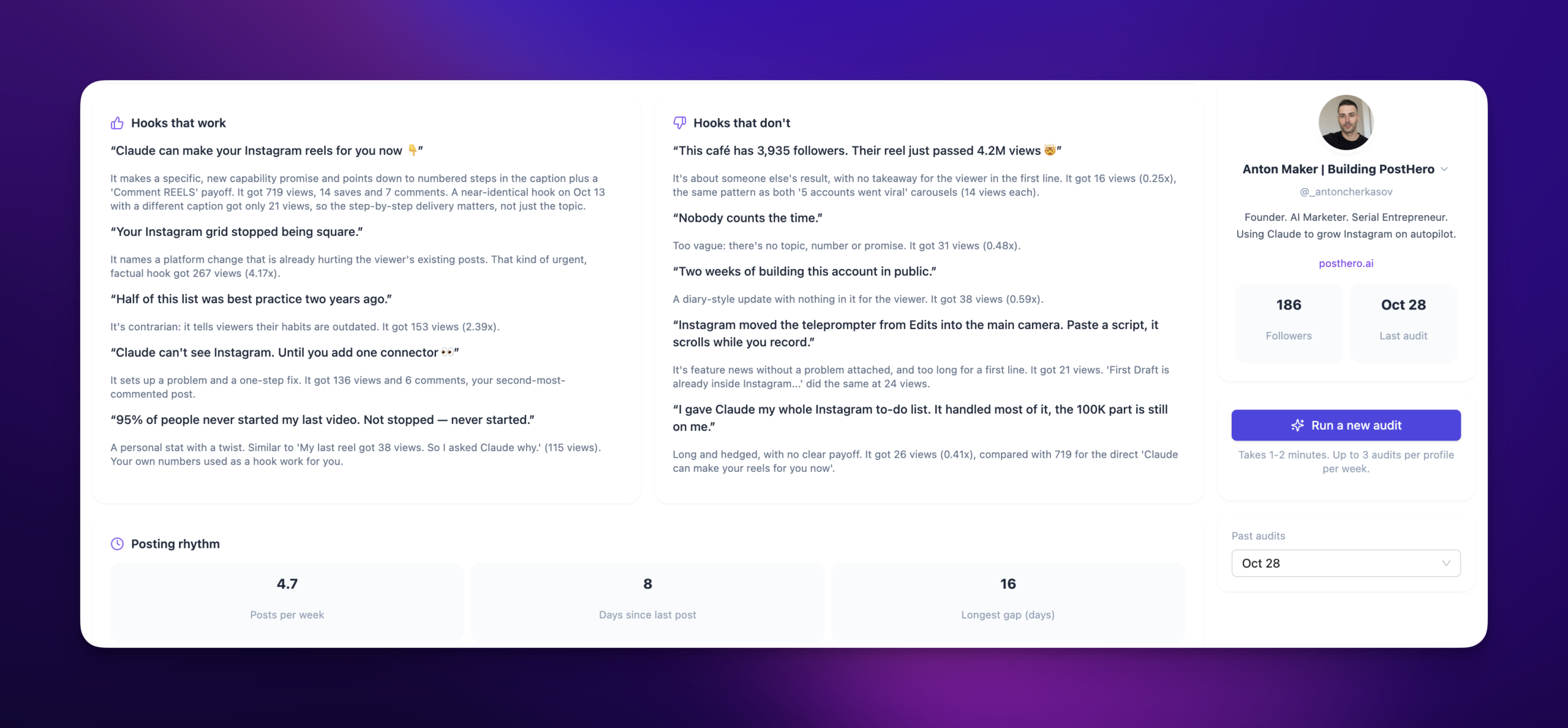
- A platform change that hurts you right now. “Your Instagram grid stopped being square.” got 267 views, 4.17x my usual.
- Telling people their habits are outdated. “Half of this list was best practice two years ago.” got 153 (2.39x).
- A problem plus one fix. “Claude can’t see Instagram. Until you add one connector 👀” got 136 views and 6 comments, my second most commented post.
- My own numbers. “My last reel got 38 views. So I asked Claude why.” got 115.
What didn’t:
- Someone else’s result. “This café has 3,935 followers. Their reel just passed 4.2M views 🤯” got 16 views. My weekly “accounts that went viral” carousels got 14 and 14.
- Diary updates. “Two weeks of building this account in public.” got 38.
- Vague lines. “Nobody counts the time.” got 31.
That second list stung a bit. I liked those viral breakdown posts. But the audit was right: a hook about another account gives the viewer nothing in the first line. Now I keep the “worked” list as templates and write new hooks into those shapes instead of starting from a blank line.
Finding 4: when I post mattered, and so did not posting
Wednesday (median 120 views) and Monday (77) were my best days. Saturday (21) and Tuesday (28) were my worst. 13:00 UTC was the most reliable slot, with a median of 81 across 9 posts.
I liked one detail here. 21:00 UTC looked even better at 137, but the audit flagged that it rested on only 3 posts and said to test it rather than trust it. That’s the kind of caveat I’d want from a human analyst too.
The less comfortable part was cadence. A 16-day gap from September 19 to October 5. And after my best reel ever, two more posts and then 8 days of silence. The audit’s top recommendation was simply: restart now, one reel a day, Monday to Friday, no multi-day gaps.
Comment keywords got the same honest treatment. My generic “Comment SYSTEM” posts drew 2 and 0 comments. The ones that named a concrete deliverable (the viral prompt, the connector link) drew 7 and 6.
What I changed after the audit (and where I slipped)
I went all in on reels. No carousels since the audit. And I started making new versions of the reels that had worked, using the hook list and the 719 template, all of them made with Claude and rendered in PostHero.
Here’s how the first four did against my usual reel median of 64 views:
| Reel (posted) | Views | vs usual |
|---|---|---|
| “Day 0. Claude runs my Instagram for the next 30 days.” (Oct 28) | 158 | 2.47x |
| “How I plan 30 days of reels with Claude, without guessing what to post.” (Nov 2) | 139, 4 saves | 2.17x |
| “How to go from 64 to 719 views with Claude, without guessing what to post 👇” (Oct 28) | 111 | 1.73x |
| “7 things I ask Claude every week 👇” (Oct 28) | 45 | 0.7x |
Three of four beat my usual. The one that didn’t is a generic list, exactly the kind of hook the audit warned about. Four posts is a small sample, so I’m not calling it proof. But it’s the direction I wanted.
Now the honest bit. Look at the dates. Three of those reels went out on the same day, which the audit specifically flagged (same-day doubles split views). Then one more on November 2, and nothing since. I wanted to post daily. Then life happened, and I didn’t post for a while. That’s the part I regret, because the audit had already shown me what gaps cost: momentum resets every time. I’m starting again this week.
I’m including it because it’s the most common way an audit fails. Not because the advice is wrong, but because nobody does it consistently.
How Claude checks new posts against the audit
This is the part I didn’t expect to use so much. When Claude pulls your latest audit through PostHero, it also gets every post published since, with fresh numbers synced daily. Each one is compared with the audit’s median for the same format, and marked if it was made with PostHero.
So you don’t need a new audit every week to know what’s working. You ask:
Show me the posts I published since my last Instagram audit, compared with my usual numbers for that format. Which beat it, which didn’t, and does that confirm or contradict what the audit said?
That’s how the table above was made. Claude also flags posts that are under 24 hours old, so you don’t judge a reel before it’s had a chance.
My weekly routine is simple. Every week I ask Claude for two things: what worked on my profile last week against my usual numbers, and what went viral in my niche. Then I use both for the next content batch. The viral part comes from PostHero’s library of viral reels, which Claude can search by niche, and it’s a great source of inspiration when my own hook list runs dry.
How to act on your own Instagram audit
An audit gives you more recommendations than you can act on. Mine had seven. Here’s the order I’d use now, after getting it half right the first time:
- Cut what clearly loses. If one format has a quarter of the reach of another, stop it for a month. This is the easiest win and the one people resist most.
- Turn your best post into a template. Not the topic, the structure. Ask Claude what the winner did that its weaker siblings didn’t.
- Keep the hooks list. Write every new hook into one of your proven shapes, and retire the shapes in the “didn’t work” list.
- Fix cadence before anything clever. One post a day in your best slot beats three on one day and silence after. I’m the example.
- Check posts since the audit every week. Keep the old audit as your baseline while you test changes. A fresh audit right away would fold your new posts into the “usual” you’re trying to beat.
Treat thin numbers with care. If a slot or a format rests on three posts, it’s a test, not a rule.
Other ways to audit Instagram with Claude
PostHero isn’t the only way to get an Instagram audit out of Claude. Here’s how the options I found today compare, on what matters for this job: a ready-made audit, checking new posts against it afterwards, and acting on it.
| Option | Ready-made audit | New posts vs the audit | Viral niche research | Makes the next posts |
|---|---|---|---|---|
| PostHero | ✅ Yes, built in | ✅ Yes, post by post | ✅ Yes | ✅ Reels and carousels, as drafts |
| Two Minute Reports | ✅ Skill you upload | Prior period only | ❌ No | ❌ No |
| Metricool | Benchmark skill | ❌ Ask by prompt | Competitors you track | Schedules, doesn’t design |
| Coupler.io | ❌ Prompts only | ❌ Ask by prompt | ❌ No | ❌ Read-only |
| Windsor.ai | ❌ Prompts only | ❌ Ask by prompt | Public competitor data | ❌ No |
| Screenshots or an export | ❌ You paste the data | ❌ No history | ❌ No | ❌ No |
Based on each vendor’s own pages, checked 10 November 2026.
The honest version:
- Two Minute Reports has the most report-like audit: a health score, audience breakdowns and a tiered action plan, compared with the previous period. Good if you hand reports to clients.
- Metricool works on its free plan and has a benchmark skill that compares you with accounts in your follower tier. Good if you already schedule there.
- Coupler.io and Windsor.ai are data pipes. Great for custom analysis and dashboards, but you write the audit prompt yourself.
- Screenshots are fine for a one-off look. Claude can’t come back next week and check anything.
- PostHero fits if you want the loop: audit, hooks, viral ideas, the next reels made in the same chat, and every new post scored against the audit.
Copy-paste prompts for an Instagram audit with Claude
Swap the bits in brackets for your own.
Run or read the audit
Get my latest Instagram audit for @[handle]. If there isn’t one, ask me before running a new one. Tell me in plain words: which format to keep, which to stop, and the one thing to fix first.
From my audit, find posts on the same topic that got very different results. What did the winner do that the others didn’t?
Hooks
List the hooks from my audit that worked and the ones that didn’t, with views and how many times my usual. Turn the top 3 into fill-in-the-blank templates I can reuse.
Check new posts
Compare every post since my last audit with my usual numbers for that format. Skip anything under 24 hours old. Which hook template is winning so far?
Plan the next batch
Search viral reels in [niche] from the last 14 days, sorted by views compared to followers. Which hook patterns match what already works on my account?
Using my audit, my posts since and those viral reels, plan next week’s 5 reels: one per weekday in my best time slot, each with a hook from my proven templates. Show me the list before you make anything.
Using ChatGPT instead?
The same audit works there. PostHero’s connector is built on MCP, the standard ChatGPT also uses for connectors, so you add https://mcp.posthero.ai/mcp as a custom connector in ChatGPT and sign in to PostHero. You get the same audit, the same posts-since check and the same viral library, and the prompts above work as they are. I run mine in Claude, which is why this guide shows Claude. The same connector covers your other platforms too: here’s what Claude can do on each of the 8 platforms.
FAQ
Can Claude audit my Instagram for free?
Mostly. Claude’s Free plan allows one custom connector, which is all this needs. PostHero has a 7-day free trial, so you can run a real audit and check a week of posts against it before paying.
Does it work with a personal Instagram account?
No. Instagram only gives apps access to Business and Creator accounts. Switching is free and takes a minute in Instagram’s settings.
Can Claude audit Instagram without a connector?
Partly. You can paste screenshots or an export and Claude will analyze them. But it only sees what you pasted, it can’t check your next posts, and you redo the whole thing every time.
How often should I run a new audit?
Less often than you’d think. Check your posts since the audit every week instead, and keep the old audit as the baseline while you test changes. Claude can tell you whether a new audit can be run right now when you ask.
How accurate is an Instagram audit made by Claude?
The numbers come from your Instagram data, synced daily. The reading of them is Claude’s, so check the sample size behind any claim. A good audit says so itself: mine marked a strong time slot as “test it” because it rested on 3 posts.
Can Claude audit a competitor’s Instagram?
Not with private numbers like reach or saves, which only the owner sees. With PostHero, Claude can track competitors you name and compare their recent reels with yours.
Will Claude post anything after the audit?
Not unless you ask. Anything Claude makes from the audit lands in PostHero as a draft, and publishing needs your explicit go-ahead plus one confirmation.
PostHero for Claude
Audit your Instagram with Claude
Connect in 2 minutes. Get your formats, hooks and best times, then let Claude check every new post against them.
7-day free trial. Everything starts as a draft.
Leave a Reply