Most people use ChatGPT for Instagram the same way. Open a chat, type “write a caption for my coffee shop post”, paste whatever comes back. It works. The caption is fine. It’s also the caption everyone else asking the same question got this morning.
I’m Anton, founder of PostHero. I built the connector that lets AI assistants work inside Instagram, and I use it on my own account every week. In this guide you’ll get the ChatGPT prompts for Instagram I’d actually use, the point where plain prompting stops helping, and how to connect ChatGPT to Instagram so it can see your account, study what’s going viral in your niche and save reels and carousels as drafts.
How to use ChatGPT for Instagram
- Tell ChatGPT your niche, who you post for, and paste one of your best posts.
- Ask for one specific thing: hooks, a caption, a reel script or a carousel outline.
- Rewrite the result in your own words before posting.
- To go further, connect ChatGPT to Instagram so it works from your real numbers and saves drafts for you.
Steps 1 to 3 need nothing but a ChatGPT account. Step 4 is where it stops being a caption writer and starts doing the research, which is the part that actually moves your views. I’ll cover both.
ChatGPT prompts for Instagram that don’t sound like ChatGPT
Generic output comes from generic input. If the only thing ChatGPT knows is “fitness”, it writes the average fitness caption, and the average gets average reach.
So start every Instagram chat with context. This one prompt does more for quality than any clever wording later:
I run an Instagram account about [niche] for [who you post for]. My tone is [3 words]. Here’s a post of mine that did well: [paste caption]. Here’s one that flopped: [paste caption]. Keep this in mind for everything I ask in this chat.
Then ask for one thing at a time. Swap the bits in brackets for your own.
Captions
Write 5 captions for a post about [topic]. Each one starts with a different kind of first line: a number, a question, a confession, a mistake, a strong opinion. Under 120 words, no hashtags, one clear call to comment.
Here’s my draft caption: [paste]. Cut it by a third, remove anything that sounds like marketing, and keep my wording where it’s already good.
Reel hooks and scripts
Give me 10 on-screen hooks for a reel about [topic]. Each must work as text in the first 2 seconds with the sound off. Maximum 8 words each.
Write a 20-second faceless reel script about [topic]. Split it into scenes, with the on-screen text and a suggested background shot for each scene. End on a line that makes people want to save it.
Carousels
Outline a 7-slide Instagram carousel on [topic]. Slide 1 is a hook that promises one specific result. Slides 2 to 6 give one point each in under 25 words. Slide 7 asks people to save or share.
Bio, ideas and comments
Rewrite my Instagram bio: [paste bio]. It has to say who I help, with what, and why they should follow, in under 150 characters. Give me 4 versions.
Give me 20 post ideas for [niche] that my audience would argue about in the comments. Mark which ones suit a reel and which suit a carousel.
Here’s a comment on my post: [paste]. Draft a short, friendly reply that answers it and asks a follow-up question.
Where plain ChatGPT runs out
Those prompts are a solid start. But use them for a few weeks and you hit the same four walls.
- It can’t see your account. It only knows the posts you paste in. Ask “what’s working for me?” and it guesses.
- It doesn’t know what’s working on Instagram right now. Its idea of a good caption is a blend of everything it has read. Your niche this month is not in there.
- It can write a reel, not make one. You still take the script to CapCut or Canva and build it yourself.
- Everything goes through copy and paste. Stats in, caption out, into Instagram by hand.
The second one matters most. The biggest change I’ve seen once ChatGPT is connected is the data: it can study viral content on Instagram before it writes, so the captions come from what’s actually getting views in your niche instead of from a generic idea of a good caption. Same model, better material to work from.
How to connect ChatGPT to Instagram
- Create a PostHero account and connect your Instagram Business or Creator account.
- On chatgpt.com, open Plugins, click the + button and choose Add custom MCP server.
- Name it PostHero, paste https://mcp.posthero.ai/mcp, choose OAuth, confirm the warning and create it.
- Sign in to PostHero, turn it on in a chat and ask: “list my connected accounts”.
What you need before you start
- An Instagram Business or Creator account. Meta only lets apps post to professional accounts. Switching is free and takes a minute in Instagram’s settings.
- A ChatGPT plan that lets you add custom MCP servers. OpenAI decides which plans get this and has changed it more than once this year. If Plugins doesn’t show “Add custom MCP server” for you, your plan or workspace doesn’t allow it yet. On Business, Enterprise and Edu workspaces, an admin may need to add it or switch it on.
- The same PostHero account in both places. Sign in to the connector with the account where you linked Instagram. Otherwise ChatGPT connects happily and then finds no Instagram account.
- chatgpt.com for the setup. Add the connector in ChatGPT on the web.
One connector covers more than Instagram: LinkedIn, X, Threads, Facebook, YouTube, TikTok and Bluesky come along with it. The guide to connecting AI to all 8 social platforms shows what works on each one. And if you’re wondering why I built PostHero for any AI assistant instead of just one, that’s in PostHero goes agentic.
Ways to connect ChatGPT to Instagram, compared
There’s no official Instagram plugin for ChatGPT from Meta or OpenAI, so every option is a third party. Most of them do one of two jobs: report your numbers, or publish media you already made. Here’s how they line up.
| Option | Reads your stats | Posts to Instagram | Makes reels and carousels | Audit and viral research |
|---|---|---|---|---|
| PostHero | ✅ Yes | ✅ Yes, as drafts | ✅ Yes | ✅ Yes |
| Windsor.ai | ✅ Yes | ✅ Yes, from a public URL | ❌ No, you bring the media | Public profiles only |
| Composio | ✅ Yes | ✅ Yes | ❌ No, you bring the media | ❌ No |
| Supermetrics | ✅ Yes | ❌ No, reporting | ❌ No | ❌ No |
| ChatGPT on its own | Only what you paste | ❌ No | Scripts and captions only | ❌ No |
Based on each vendor’s own ChatGPT + Instagram page, checked 11 November 2026.
My honest take:
- Supermetrics or Windsor if you mainly want reports, for example across client accounts.
- Windsor or Composio if you already make your reels in CapCut or Canva and just want ChatGPT to publish them and handle comments. Composio also covers DMs.
- PostHero if the hard part for you is knowing what to post and then making it.
Some of these install from ChatGPT’s plugin directory in a click. PostHero you add by URL, which takes about a minute longer.
What ChatGPT can do once Instagram is connected
With PostHero connected, ChatGPT can take a post from “no idea” to a finished draft in your queue without you leaving the chat.
Audit your profile
Ask for an audit and ChatGPT runs one on your account: what’s working, what isn’t, and which recent posts beat your usual numbers. The audit is saved in PostHero, so later posts get checked against it instead of starting fresh every time.
Study what’s going viral in your niche
This is the step that changes the results. ChatGPT can search a library of viral reels by niche, track competitors you name, and break a reel down into its hook, its structure and the reason people shared it. Not sure who your competitors are? Ask it to find accounts in your niche whose reels get far more views than their follower count suggests.
Write captions from proof
Remember the captions from the first half of this guide? Run the same requests after a research step and they get noticeably better. ChatGPT is now copying the shape of what’s working this month in your niche, not the average of the internet.
Make a reel
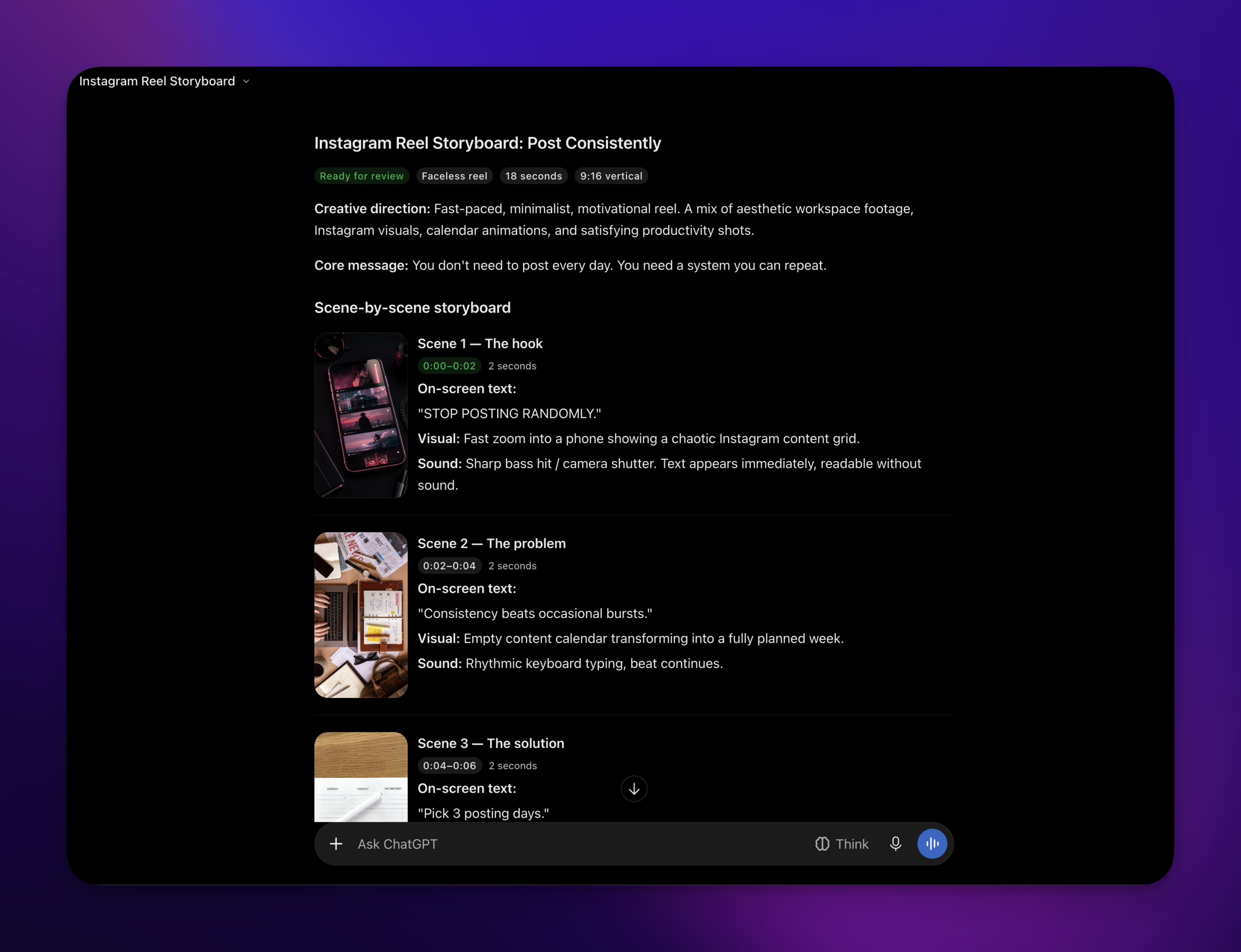
Hand ChatGPT a breakdown of a viral reel and your own topic, and it designs the whole reel as a storyboard, scene by scene: on-screen text, background footage from stock or your media library, timing and music. You review it and ask for changes, then PostHero renders the video and saves it as a draft. More on what goes into these in the Instagram reels guide.
Make a carousel
ChatGPT writes the slides, designs them, and saves the carousel as a draft. If you’ve saved a brand book in PostHero, it uses your colors and fonts.
Save drafts, and post only when you say so
Everything lands in PostHero as a draft. To schedule, give ChatGPT a day and time. To publish right away, you ask for it and confirm once more. I built it this way deliberately: an assistant that posts a half-finished caption on its own is the fastest way to never trust it again.
Why the research step matters: 64 views vs 719
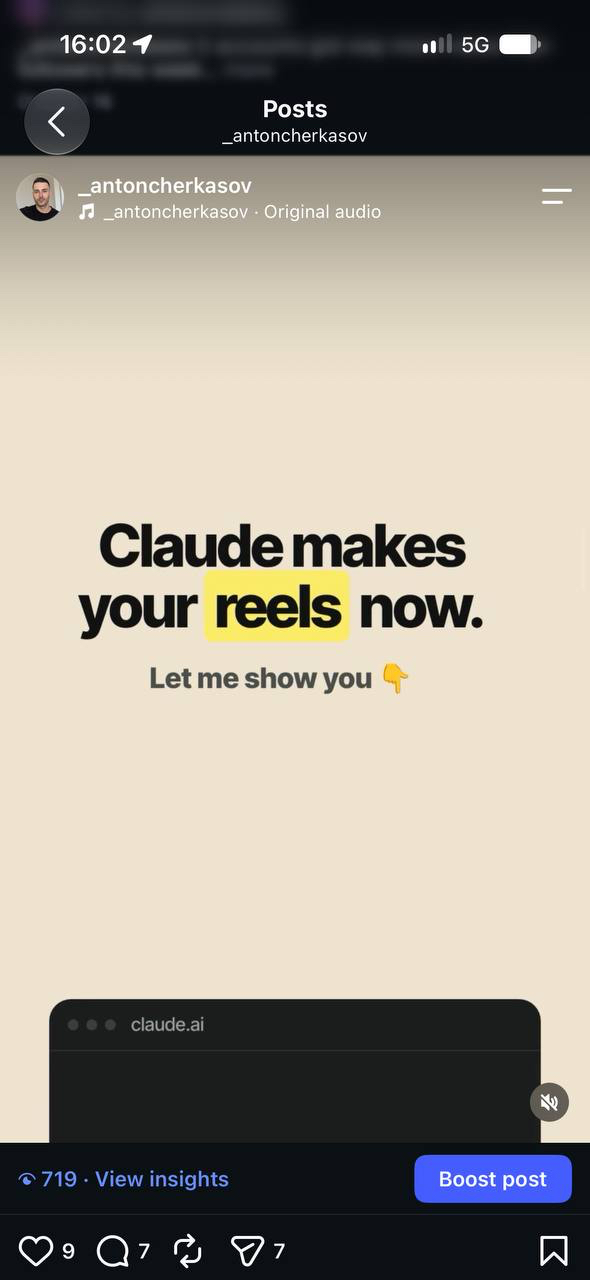
My reels usually get around 64 views. One got 719. Roughly 11 times my normal, and the only thing I changed was how I asked for it.
A note before the story: I made that reel with Claude, not ChatGPT. It ran through the same PostHero connector and the same tools ChatGPT now uses, which is why I’m including it. I don’t have a ChatGPT-made number yet, and I’d rather tell you that than dress one up.
The first reels I made with AI were bad. Not broken, just forgettable. I was typing things like “make a reel about social media scheduling”, and with nothing else to go on, the model gave me the average reel on that topic. The average gets scrolled past.
What worked was starting from proof instead of a topic:
- Find a fresh viral reel in your niche. Recent, from a comparable account, clearly above that account’s normal views.
- Get it broken down. The hook in the first second, the reason people stopped, the order of the points.
- Make your own reel on that structure. Your topic, your words, their pattern. No copying.
- Post it and compare against your usual numbers, not against the viral original.
One reel proves nothing on its own. But it matched a pattern I kept seeing: studying what’s working right now beat guessing every time. The full walkthrough, with screenshots of each step, is in my guide to connecting Claude to Instagram. The steps are the same in ChatGPT.
Who shouldn’t expect this? Anyone hoping for a great reel on the first attempt. Good reels take a few tries, with or without AI. An average first reel is the normal start of learning a skill.
Prompts to use once ChatGPT is connected
These only work with PostHero connected, because they ask ChatGPT to look at real accounts and save real drafts.
Research
Run an audit on my Instagram @[handle]. Which 3 posts beat my average the most, and what do they have in common?
Search viral reels in [niche] from the past month. Pick the 3 that most outperformed their account’s size and tell me why each one worked.
Start tracking @[competitor]. What are they posting that gets more saves than my posts do?
Create
Based on the viral reels you just found, write 5 captions for my next post about [topic]. Use the hook styles that are working in my niche, in my tone.
Take the structure of the top reel from that breakdown and design a faceless reel about [my topic] in my own words. Show me the storyboard before you save it.
Make a 6-slide carousel from my best-performing post this month and save it as an Instagram draft.
Schedule
Schedule the reel draft for [day] at [time] my time. Don’t publish anything else.
Is it safe to connect ChatGPT to Instagram?
Yes, with a connector that uses Instagram’s official login. You approve access on Instagram’s own screen, so neither ChatGPT nor PostHero sees your Instagram password, and you can disconnect at any time from ChatGPT’s Plugins page or from PostHero.
ChatGPT will show you a warning when you add a custom MCP server, because OpenAI doesn’t review them. That’s reasonable: only add servers from companies you trust. The bigger everyday risk is a tool that posts without asking, which is why PostHero keeps everything as a draft until you say publish and confirm.
ChatGPT isn’t seeing my Instagram: quick fixes
- The connector isn’t on in this chat. Pick PostHero from the + menu in a new chat, or mention PostHero by name in your message.
- There’s no “Add custom MCP server” option. Your plan or workspace doesn’t allow custom servers. On a work workspace, ask your admin.
- Wrong PostHero account. ChatGPT connects but finds no Instagram. Disconnect, then sign in with the account that has Instagram linked.
- Personal Instagram account. Switch to Business or Creator, then reconnect it in PostHero.
- Your own video won’t attach. Upload it to your PostHero media library first, then ask ChatGPT to use it.
FAQ
Can ChatGPT post to Instagram?
Not on its own. With a connector like PostHero, ChatGPT saves posts, reels and carousels as drafts and publishes only when you ask and confirm.
Can ChatGPT make Instagram reels?
Plain ChatGPT can write a reel script. With PostHero connected, it designs a faceless reel (text, footage, music) that PostHero renders into a video draft you can preview and schedule.
Is ChatGPT good at Instagram captions?
Yes, if you give it context: your niche, your audience and a post that worked. Captions get better again once it can study what’s going viral in your niche before writing.
Can ChatGPT see my Instagram analytics?
Only through a connector. Without one, it only knows the numbers you paste in.
Does it work with a personal Instagram account?
No. Meta only allows apps to post to Business and Creator accounts. Switching is free.
Will ChatGPT post without asking me?
Not with PostHero. Everything starts as a draft, and publishing needs your go-ahead plus one confirmation.
PostHero for ChatGPT
Give ChatGPT something real to work with
Connect ChatGPT to Instagram in 2 minutes, then build your next reel from a viral breakdown instead of a blank prompt.
Connect ChatGPT to Instagram →
Free trial. Everything starts as a draft.
Leave a Reply