
You can connect Claude to all your social media accounts with one connector. Set it up once, and Claude can draft, schedule and check posts on LinkedIn, X, Threads, Instagram, Facebook, YouTube, TikTok and Bluesky from the same chat.
I’m Anton, founder of PostHero. I built our Claude connector, and I run my own social media from Claude now. This page covers how to connect Claude to social media step by step, what Claude can actually do on each platform (they’re more different than most guides admit), how the options compare, and the prompts I use every week.
How to connect Claude to social media
To connect Claude to your social media accounts:
- Create a PostHero account and connect your social accounts.
- In Claude, open Customize > Connectors, click “+ Add”, then “Add custom connector”.
- Name it PostHero, paste
https://mcp.posthero.ai/mcp, and sign in. - Turn it on in a chat and ask: “list my connected accounts”.
That’s it, and you only do it once for all 8 platforms. Here’s each step in a bit more detail.
What you need first
- Any Claude plan. Custom connectors work on Free, Pro, Max, Team and Enterprise. The Free plan is limited to one custom connector, and one is all you need here.
- Professional accounts where the platform asks for one. Instagram, for example, only lets apps publish to Business or Creator accounts. Switching is free.
Step 1: Connect your accounts to PostHero
Sign up at posthero.ai/claude and connect the platforms you post on. Each one asks you to approve access on its own screen, so Claude never sees your passwords. You can start with two or three and add the rest later.
Step 2: Add the connector in Claude
In Claude, go to Customize > Connectors, click + Add, then Add custom connector. Name it “PostHero” and paste this URL:
https://mcp.posthero.ai/mcp
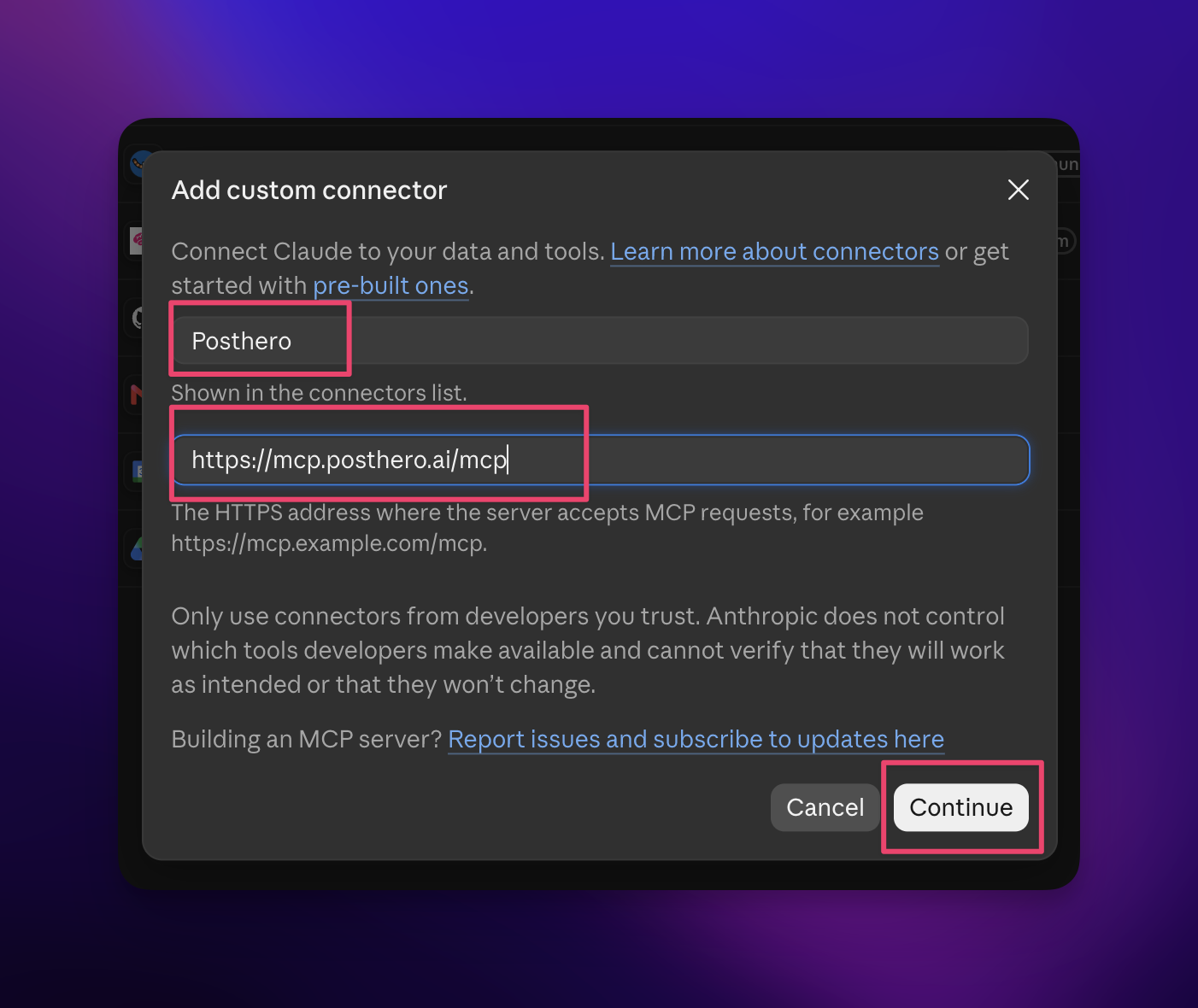
Click Continue. Claude detects how PostHero signs you in, so leave the defaults (“Sign in now”, “Register automatically”) and click Add.
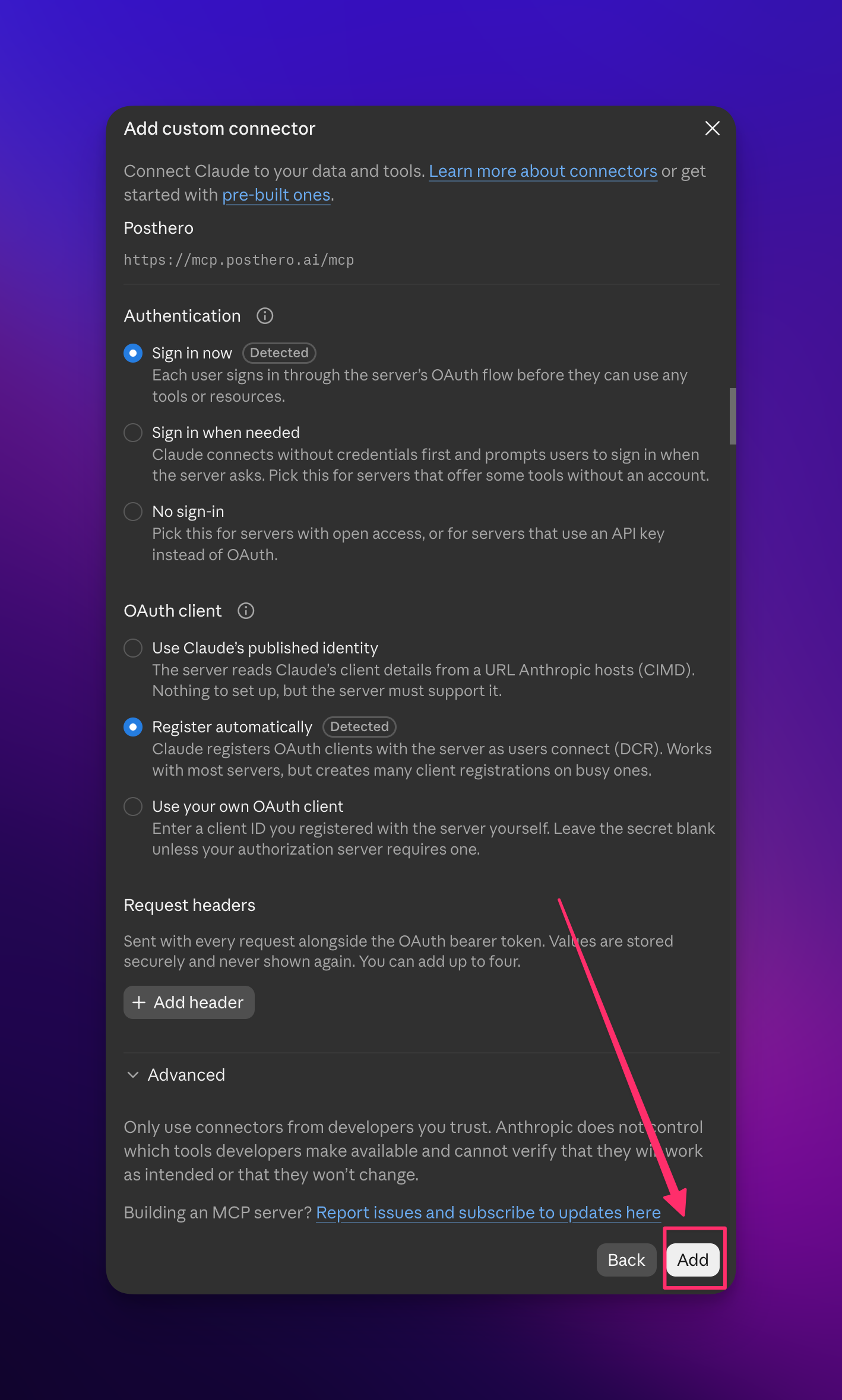
On a Team or Enterprise plan, an owner adds it once under Organization settings > Connectors, and everyone else just clicks Connect.
Step 3: Sign in
Claude asks you to sign in to PostHero. Use the same account you connected your socials to in step 1, otherwise Claude will connect fine and then find no accounts. PostHero shows what Claude will be able to do (see your accounts, read posts and analytics, create and schedule posts). Click Allow.
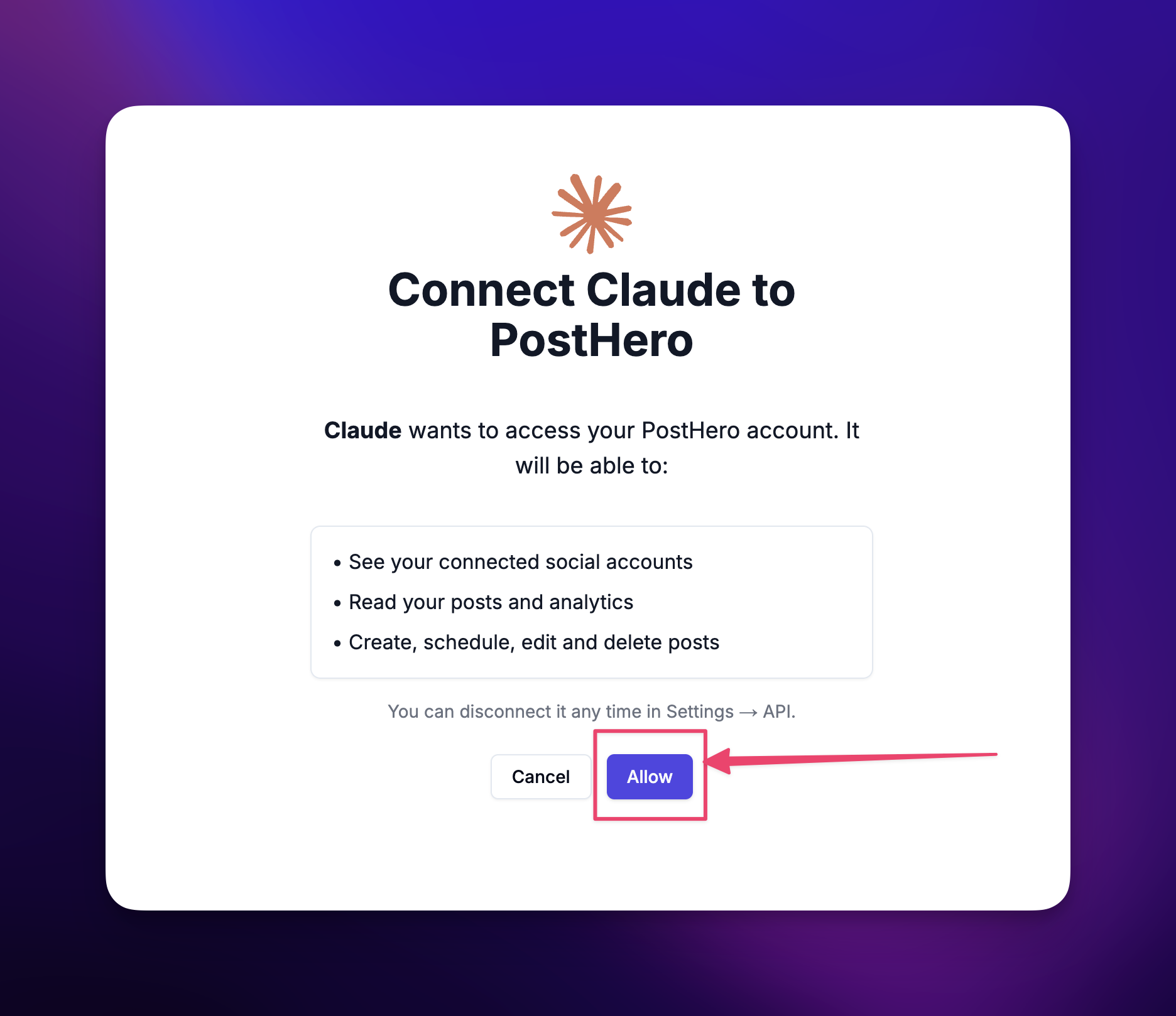
Step 4: Turn it on and test it
In a new chat, click + at the lower left, open Connectors and switch PostHero on. Then type:
List my connected social accounts.
If Claude lists every account you connected, you’re done. If it doesn’t, jump to the troubleshooting section below.
On mobile, in Claude Code and in other AI agents
Connectors you add on the web show up in the Claude mobile app too. In Claude Code, add the same URL as a remote MCP server. And it isn’t Claude-only: ChatGPT, Cursor, or an agent like OpenClaw or Hermes can use the same URL, because they all speak MCP. I explained why I built it that way in PostHero goes agentic.
What Claude can do on each platform
Most connector pages list platforms as if they were all the same thing. They aren’t, and honestly that’s my favorite part of building this. The 8 platforms are similar enough to run from one chat and different enough that the details matter: what each one accepts, what it rewards, and what tone works there.
On all 8, Claude can write posts, save them as drafts, schedule them, and pull your analytics and top posts. Here’s what changes from one platform to the next.
| Platform | What Claude can post | Extra with PostHero |
|---|---|---|
| Text, image, video, PDF carousels | Viral post library, first comment | |
| X | Posts and threads | Own text per account |
| Threads | Posts and threads | Up to 20 images |
| Reels, carousels, feed posts, stories | Audits, competitors, viral reels | |
| Text, image, video | Own text per platform | |
| YouTube | Shorts and long videos | Title, tags, privacy, thumbnail |
| TikTok | Videos and photo posts | Send to your TikTok drafts |
| Bluesky | Posts and threads | Up to 4 images |
PostHero started as a LinkedIn tool, so this is where it goes deepest. Claude writes posts up to 3,000 characters, for your profile or company pages, and can design a carousel that’s saved as a PDF document draft. It can also search PostHero’s library of viral LinkedIn posts, sorted by reactions per 1,000 followers, so you see small creators with big hits instead of the same famous accounts. Got a link to share? Claude puts it in a first comment that goes up 30 seconds after the post, because LinkedIn shows posts with links to fewer people.
Full guide: Connect Claude to LinkedInComing soon
X (Twitter)
Posts of up to 280 characters, threads, and up to 4 images. One rule worth knowing if you run more than one account: X doesn’t allow the same text on several accounts, so Claude writes each account its own version instead of copy-pasting.
Full guide: Connect Claude to XComing soon
Threads
Posts of up to 500 characters, threads, and up to 20 images. Threads sits between X and Instagram in tone, so it’s a good test of whether Claude is really adapting a post or just trimming it.
Full guide: Connect Claude to ThreadsComing soon
Instagram gets the most tools. Claude can audit your profile, track competitors, search a library of viral reels, break down why a reel worked, and then design a reel or carousel that PostHero renders into a draft. Captions run up to 2,200 characters, and every post needs an image or video. Using that workflow, one of my reels went from my usual 64 views to 719.
Full guide: Connect Claude to Instagram (and make reels)
Facebook is the most straightforward of the eight: Claude writes the post, attaches images or video, and schedules it. When the same idea also goes to other platforms, Facebook can get its own version of the text instead of the LinkedIn one.
Full guide: Connect Claude to FacebookComing soon
YouTube
Every YouTube post needs a video and a title. Claude can post it as a Short (vertical, up to 3 minutes) or a regular video, and set the description, tags, privacy (public, unlisted or private) and, for long videos, a thumbnail. A reel Claude made for Instagram can go out as a Short from the same chat.
Full guide: Connect Claude to YouTubeComing soon
TikTok
This is my favorite example of a small platform nuance. Claude can publish videos and photo posts directly, with privacy, duet, stitch and comment settings. But it can also send the post to your TikTok drafts instead. Then you open the TikTok app and post it from there. My read is that TikTok favors content posted inside its own app, so for videos that matter, that’s how I’d do it.
Full guide: Connect Claude to TikTokComing soon
Bluesky
Posts of up to 300 characters, threads, and up to 4 images. Short and conversational, closer to X than to LinkedIn.
Full guide: Connect Claude to BlueskyComing soon
How I actually use it: one idea, four platforms
I manage my own social media from Claude now, and the part I love most is boring to describe: everything happens in one place.
I write a post for LinkedIn in Claude, in a chat that already has all my context: what I’m building, what I posted last week, how I like to write. Then I ask Claude to turn it into versions for X, Threads and Instagram, check them, and save them as drafts. No tabs, no copy-paste, no explaining my business to a new tool every time.
The mistake I see most often is treating every platform the same. “Here’s my LinkedIn post, make it an X thread” usually gets you the same post with more line breaks. That’s not repurposing. On LinkedIn I write like an expert sharing what I learned. On X I’m much more casual. On Instagram the same idea probably wants to be a carousel, not a caption. It’s a change of language, not of formatting.
So tell Claude that in the prompt:
Here’s my LinkedIn post. Rewrite it for X, Threads and Instagram. Don’t just split it into shorter lines: change the tone for each platform (more casual on X, shorter and conversational on Threads, a 7-slide carousel for Instagram). Show me every version before saving anything as a draft.
The ways to connect Claude to social media, compared
There’s no official social media connector from Anthropic, so every option is a third-party tool. Almost all of them do the same core job well: Claude writes, the tool publishes. Where they differ is how many networks they cover and what Claude can do before the post exists.
| Option | Networks | Posts and schedules | Makes reels and carousels | Viral research | Stands out for |
|---|---|---|---|---|---|
| PostHero | 8 | ✅ Yes, as drafts | ✅ Yes | ✅ Instagram and LinkedIn | Research and creation |
| Blotato | 9 | ✅ Yes | ❌ No, you bring the media | ❌ No | Publishing, flat price |
| PostFast | 11 | ✅ Yes, held for approval | ❌ No | ❌ No | Comment replies |
| PostEverywhere | 13 | ✅ Yes | ❌ No, images from its own studio | ❌ No | Telegram, Discord, WordPress |
| Upload-Post | 22 | ✅ Yes | ❌ No, trims video only | ❌ No | Network count, comments and DMs |
| Hootsuite | Your Hootsuite networks | ✅ Yes | ❌ No | Listening only | Teams already on Hootsuite |
| DIY with each API | One per build | If you build it | ❌ No | ❌ No | Full control |
Based on each vendor’s own pages, checked 3 November 2026.
The honest verdict:
- Pick Upload-Post or PostEverywhere if you need networks beyond the big eight, like Pinterest, Telegram, Discord or Google Business Profile. PostHero doesn’t cover those.
- Pick PostFast if answering comments from Claude matters more to you than creating content.
- Pick Hootsuite if your team already runs on it and you want listening and the inbox in the same chat.
- Pick Blotato if you already make your videos elsewhere and only want Claude to publish them.
- Pick PostHero if you want Claude to help with the hard part: working out what to post on each platform, then making it.
- Skip connectors altogether if you don’t use Claude or ChatGPT. Then this whole setup adds nothing, and the PostHero web app does the same job with buttons.
One difference matters more than the table shows. Tools that create content usually design it inside their own editor. We went the other way: Claude designs the reel or carousel, and PostHero only renders the finished draft. Claude is genuinely good at layout, so letting it do that part gives better results than squeezing it through a template.
Copy-paste prompts
Swap the bits in brackets for your own. Click a prompt once to select all of it, then copy.
Plan
Plan next week on LinkedIn, X and Threads in my voice. Show me the plan first, then save each post as a draft.
Search the viral LinkedIn post library for [topic] from the last 30 days and show me the 5 posts with the most reactions per 1,000 followers. What do their hooks have in common?
Create
Turn this LinkedIn post into a 7-slide carousel and save it as drafts for both Instagram and LinkedIn. Show me the slide plan first.
Post the reel we just made as a YouTube Short and a TikTok too. Write a separate title and caption for each platform.
Send this video to my TikTok drafts so I can finish and post it in the TikTok app.
Schedule and review
Schedule the drafts we made today: LinkedIn on [day] at [time], X and Threads the same day at [time], all in my time zone.
Show me my top 3 posts on each platform from last month. What do the winners have in common, and what should I post more of?
Is it safe to connect Claude to social media?
Yes, if the connector goes through each platform’s official login. You approve access on the platform’s own screen, so Claude never sees or stores your passwords. You can remove the connector in Claude’s settings, or disconnect any account in PostHero, at any time.
The bigger risk is a tool that posts without asking. With PostHero, everything Claude makes is a draft. To schedule, you give Claude the time. To publish right now, you say so and confirm once more, because a published post can’t be taken back. An AI that posts to eight accounts without asking is a liability, and I didn’t want to build one.
Why isn’t Claude seeing my accounts?
- The connector is off in this chat. Connectors are switched on per conversation. Click +, then Connectors, and turn PostHero on.
- You signed in to a different PostHero account. Claude connects fine but finds no accounts. Sign out of the connector and sign in with the account that has your socials connected.
- A post saved but won’t publish. Usually it’s too long for one platform, or it’s missing something that platform requires, like a video and title on YouTube or media on Instagram and TikTok. Ask Claude to fix the draft; it sees the same warnings.
- Your own photo or video won’t attach. Claude can’t pass files from the chat to PostHero. Upload them to your PostHero media library first, then ask Claude to use them.
FAQ
Can Claude post to social media?
Not on its own, but yes with a connector. With PostHero, Claude can draft, schedule and publish to LinkedIn, X, Threads, Instagram, Facebook, YouTube, TikTok and Bluesky from one chat.
Can Claude post the same thing to every platform at once?
Yes, one post can go to several platforms in one go. But I wouldn’t send identical text everywhere. Ask Claude to write each platform its own version, and on X it has to, if you post from more than one account.
Can I connect Claude to social media for free?
Claude’s Free plan supports one custom connector, so yes on the Claude side. PostHero has a 7-day free trial so you can test the full workflow before paying.
Will Claude post without asking me?
No. Everything starts as a draft, and publishing needs your explicit go-ahead plus one confirmation.
Does it work with ChatGPT too?
Yes. The same connector works in ChatGPT and in any AI agent that supports MCP.
Can I use it from the Claude mobile app?
Yes. Once you add the connector on the web, it works in the Claude app on your phone too.
PostHero for Claude
Run all your socials from one chat
Connect Claude to 8 platforms in 2 minutes. Write the idea once, then let Claude adapt it for each one.
7-day free trial. Everything starts as a draft.
Leave a Reply