You can connect Claude to Instagram in about two minutes with a connector. That part is easy. What most guides skip is what happens next: Claude can do a lot more than read your follower count back to you.
I’m Anton, founder of PostHero. I built our Claude connector for Instagram, and I use it on my own account every week. In this guide I’ll show you how to set it up, how the main options compare, and the exact workflow that took one of my reels from my usual 64 views to 719.
How to connect Claude to Instagram
To connect Claude to Instagram:
- Create a PostHero account and connect your Instagram Business or Creator account.
- In Claude, open Customize > Connectors, click “+ Add”, then “Add custom connector”.
- Name it PostHero, paste
https://mcp.posthero.ai/mcp, and sign in. - Turn it on in a chat and ask: “list my accounts”.
That’s the whole setup. Here’s each step in a bit more detail, with what tends to go wrong.
What you need first
- An Instagram Business or Creator account. Meta only lets apps publish to professional accounts, so a personal account won’t work. Switching is free and takes a minute in Instagram’s settings.
- Any Claude plan. Custom connectors work on Free, Pro, Max, Team and Enterprise. The Free plan is limited to one custom connector, so if you already use one, you’ll need to swap it out or upgrade.
Step 1: Connect Instagram to PostHero
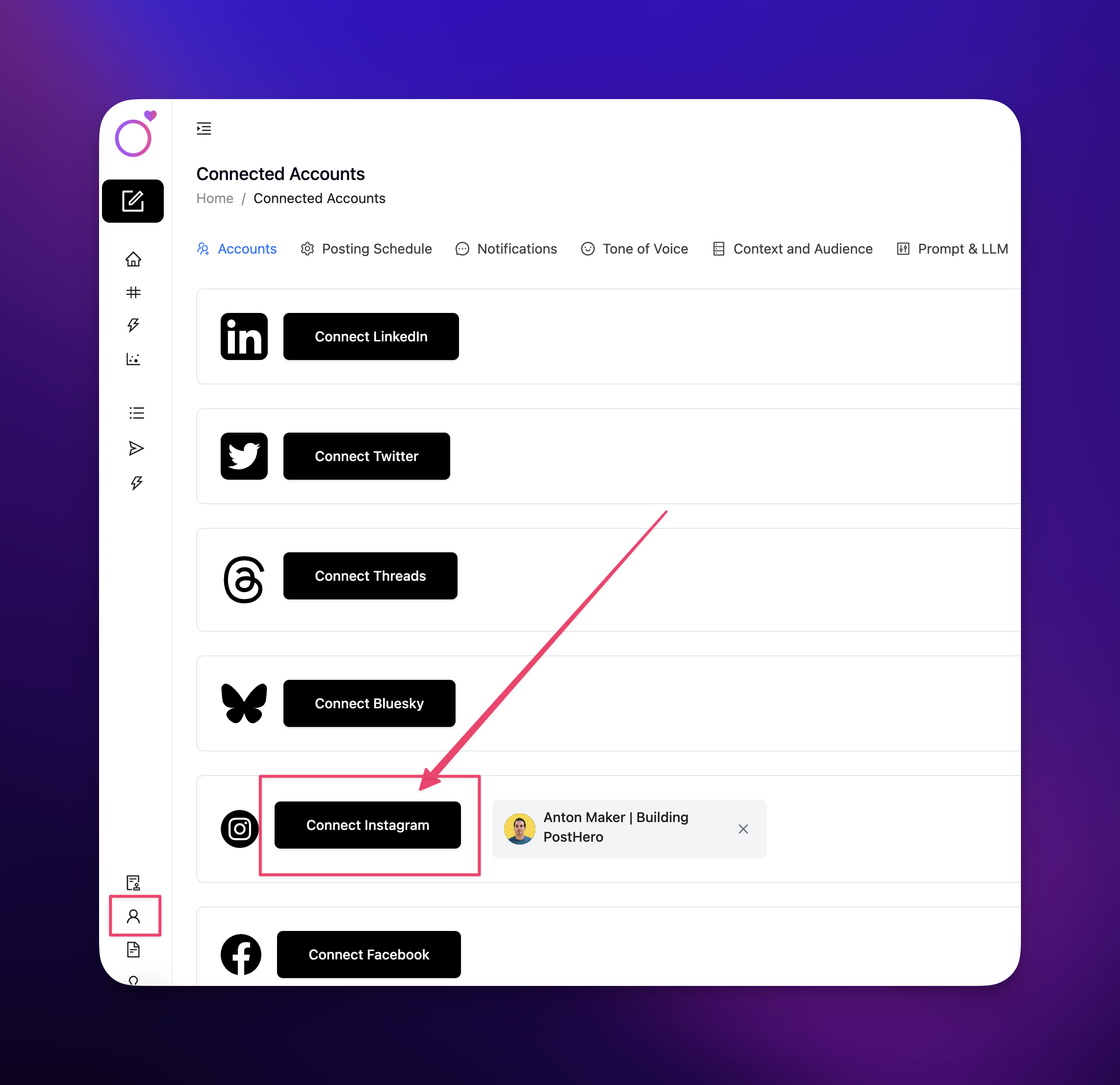
Sign up at posthero.ai/ig and connect your Instagram account. This is the step where Instagram asks you to approve access. Claude never sees your Instagram password.
Step 2: Add the connector in Claude
In Claude, go to Customize > Connectors, click + Add, then Add custom connector. Name it “PostHero” and paste this URL:
https://mcp.posthero.ai/mcp
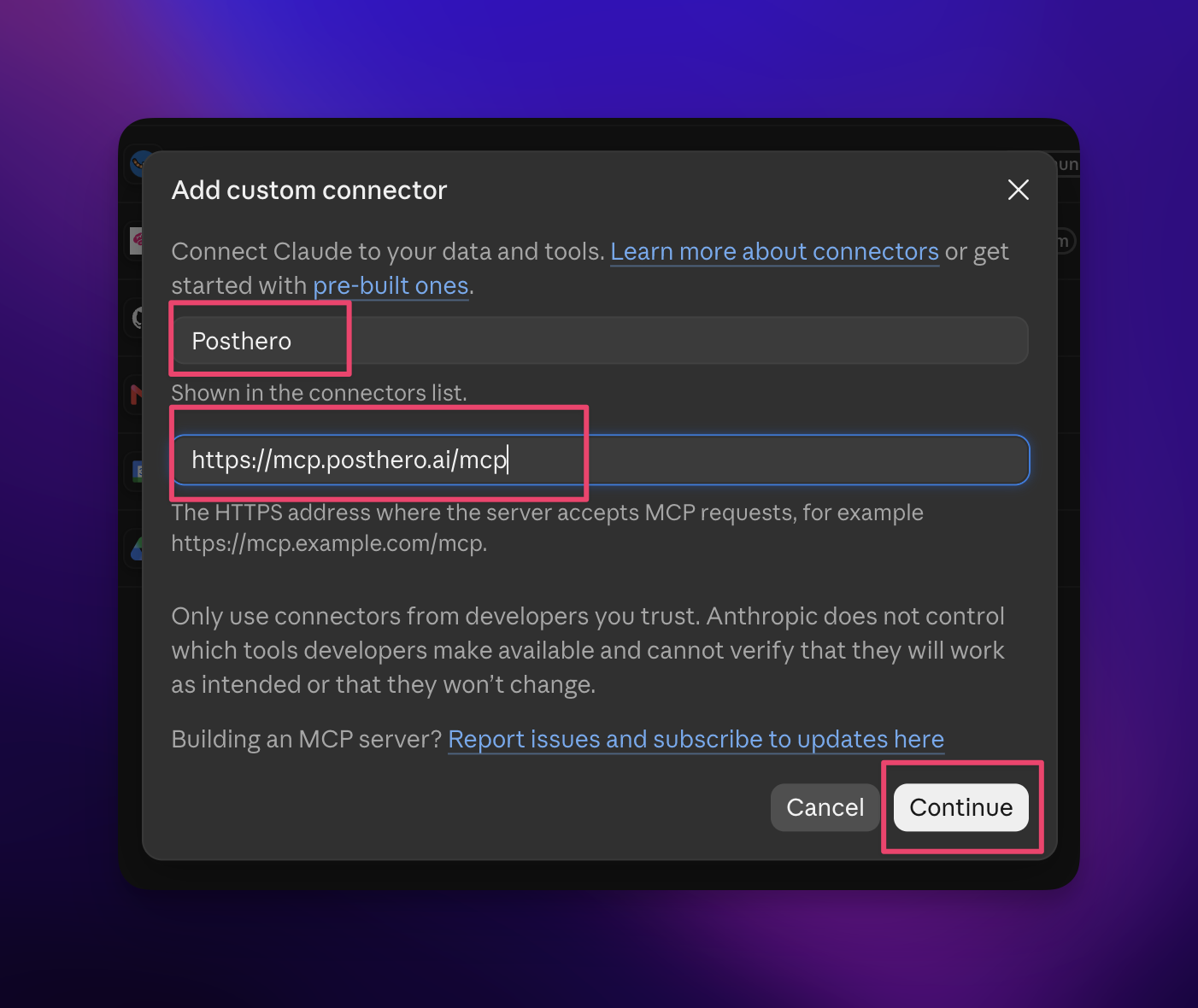
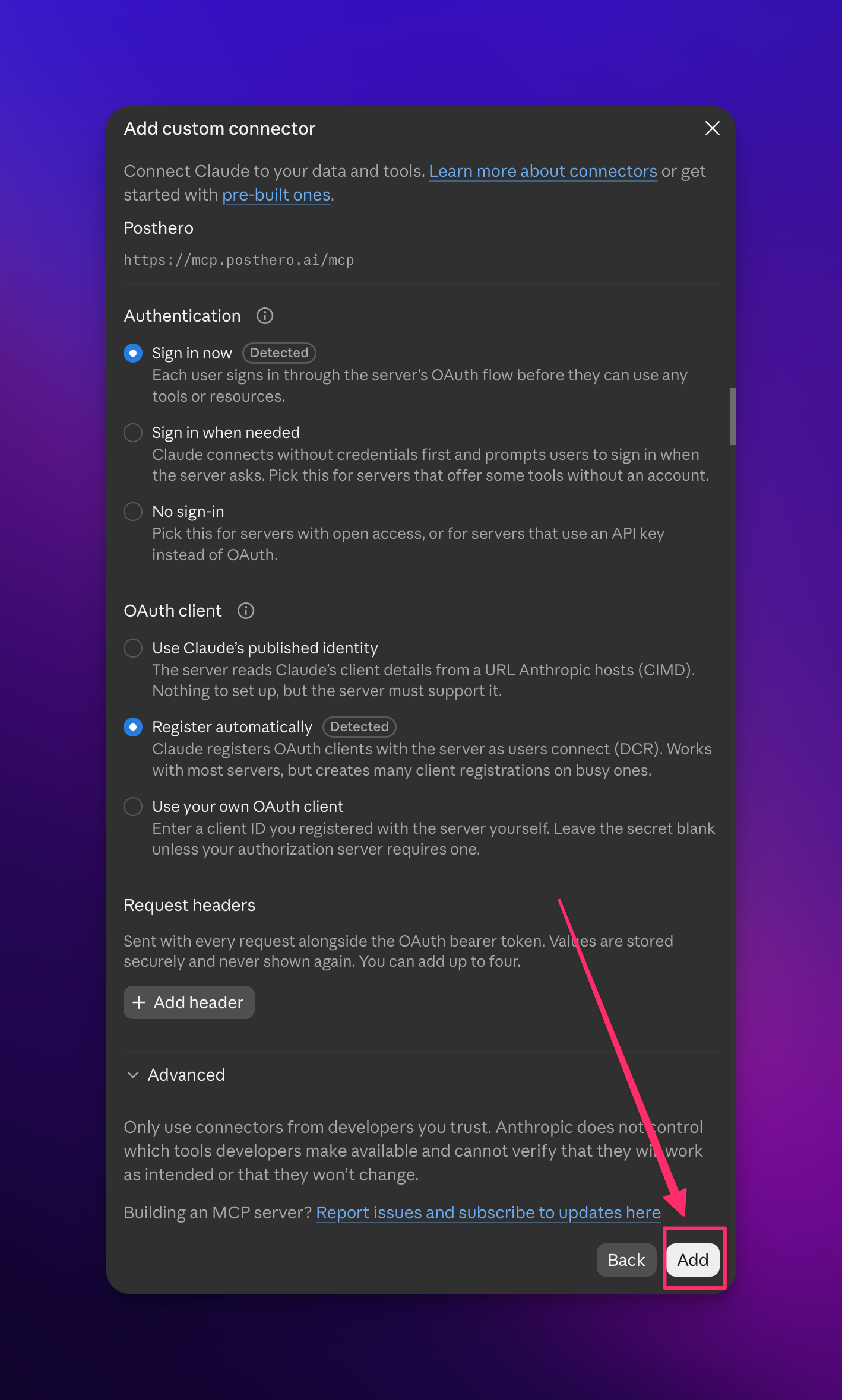
Click Continue. Claude detects how PostHero signs you in, so leave the defaults (“Sign in now”, “Register automatically”) and click Add.
On a Team or Enterprise plan, an owner adds it once under Organization settings > Connectors, and everyone else just clicks Connect.
Step 3: Sign in
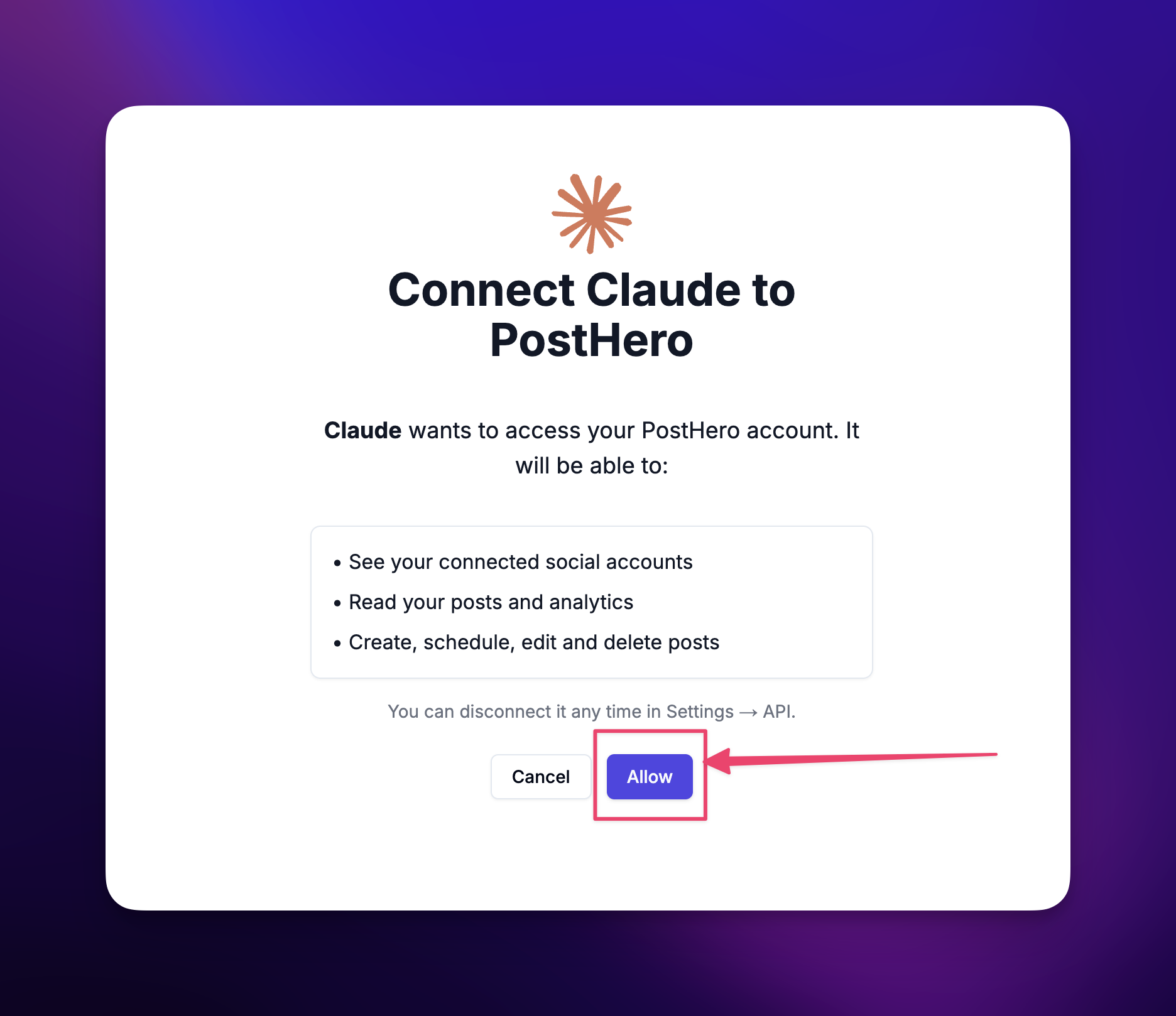
Claude asks you to sign in to PostHero. Do it with the same account you used in step 1, otherwise Claude will connect fine and then find no Instagram account. PostHero then shows what Claude will be able to do (see your accounts, read posts and analytics, create and schedule posts). Click Allow.
Step 4: Turn it on and test it
In a new chat, click + at the lower left, open Connectors and switch PostHero on. Then type:
List my connected accounts.
If Claude comes back with your Instagram handle, you’re done. If it doesn’t, jump to the troubleshooting section below.
On mobile and in Claude Code
Connectors you add on the web show up in the Claude mobile app too, because the connection runs from Anthropic’s cloud rather than your phone. In Claude Code, add the same URL as a remote MCP server.
The ways to connect Claude to Instagram, compared
There’s no official Instagram connector from Meta or Anthropic, so every option is a third-party tool. They fall into two camps. Analytics connectors (Porter, Windsor) let Claude read your numbers. Publishing connectors (Blotato, PostFast, Planoly) let Claude post media you already have. Metricool sits in between.
None of them, as far as their own Claude guides show, has Claude make the reel or carousel itself. That’s the gap I built PostHero to fill.
| Option | Reads your stats | Posts and schedules | Makes reels and carousels | Audit and viral research |
|---|---|---|---|---|
| PostHero | ✅ Yes | ✅ Yes, as drafts | ✅ Yes | ✅ Yes |
| Blotato | Partly | ✅ Yes | ❌ No, you bring the media | ❌ No |
| PostFast | ✅ Yes | ✅ Yes | ❌ No, captions only | ❌ No |
| Planoly | ✅ Yes | ✅ Yes | ❌ No | ❌ No |
| Metricool | ✅ Yes | ✅ Yes | ❌ No | Competitors only |
| Windsor.ai | ✅ Yes | Single images only | ❌ No | ❌ No |
| Porter Metrics | ✅ Yes | ❌ No, read-only | ❌ No | ❌ No |
| DIY Graph API | If you build it | If you build it | ❌ No | ❌ No |
Based on each vendor’s own Claude + Instagram guide, checked 28 October 2026.
The honest verdict:
- Pick Porter or Windsor if you only want reporting, for example for client dashboards.
- Pick Blotato, PostFast or Planoly if you already make your reels in CapCut or Canva and just want Claude to schedule them.
- Pick PostHero if you want Claude to help with the hard part: figuring out what to make, then making it.
- Build on the Graph API yourself only if you’re a developer who wants full control and is happy to maintain a Meta app.
One difference matters more than the table shows. Most tools that create content try to design it inside their own editor. We went the other way: Claude designs the reel first, and PostHero only renders the finished draft. Claude is genuinely good at design and layout, so letting it do that part gives better-looking reels than squeezing it through a template.
What Claude can do once Instagram is connected
Here’s the part the other guides treat as an afterthought. With PostHero connected, Claude can work through the whole job, from “what should I post?” to a finished draft sitting in your queue.
Audit your profile
Ask Claude to audit your Instagram and it runs a profile audit: what’s working, what isn’t, and how your recent posts compare with your usual numbers. The audit also lives in PostHero, so you can open it outside the chat. After that, Claude checks new posts against it instead of starting from zero every time.
Find what’s going viral in your niche
This is where your results actually come from. Claude can search a library of viral reels by niche, track competitors you name, and break any reel down: the hook, the structure, the trigger that made people share it.
You don’t have to guess who your competitors are, either. Ask Claude to find accounts in your niche whose reels outperform their follower count, and track the ones that fit.
Make a reel
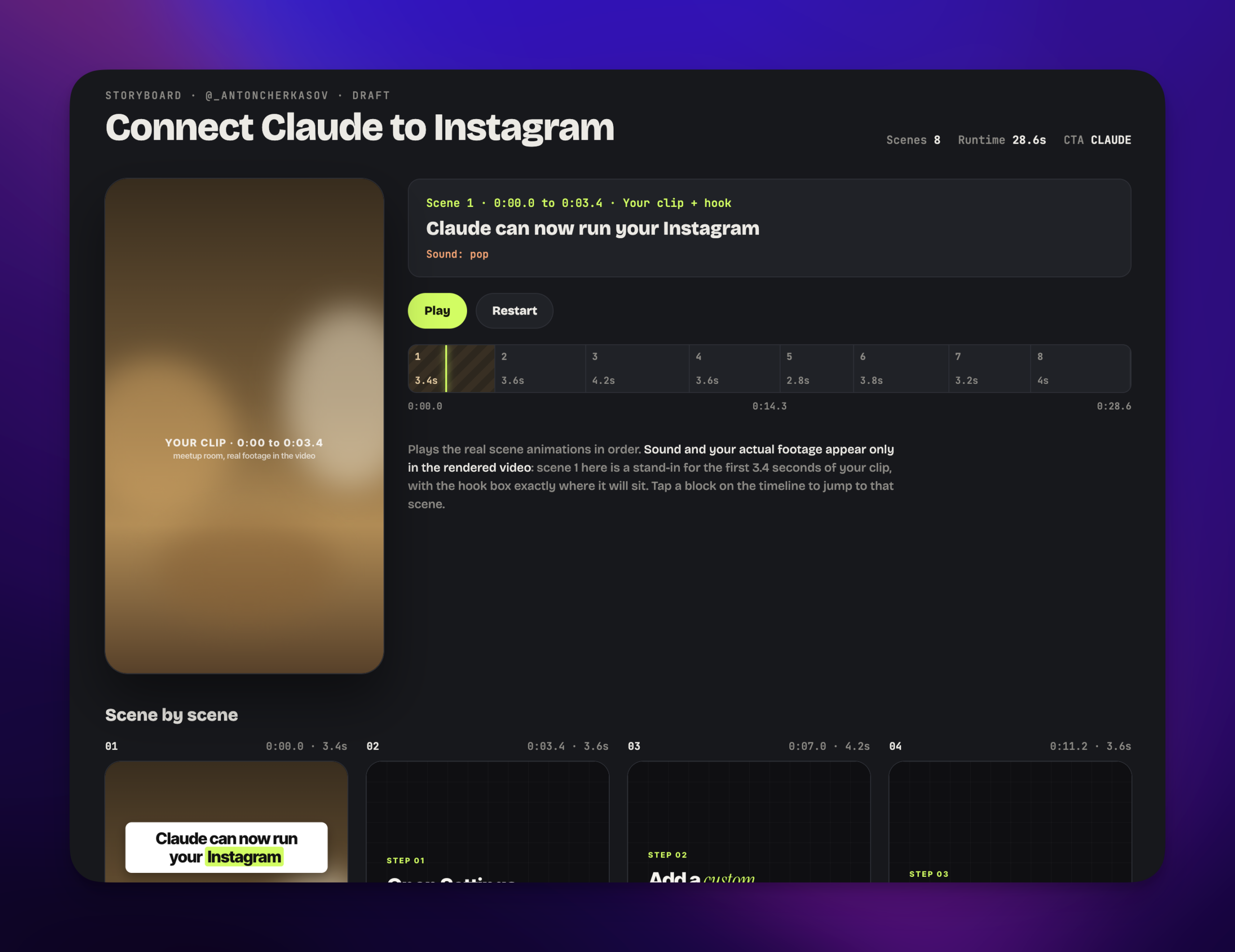
Give Claude a topic, or better, a breakdown of a viral reel, and it designs a faceless reel: the text on screen, the layout, the pacing, background footage from stock or your own media library, and music. PostHero renders it and saves it as an Instagram draft.
You’ll see a preview before anything is saved. If the hook is weak or the font is wrong, say so and Claude changes it.
Make a carousel
Same idea for carousels. Claude writes the slides, designs them, and saves the carousel as a draft. If you have a brand book saved in PostHero, it uses your colors and fonts.
Schedule it (and why it stays a draft)
Everything Claude makes lands in PostHero as a draft. Nothing goes live because Claude felt like it. To schedule, tell Claude the time; to publish now, you say so and confirm once more, because a published post can’t be taken back.
I built it this way on purpose. An AI that posts to your account without asking is a liability, and the first time it publishes a half-finished caption you’ll turn it off forever.
A reel you made for Instagram can go out to TikTok, YouTube Shorts and LinkedIn from the same chat too.
A real workflow: from 64 views to 719
719 views. My reels usually get around 64. That’s about 11x, from one change in how I asked Claude for the reel.
I’ll be honest about where this started. My first reels made with Claude were quite bad. Not broken, just average: the kind of reel you scroll past without noticing. I was doing what almost everyone does at first, typing something like “create a reel about social media scheduling” and hoping for the best.
The problem with that prompt is that Claude has nothing to work with except your topic. So you get the average of every reel about that topic. Average gets average views.
Here’s what I did differently.
1. Pick a competitor’s reel that just went viral. Not an old classic from two years ago. Something recent, from an account in my niche, that clearly beat that account’s normal numbers.
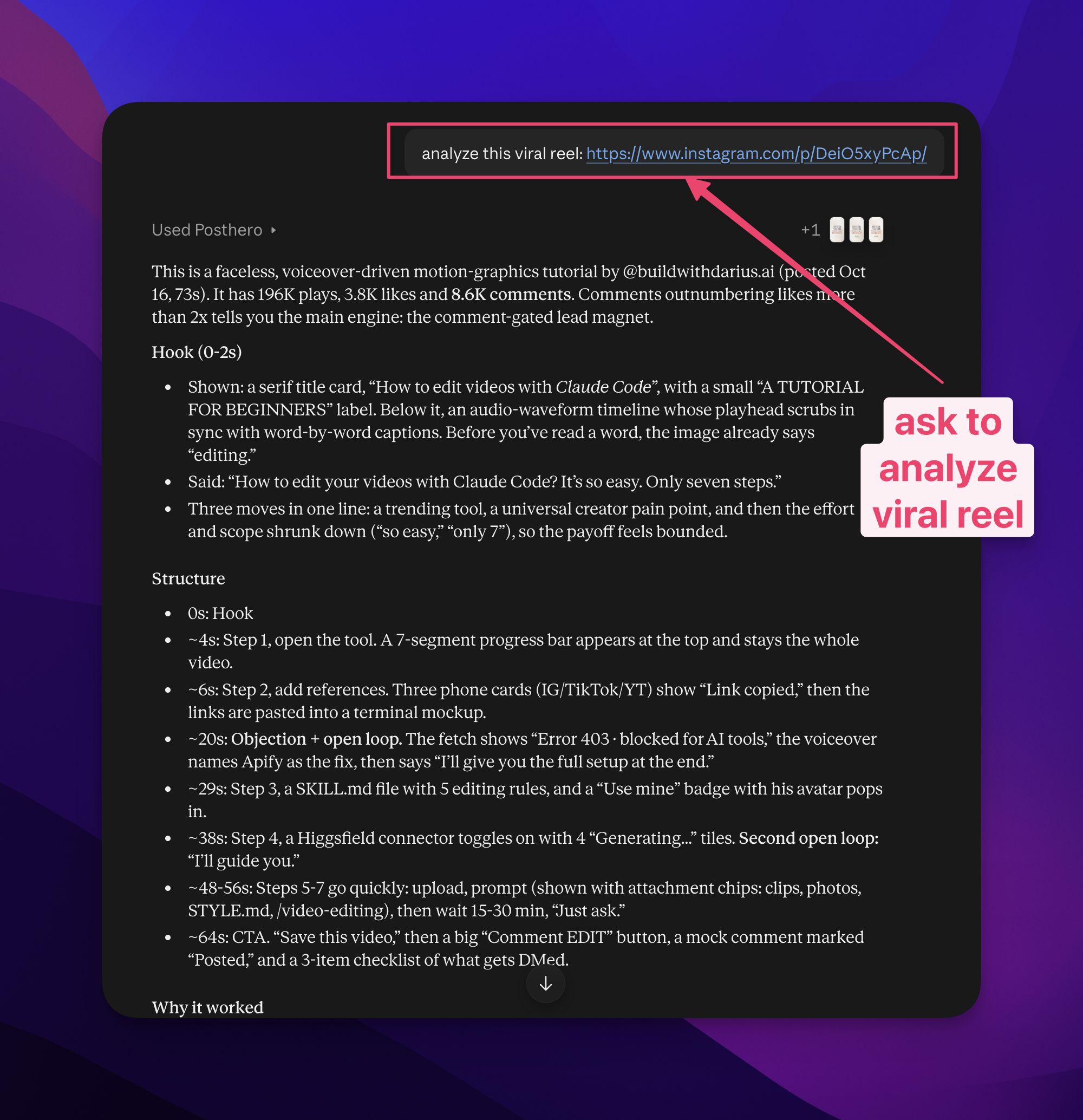
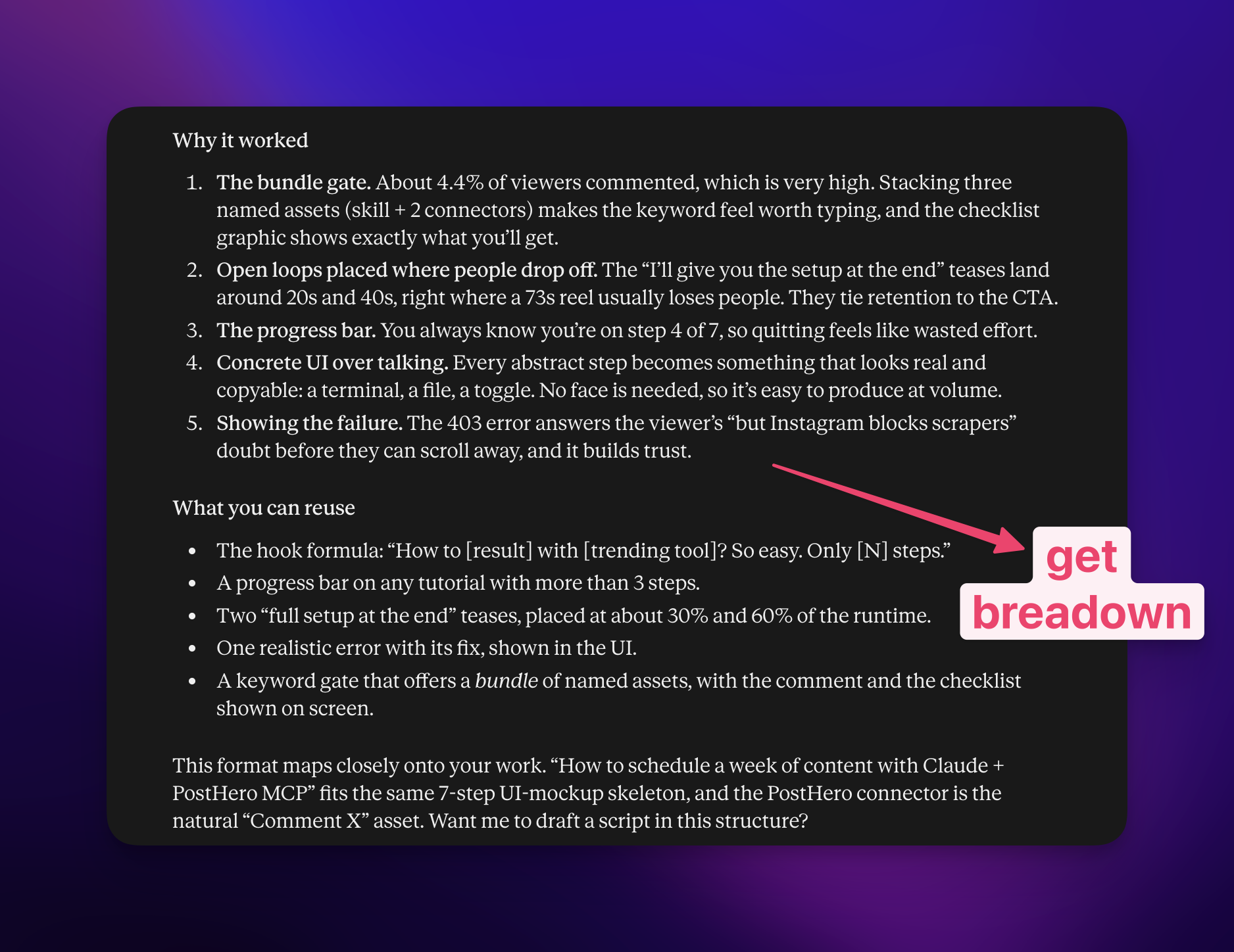
2. Ask Claude to break it down. What made it work: the hook in the first second, the triggers that made people stop and share, the key points and the order they came in. Claude went through it piece by piece.
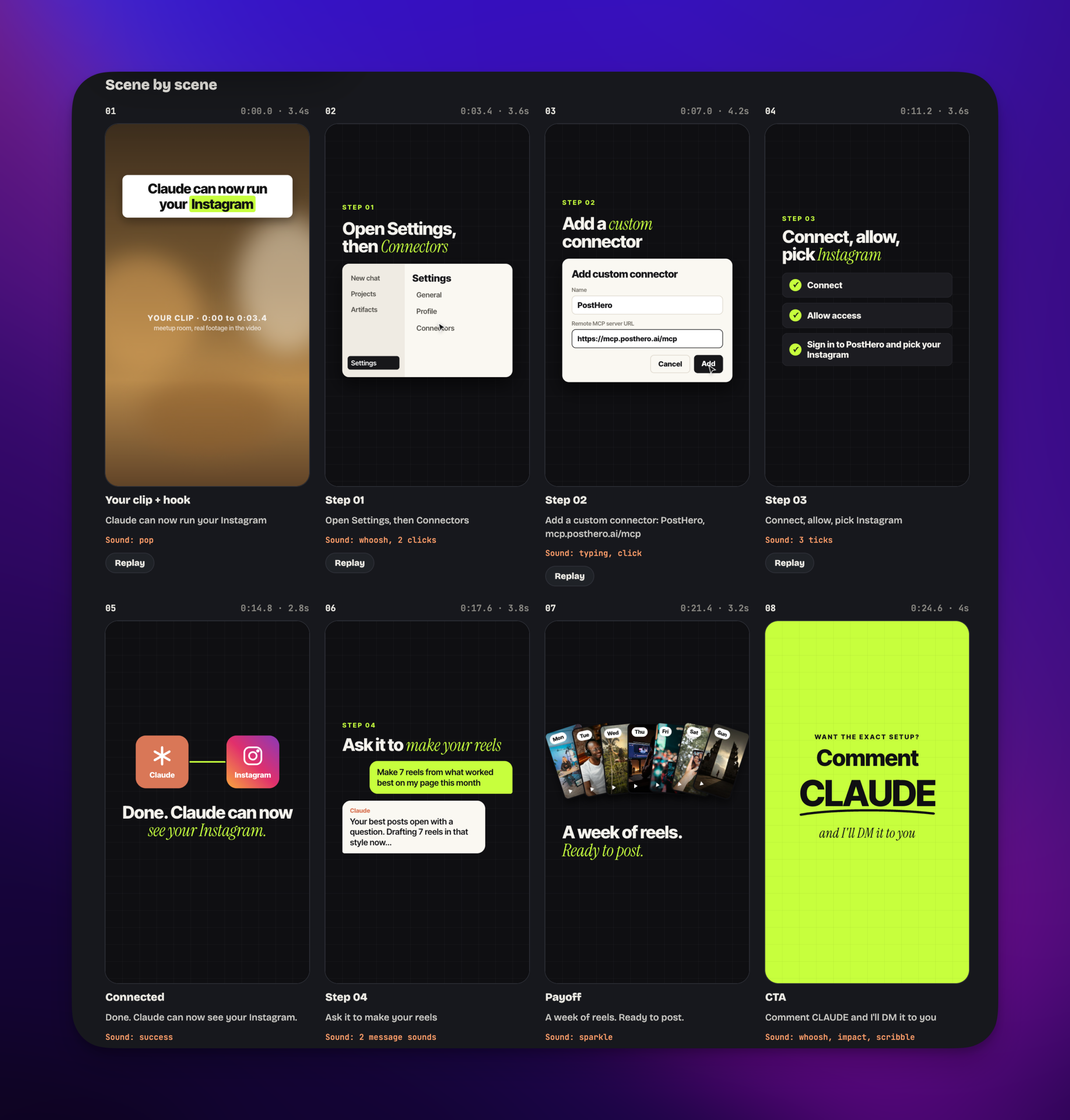
3. Build my reel on those insights. I didn’t copy the reel. I took what made it work and applied it to my own topic. Claude designed the reel with that structure, and PostHero rendered it as a draft.
4. Publish and compare. It got 719 views against my usual 64.
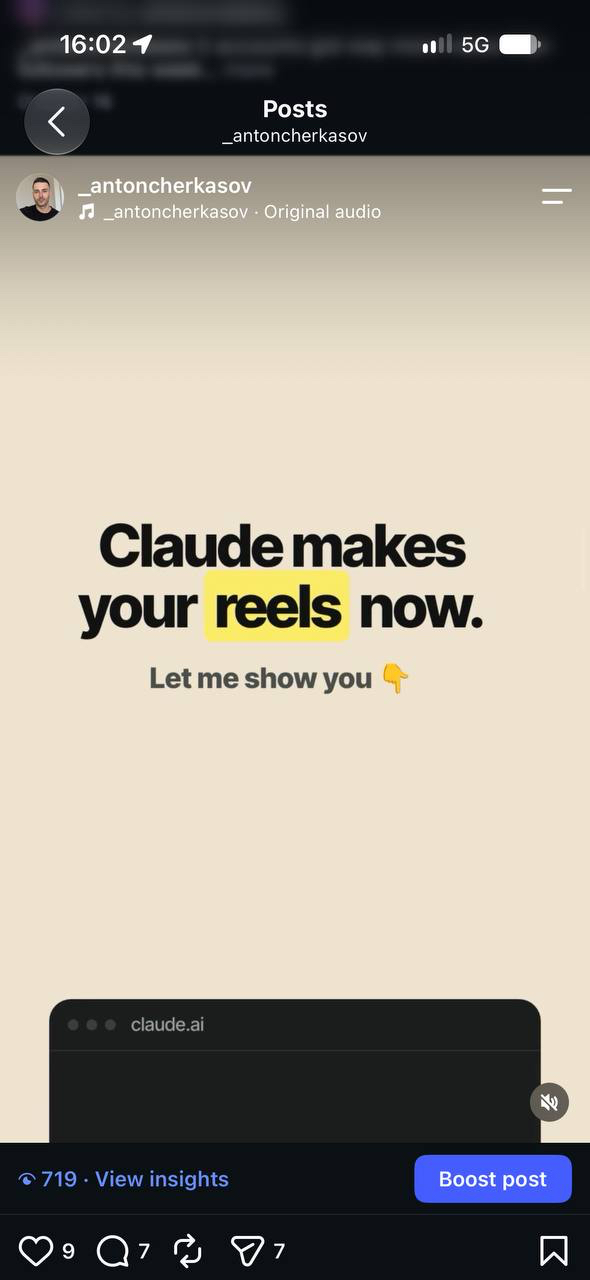
One reel isn’t a law of physics. But it matched what I kept seeing: looking at what top creators are doing right now helped me far more than guessing what might work.
Those lessons went back into the product too. Every bad reel I made showed us something to fix, and we kept improving how the connector renders reels. The reels it makes today are much better than my first ones.
Who shouldn’t bother with this? People who want a perfect reel on the first try. Good reels take several attempts for anyone, with or without AI. If your first one is average, that’s not Claude failing or Instagram hiding you. It’s the normal start of learning a skill, and the people who stay curious about why one reel works and another doesn’t are the ones who get better.
Copy-paste prompts
The most common mistake I see is a basic prompt. “Make me a reel about fitness” gives you an average reel, every time. Prompts that start from proof (your audit, a recent viral reel, a competitor’s breakdown) give Claude something real to build on.
Swap the bits in brackets for your own. Click a prompt once to select all of it, then copy.
Research
Audit my Instagram account @[handle]. What’s working, what isn’t, and which 3 posts beat my usual numbers the most?
Find reels in the [niche] niche from the last 30 days that got far more views than the account’s follower count. Show me the top 5.
Track @[competitor] and break down their most viral reel from the last month: the hook, the structure, and why people shared it.
Compare my last 10 reels with @[competitor]’s last 10. What are they doing that I’m not?
Create
Using the breakdown above, design a faceless reel for my account about [my topic]. Keep the same hook pattern and structure, but in my own words. Show me a preview before saving.
The hook is too slow. Rewrite the first line so it works in under 2 seconds, then re-render.
Turn this reel’s script into a 7-slide carousel for Instagram and save it as a draft.
Schedule
Schedule the reel draft for [day] at [time] my time, and post the same video to TikTok and YouTube Shorts.
Is it safe to connect Claude to Instagram?
Yes, if you use a connector that goes through Instagram’s official login. You approve access on Instagram’s own screen, so Claude never sees or stores your password. You can remove the connector in Claude’s settings, or disconnect Instagram in PostHero, at any time.
The bigger risk is a tool that posts without asking. With PostHero everything is a draft until you explicitly tell Claude to publish, and Claude asks you to confirm before it goes live.
Why isn’t Claude seeing my Instagram?
- The connector is off in this chat. Connectors are switched on per conversation. Click +, then Connectors, and turn PostHero on.
- You signed in to a different PostHero account. Claude connects fine but finds no Instagram. Sign out of the connector and sign in with the account that has Instagram connected.
- It’s a personal Instagram account. Switch to a Business or Creator account and reconnect.
- Your own photo or video won’t attach. Claude can’t pass files from the chat to Instagram. Upload it to your PostHero media library first, then ask Claude to use it.
FAQ
Can Claude post directly to Instagram?
Yes, through a connector like PostHero. Claude saves the post as a draft, and publishes it only when you ask and confirm.
Can Claude make Instagram reels?
Yes. With PostHero, Claude designs a faceless reel (on-screen text, footage, music) and PostHero renders it into a video draft you can preview, edit and schedule.
Can I connect Instagram to Claude for free?
Claude’s Free plan supports one custom connector, so yes on the Claude side. PostHero has a free trial so you can test the full workflow before paying.
Does it work with a personal Instagram account?
No. Meta only allows publishing to Business and Creator accounts. Switching is free.
Will Claude post without asking me?
No. Everything starts as a draft, and publishing needs your explicit go-ahead plus one confirmation.
Can I use it from the Claude mobile app?
Yes. Once you add the connector, it works in the Claude app on your phone too.
PostHero for Claude
Try it on your own account
Connect Claude to Instagram in 2 minutes. Then make your first reel from a real viral breakdown instead of a blank prompt.
Free trial. Everything starts as a draft.
Leave a Reply