A ChatGPT LinkedIn setup comes down to one plugin. Connect ChatGPT to LinkedIn once, and the same chat can write, schedule and track posts on your profile or company page. It takes about 2 minutes, and there’s no LinkedIn developer app to register.
I’m Anton, founder of PostHero. PostHero began as a LinkedIn tool, I built the connector that plugs it into ChatGPT, and I also write LinkedIn posts for clients. First comes the setup, then what ChatGPT can really do on LinkedIn, the habit behind my best post of the month, LinkedIn’s rules, how the options compare, and the prompts I use.
How to connect ChatGPT to LinkedIn
- Create a PostHero account and connect your LinkedIn account.
- On chatgpt.com, open Plugins, click the + button and choose Add custom MCP server.
- Name it PostHero, paste https://mcp.posthero.ai/mcp, choose OAuth, confirm the warning and create it.
- Sign in to PostHero, turn it on in a chat and ask: “list my connected accounts”.
What you need for LinkedIn specifically
- A personal profile, a company page, or both. PostHero connects either, and each one then appears in ChatGPT as a separate account, so “save this to my profile” and “this one is for the company page” land in the right place.
- LinkedIn’s official login. You link LinkedIn inside PostHero, on LinkedIn’s own sign-in screen, so ChatGPT never gets your password. Also, nothing signs in with your browser cookies.
- No developer app. The connection to LinkedIn’s API sits with PostHero, so there’s no app to register and no permissions to request from LinkedIn.
- A ChatGPT plan that allows custom MCP servers. OpenAI decides which plans get this, and it has moved the line more than once this year. If Plugins shows no “Add custom MCP server” option, your plan or workspace doesn’t allow it yet. In Business, Enterprise and Edu workspaces, an admin may have to add it or switch it on.
- One PostHero account for both steps. Sign in to the connector with the account where you linked LinkedIn. Otherwise ChatGPT connects fine and then finds no profile or page.
- chatgpt.com for the setup. Add the connector in ChatGPT on the web.
Posting on other platforms as well? Then the same connector handles them too. My guide to connecting ChatGPT to all your social media shows what works on each one.
Can ChatGPT post to LinkedIn?
Yes, with a connector. By itself, though, ChatGPT can only hand you a LinkedIn post as text to copy and paste. Once PostHero is connected, it saves the post as a draft on your profile or company page, schedules it when you name a time, publishes only after you confirm, and tells you how it performed.
One thing that trips people up: LinkedIn has its own plugin in ChatGPT’s directory, but that one looks up professionals and doesn’t post. More on it in the comparison below.
What ChatGPT can do on LinkedIn through PostHero
Once PostHero is connected, ChatGPT can do all of this on LinkedIn:
- Text posts of up to 3,000 characters.
- Images or video: either up to 20 images in one post, or a single video with a title. They have to be public links, so put your files in your PostHero media library first and tell ChatGPT which ones to use.
- Carousels (PDF document posts). ChatGPT designs the slides, then PostHero renders them and saves a LinkedIn document draft. You get the slide plan first and see every slide before anything is saved. If the PDF already exists, ChatGPT can attach it with a title.
- A first comment. Your link goes into a comment that PostHero adds 30 seconds after the post is live, so it stays out of the post body.
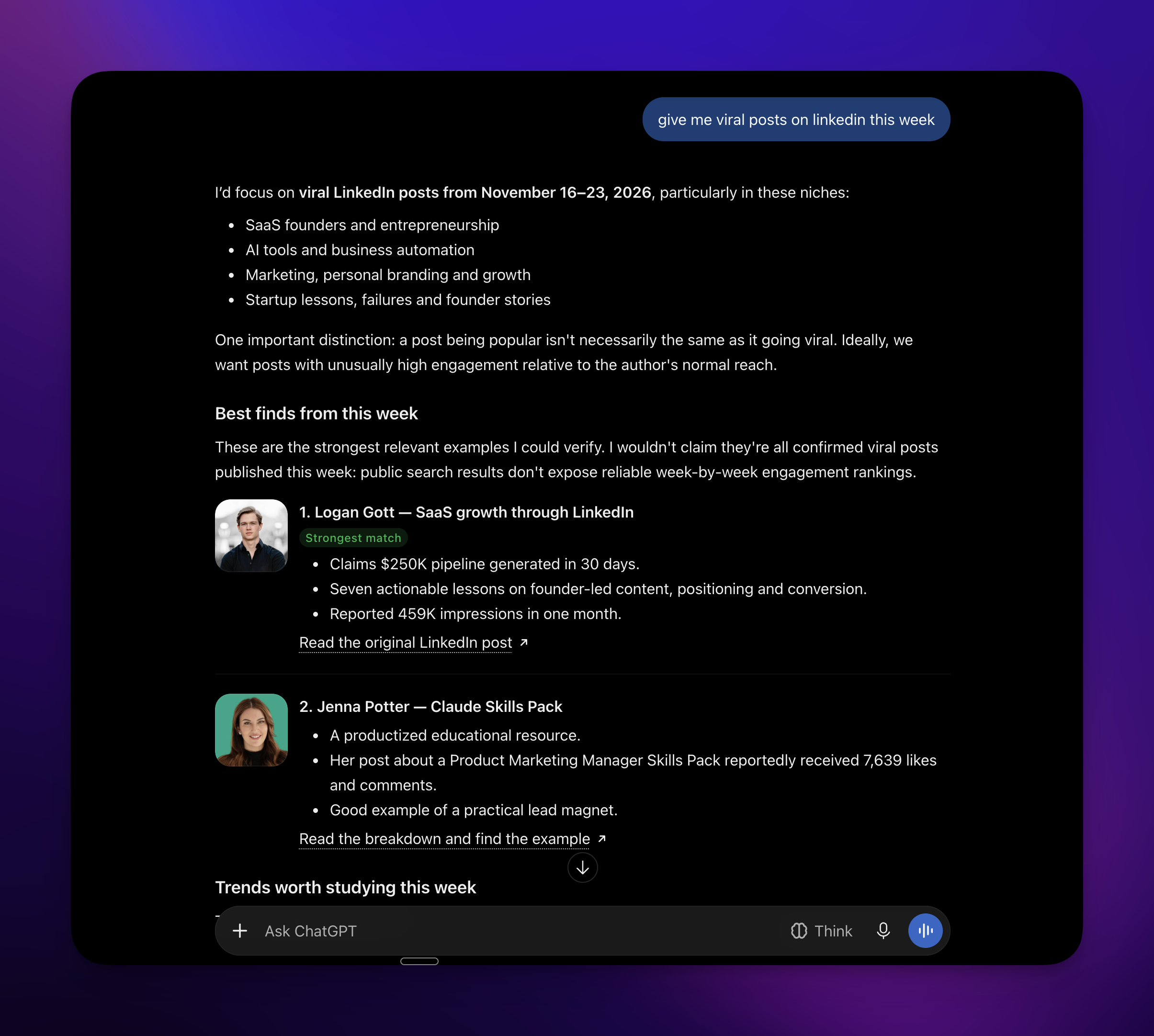
- Viral post library. ChatGPT can search real LinkedIn posts that took off (full text, hook, reactions, comments, creator) and study how they were built before it writes yours.
- Scheduling for whatever date and time you name.
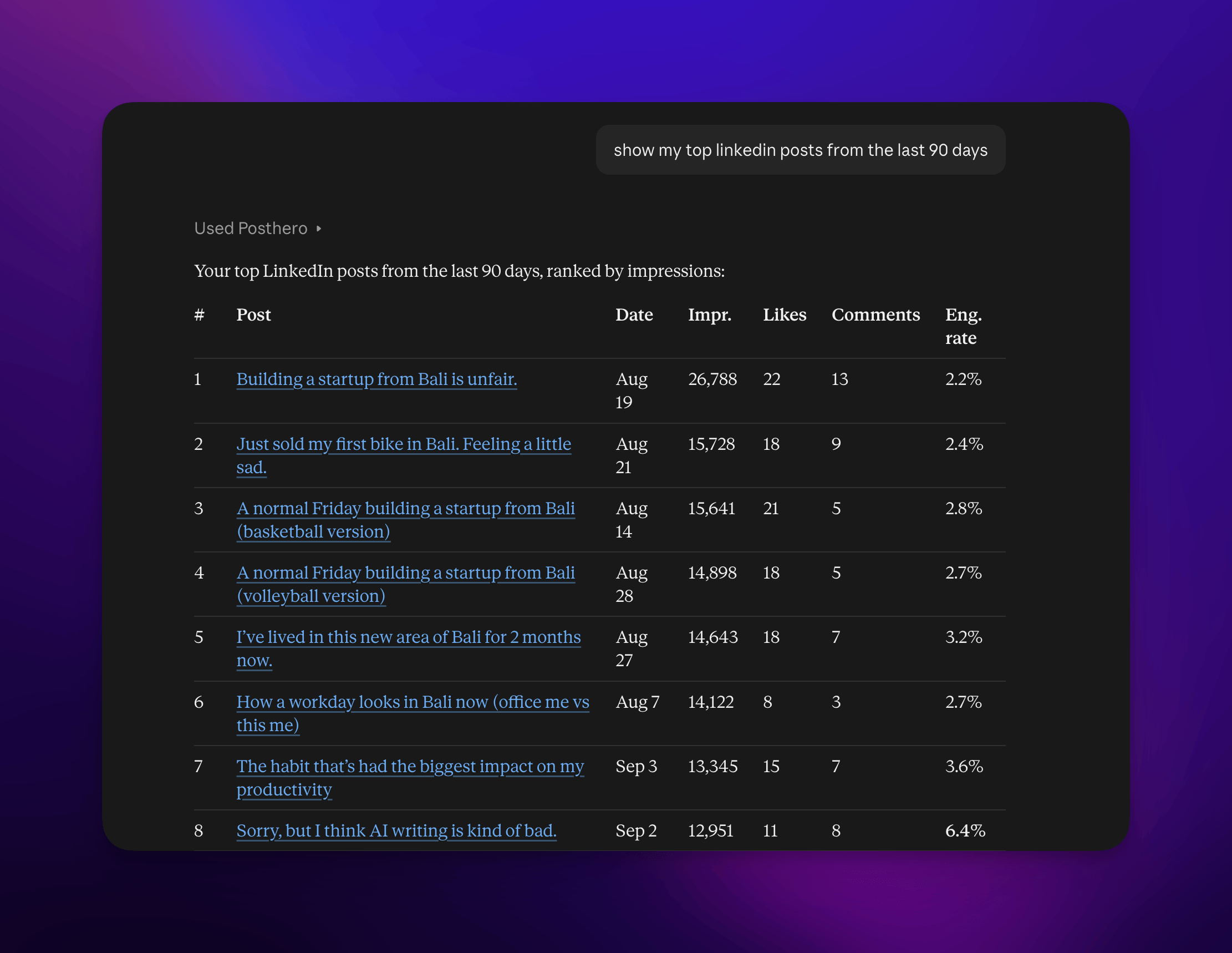
- Analytics for your own accounts, including your personal profile: impressions, likes, comments and shares over a period, as well as your top posts ranked by a metric you choose.
- Separate text per account when the same idea goes to your profile and a company page.
How I use ChatGPT for LinkedIn
Most of it looks the same as on any platform. For example, I hand ChatGPT a rough idea and ask for a post, or I paste in what I wrote and ask it to check my language. And on days when I have nothing to post, I ask ChatGPT, because it remembers our past chats and already knows what my week looked like. Then it suggests something like the client problem I mentioned after a call. That’s my idea bank.
Start from posts that already worked
One habit is LinkedIn-only, though: before I write, I look at what already worked.
The first two lines of a LinkedIn post decide whether anyone taps “see more”. So a hook that has already stopped thousands of people beats a blank page as a starting point. That’s why I check what’s working before I write, either in PostHero’s viral post library or among creators I follow.
Here’s a real example: I came across a viral post from a creator I like, and its hook was built like this:
I turn [AGE] today.
[NUMBER] days ago, I moved to [PLACE].
No friends. No experience. Just [RECENT TRANSITION].
Three short lines: a personal milestone, then a specific number, then a blunt “look how little I had”. It reads like the start of a story, so you keep reading.
Then I dropped that post into the chat and asked for it to be used as inspiration only: write the post for my case and my niche, with my own examples. The shape of the hook stayed, but the story inside it was mine. It became my best performing LinkedIn post that month.
The rule I took away: borrow the structure, never the words. The hook pattern is the lesson. The story still has to be yours, otherwise you’ve made a worse copy of somebody else’s post.
Before you post more, one thing: every good post sends people to your profile, and the profile decides whether they book a call. How I set mine up is in LinkedIn profile optimization for founders.
What goes wrong (and what I tell ChatGPT instead)
- General AI slop. “Write a LinkedIn post about leadership” returns the post everyone has scrolled past a hundred times. Instead, feed ChatGPT something real: a client conversation, a number, a decision and why you made it. If drafts still sound machine-made, paste my list of AI words to avoid at the top of the chat.
- Content recycled from another platform. A tweet stretched to LinkedIn length, or a pasted blog intro, rarely lands. That’s because LinkedIn wants a short story with room to breathe.
- Too polished, too expert. The “7 lessons from 10 years of leadership” voice is the one that gives AI posts away. Posts that do well sound like a person talking rather than a consultant presenting.
- Copying the viral post itself. Hand ChatGPT a viral post with nothing but “write one like this” and you get the same story with new nouns. So tell it which parts are yours.
So my standing instruction is short: write like a person on LinkedIn, not a brand, and pitch nothing.
Write this for LinkedIn in a natural, personal style, as if I’m telling a colleague the story. Short lines, plain text, no markdown, no bold, no hashtags, no pitch or call to action. Also keep my wording wherever it sounds like me. Show me the draft before you save it.
ChatGPT LinkedIn rules worth knowing
Use the API, not your browser session. Some tools that tie ChatGPT to LinkedIn, browser extensions and unofficial services especially, work by driving your logged-in session to read profiles and your feed. But LinkedIn’s User Agreement rules out bots and scraping, and that kind of access is what gets accounts restricted. PostHero posts through LinkedIn’s official API instead, with the permission you granted on LinkedIn’s own login screen.
Plain text only. LinkedIn doesn’t render markdown, but ChatGPT loves it. If it writes **bold**, your post shows the asterisks. So ask for plain text (the instruction above does).
Links go in the first comment. On LinkedIn, posts with a link in the body tend to reach fewer people, so mine go in the first comment. Ask ChatGPT to do the same:
Save this as a LinkedIn draft on my profile. Leave the link out of the post and add it as the first comment instead: [link]
Keep a human in the loop. Everything ChatGPT makes in PostHero begins as a draft. It schedules only when you name a time, and it publishes right away only when you ask and then confirm once more. That’s on purpose, because your LinkedIn profile is your professional reputation, and an AI posting there unasked is a risk nobody needs.
ChatGPT LinkedIn connectors, compared
LinkedIn does have a plugin of its own in ChatGPT. However, it only looks up professionals (title, company, location, follower count) and links to their profiles: there’s no posting. So every option that publishes is third-party. Most can get a post out, but they differ in what else they do and how they connect.
| Option | Platforms | Stands out for | Good to know |
|---|---|---|---|
| PostHero | 8 | Viral LinkedIn post library, carousels ChatGPT designs, first comment | ✅ Profile analytics, ✅ draft first |
| PostFast | 11 | One-click install from ChatGPT’s plugin directory | ❌ No first comment, ❌ no profile analytics |
| Taplio | A LinkedIn-only toolkit that also drafts comments | Added by URL, drafts until you confirm | |
| LiGo | A custom GPT that turns notes into posts | Text posts only, needs ChatGPT Plus or Pro | |
| Composio | Commenting, deleting posts, page statistics | ❌ No drafts or scheduling listed | |
| LinkedIn’s own plugin | Looking up professionals | ❌ Doesn’t post | |
| Browser extensions, unofficial tools | Typing into linkedin.com for you | ❌ Uses your logged-in session: account risk |
Based on each vendor’s own pages, checked 23 November 2026.
Which one should you pick?
My take:
- Pick Taplio or LiGo if LinkedIn is your only platform and you want a tool built around it. Note that LiGo runs as a custom GPT you set up yourself, and its help page calls text-only posts the reliable option.
- Pick PostFast if you want a one-click install from the plugin directory and you mostly schedule company page posts. PostHero is added by URL, so it takes a few more clicks.
- Pick Composio if you want raw actions such as commenting or deleting a post and you’ll do your own review. Its page lists no drafts and no scheduling, though.
- Skip anything that acts through your logged-in session on the account you make a living from. Free isn’t worth a restricted profile.
- Pick PostHero if you want ChatGPT to learn from what’s going viral on LinkedIn, write your own story, design the carousel, and also run your other platforms from the same chat. That’s the job I built it for.
Copy-paste prompts for LinkedIn
Replace the parts in brackets with your own.
Find hooks that are working right now
Search the viral LinkedIn post library for [topic] over the last 30 days. Sort by viral ratio, so small creators with big hits come up. Then give me the 5 strongest hooks, each with a link to the post and a line on why it works. Don’t write anything yet.
Borrow the structure, write your story
Treat this post as inspiration for the hook and structure only: [post or link]. Then write my own version for my niche ([niche]) from my examples: [what happened to me]. Reuse none of its wording. Plain text, short lines, no pitch. Show me the draft before saving.
Get ideas from your own week
From what we’ve talked about this week, give me 5 LinkedIn post ideas. Each has to come from something that really happened to me, with a first line that would stop someone scrolling. One idea per line.
Turn a post into a carousel
Turn this post into a LinkedIn carousel of 6-8 slides: a hook slide, then one point per slide, then a closing question. Show me the slide plan before you design anything. Once I approve it, design the slides and save them as a LinkedIn document draft on my profile: [post]
Profile and company page
Put this idea on both my LinkedIn profile and the [company] page, with separate text for each: first person and personal on my profile, but shorter and factual on the page. Then save both as drafts.
Schedule and review
Schedule the LinkedIn drafts from today: one on [day] at [time], the other on [day] at [time], in my time zone. First check what’s already scheduled so nothing clashes.
Show my top 5 LinkedIn posts from the last 90 days by impressions. Then tell me what their first two lines have in common, and what I should write more of.
Using Claude instead?
It’s the same connector, with the same LinkedIn profile and pages, the same viral library and the same drafts. In Claude you add PostHero as a custom connector instead of an MCP server under Plugins, and after that everything works the same way. So the prompts above need no changes. The Claude setup is in my Claude LinkedIn guide, and the reason I built PostHero for any AI agent is in PostHero goes agentic.
Why isn’t ChatGPT posting to LinkedIn?
- The connector isn’t on in this chat. Either pick PostHero from the + menu in a new chat, or mention PostHero by name in your message.
- ChatGPT says it posted, but nothing happened. Without the connector active, ChatGPT can describe posting without doing anything. So turn it on, then ask it to list your accounts.
- There’s no “Add custom MCP server” option. In that case, your plan or workspace doesn’t allow custom servers. On a work workspace, ask your admin.
- ChatGPT finds no LinkedIn profile or page. Either the profile or page isn’t connected in PostHero yet, or the connector is signed in to a different PostHero account. Check both.
- The draft saved but won’t publish. Usually the text runs past 3,000 characters. Ask ChatGPT to shorten it, since it sees the same warning.
- Asterisks or # signs in the post. ChatGPT used markdown, so ask for a plain text rewrite.
- Your image won’t attach. Files in the chat can’t go to PostHero. Instead, upload the image to your PostHero media library, then tell ChatGPT which one to use.
FAQ
Can ChatGPT post to LinkedIn on its own?
No, because ChatGPT has no built-in way to publish on LinkedIn. It writes posts as text, so saving, scheduling or publishing them takes a connector like PostHero.
Is there an official LinkedIn plugin for ChatGPT?
Yes, but it’s for looking people up: title, company, location and follower count, with a link to the profile. It doesn’t write to your account, so posting still goes through a third-party connector.
Can ChatGPT post to a LinkedIn company page?
Yes. Connect the page in PostHero alongside your profile, then tell ChatGPT which one you mean. A single idea can also go to both, with separate text for each.
Can ChatGPT make LinkedIn carousels?
Yes. ChatGPT designs the slides, then PostHero renders them into a PDF document draft for LinkedIn. You approve the slide plan and see the slides before anything is saved.
Can ChatGPT find viral LinkedIn posts for inspiration?
Yes, through PostHero’s viral post library. ChatGPT searches it by topic, reads the posts and their numbers, then adapts the structure to your story. Still, tell it not to reuse the original wording.
Will ChatGPT post to LinkedIn without asking me?
No, because everything starts as a draft. Publishing takes your explicit go-ahead plus one confirmation.
Is it free to connect ChatGPT to LinkedIn?
That depends on your ChatGPT plan, because it has to let you add a custom MCP server, and OpenAI has changed which plans do. On PostHero’s side there’s a 7-day free trial, so you can test the whole workflow before paying.
Does it work with my other platforms too?
Yes. The same connector also covers X, Threads, Instagram, Facebook, YouTube, TikTok and Bluesky. Start with the guide to connecting ChatGPT to social media, then see the ChatGPT Instagram guide for reels and the ChatGPT X guide for threads.
PostHero for ChatGPT
Run your LinkedIn from ChatGPT
Connect in 2 minutes. Study the posts that are already working, write your own story, and approve every post before it goes out.
7-day free trial. Everything starts as a draft.
Leave a Reply