
You can connect ChatGPT to social media with one connector. Set it up once, and then ChatGPT can draft, schedule and check posts on Instagram, X, TikTok, YouTube, Facebook, LinkedIn, Threads and Bluesky from the same chat. So there’s no copy and paste between tabs, and no separate setup per platform.
I’m Anton, founder of PostHero. I built the connector, and I’ve written a separate ChatGPT guide for each platform as I went. This page is the map for all of them. First comes the short answer on what ChatGPT can and can’t do by itself, then the setup. After that, you’ll see what changes from one platform to the next, with a link to each full guide. Finally, there’s a workflow that puts one idea on several platforms, a comparison of the options, and prompts you can copy.
Can ChatGPT post to social media?
Not on its own. ChatGPT can write a caption, a thread or a video script, but it has no access to your accounts. Add a connector like PostHero and it can save posts as drafts, schedule them, publish after you confirm, and read your analytics on 8 platforms from the same chat.
So the honest answer has two halves:
- Plain ChatGPT: a writer. Everything it makes leaves the chat by copy and paste. Also, it only knows the numbers you paste in.
- ChatGPT with a connector: a writer that can also see your accounts, save real drafts and put them on a schedule.
With PostHero, nothing goes live by accident, because every post starts as a draft. ChatGPT schedules only when you give it a time. And it publishes right away only when you ask and confirm once more.
How to connect ChatGPT to social media
- Create a PostHero account and connect your social accounts.
- On chatgpt.com, open Plugins, click the + button and choose Add custom MCP server.
- Name it PostHero, paste https://mcp.posthero.ai/mcp, choose OAuth, confirm the warning and create it.
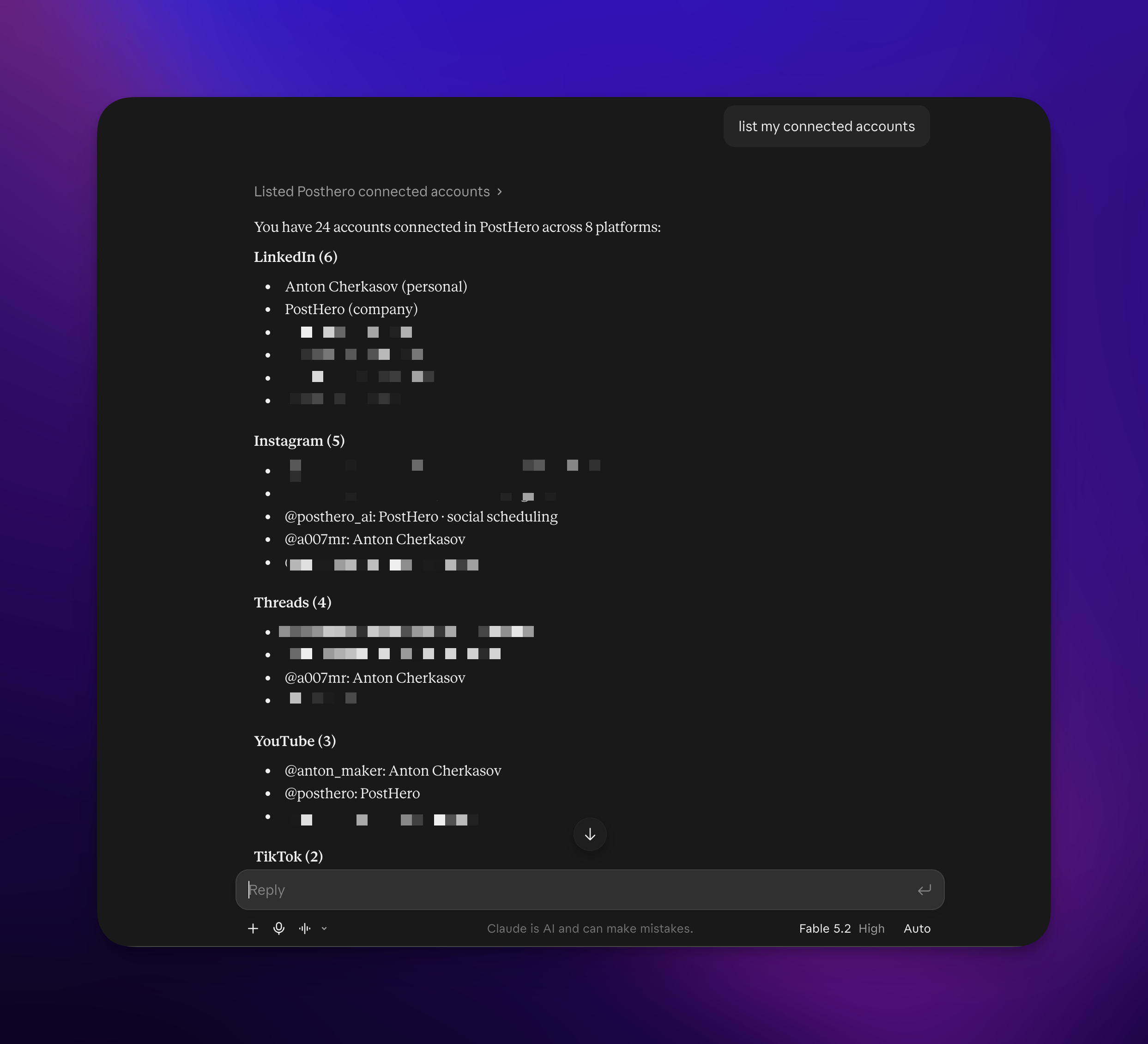
- Sign in to PostHero, turn it on in a chat and ask: “list my connected accounts”.
You do this once. After that, every platform you connect in PostHero shows up in ChatGPT through the same plugin. Platforms you add later appear too, without touching ChatGPT again.
What you need before you start
- A ChatGPT account. OpenAI’s pricing table lists Plugins on every individual plan, Free included (I checked it on 19 November 2026). PostHero is added as a plugin, by URL. However, if Plugins doesn’t show “Add custom MCP server” for you, your account or workspace doesn’t allow custom servers yet. On Business, Enterprise and Edu workspaces, for example, an admin may need to add it or switch it on.
- Professional accounts where the platform asks for one. For example, Instagram only lets apps post to Business or Creator accounts, and Facebook only to Pages. Switching Instagram is free and takes a minute.
- The same PostHero account in both places. Sign in to the connector with the account where you linked your socials. Otherwise ChatGPT connects happily and then finds no accounts.
- chatgpt.com for the setup. Add the connector in ChatGPT on the web.
You don’t have to connect all 8 on day one. Instead, start with the two or three you post on and add the rest later. You also don’t need a developer account on any of them, because you approve access on each platform’s own login screen. So ChatGPT never sees a password.
When you add the server, ChatGPT shows a warning, because OpenAI doesn’t review custom servers. That’s fair. So only add ones from companies you trust.
What ChatGPT can do on each platform
On all 8, ChatGPT can write posts, save them as drafts, schedule them, and pull your analytics and top posts. The rest, though, depends on the platform: what it accepts, what it requires, and how deep the tools go.
The platform I see ChatGPT users connect first is usually Instagram. They love searching viral posts in their niche without leaving ChatGPT, and then using what they find for their own content. That’s why Instagram comes first below.
| Platform | What ChatGPT can post | Worth knowing | ChatGPT guide |
|---|---|---|---|
| Reels, carousels, feed posts, stories | Audits, competitors, viral reels | ✅ Live | |
| X | Posts and threads | Own text for each account | ✅ Live |
| TikTok | Videos and photo posts | Send to your TikTok inbox | ✅ Live |
| YouTube | Shorts and regular videos | Every upload needs a title | ✅ Live |
| Page posts with images or video | Pages only, no Reels yet | ✅ Live | |
| Text, image, video, PDF carousels | Viral post library, first comment | Coming soon | |
| Threads | Posts and threads | 500 characters, up to 20 images | Covered below |
| Bluesky | Posts and threads | 300 characters, up to 4 images | Covered below |
Instagram gets the most tools, and it’s also where a connector changes the output the most. Before ChatGPT writes anything, it can audit your profile, track competitors you name, search a library of viral reels by niche, and break one down into its hook and structure. Then it designs a reel or a carousel, PostHero renders it, and it lands as a draft. Captions run up to 2,200 characters, and every post needs an image or a video.
Same model, better material. For example, a caption written after ChatGPT has looked at what’s getting views in your niche this month reads nothing like one written from “fitness, friendly tone”.
Full guide: ChatGPT for Instagram: prompts and how to connect it
X (Twitter)
Posts of up to 280 characters (up to 25,000 on X Premium), threads saved as one draft, and up to 4 images or one video. ChatGPT can also read your impressions, replies and top posts back to you.
One rule matters if you run more than one account: X doesn’t allow the same text on several accounts. So “post this to my personal and company account” is the request not to make as is. Instead, ask for a version per account, and ChatGPT saves each one with its own text.
Full guide: How to connect ChatGPT to X (Twitter)
TikTok
TikTok has no text-only posts, so everything starts from a video or images. ChatGPT can design a short vertical video scene by scene. Then PostHero renders it, and the file becomes a TikTok draft with its own caption. Photo posts take up to 35 images. You also choose who sees the post and whether comments, Duet and Stitch are on.
My favorite detail here: instead of posting, ChatGPT can send the video to the inbox in your TikTok app. You add a sound or set a disclosure there, then post it yourself.
What it can’t do yet on TikTok: reply to comments or search viral TikToks. For now, the viral library covers Instagram and LinkedIn.
Full guide: ChatGPT for TikTok: prompts and how to connect it
YouTube
Every YouTube upload needs a video and a title. ChatGPT can post a Short (vertical, up to 3 minutes) or a regular video from your media library. It can also set the description, tags and privacy: public, unlisted or private. Regular videos can take a custom thumbnail. Shorts can’t, so the first frame has to do that job.
The title is the step people skip. A reel lives on its caption. A Short also shows a title, though, and YouTube search reads it. So ask for a few options instead of reusing your Instagram caption’s first line.
Full guide: ChatGPT for YouTube: prompts and how to connect it
Facebook means Pages. Meta’s API doesn’t let outside tools publish to personal profiles or Groups, so that’s true of every connector, PostHero included. On a Page, ChatGPT can write the post, attach images or one video, schedule it, and then report reach and engagement.
There are two limits to know before you plan around it. First, video goes out as a regular Page video (no Reels or Stories on Facebook yet). Second, ChatGPT can’t reply to comments or Messenger through PostHero.
Full guide: ChatGPT for Facebook: prompts and how to connect it
PostHero started as a LinkedIn tool, so the connector goes deep here. ChatGPT writes posts of up to 3,000 characters for your profile or company pages, and can design a carousel that’s saved as a PDF document draft. It can also search a library of viral LinkedIn posts sorted by reactions per 1,000 followers, which surfaces small creators with big hits. And if you have a link to share, it goes in a first comment that PostHero adds 30 seconds after the post, because LinkedIn shows posts with links to fewer people.
Full guide: ChatGPT for LinkedInComing soon Until it’s live, the Claude LinkedIn guide shows the viral library workflow step by step.
Threads and Bluesky
These two don’t have their own ChatGPT guide, because there’s less to explain. Both are short text platforms with the same toolkit as X.
- Threads: posts of up to 500 characters, multi-post threads saved as one draft, up to 20 images or one video, and analytics with your top posts. Running several accounts? Then ask for a different version for each, because Meta treats identical posts across accounts as a spam signal.
- Bluesky: posts of up to 300 characters, threads, and up to 4 images.
The length limit is where cross-posting breaks. For example, a LinkedIn post pasted into Threads fails at 500 characters. So ask ChatGPT to rewrite the idea as a short post or a thread instead of trimming it.
For the full workflow, including the weekly system I run on Threads, read the Claude Threads guide. The prompts in it also work in ChatGPT as written.
One idea, every platform
This is the part a single-platform tool can’t give you, and PostHero users can do it from ChatGPT today. You make one post or one video, then schedule it to several platforms without leaving the chat.
One video as a TikTok, a reel and a Short
A short vertical video is a short vertical video, so the same file works as a TikTok, an Instagram reel and a YouTube Short. Here’s how that goes:
- ChatGPT designs the video. First, you describe the idea. Then it writes a storyboard scene by scene and shows it to you before anything renders.
- PostHero renders it. About a minute later, the video is in your media library. PostHero doesn’t design anything. Instead, it renders what ChatGPT designed and you approved.
- One file, three drafts. After that, ChatGPT saves it as a TikTok, a reel and a Short. Each gets a caption written for that platform, and the Short also gets a title.
- You pick the times. Give ChatGPT a day and time for each. Otherwise, leave them as drafts and decide later.
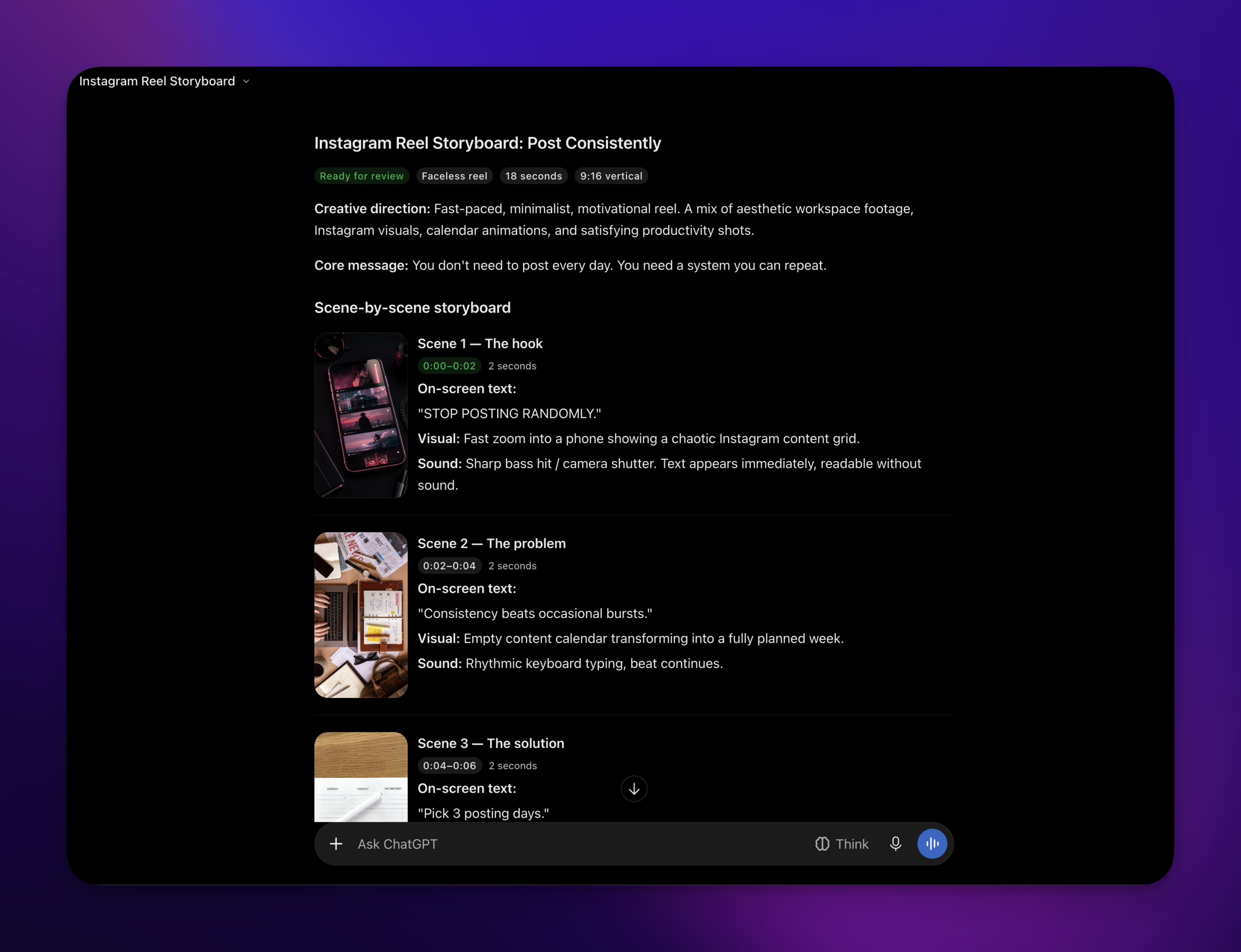
Design a 20-second vertical video about [idea]. Show me the storyboard scene by scene first, and render it with PostHero only after I say yes. Then save the same video as a TikTok draft, an Instagram reel and a YouTube Short. Also write a separate caption for each platform and a title for the Short. Drafts only, so don’t publish anything.
One idea as text on X, Threads and LinkedIn
Text works the same way. For example, one idea can go out as an X thread, a Threads post and a LinkedIn post in a single draft, with its own text for each platform.
The mistake I see most often is treating every platform as the same place. “Here’s my LinkedIn post, make it an X thread” usually gets you the same post with more line breaks. But the platforms don’t talk the same way. On LinkedIn, I write like someone sharing what they learned. My X posts are far more casual. And on TikTok, anything that looks like an ad gets scrolled past. So adapting means changing the language, and ChatGPT only does that when you ask for it:
Here’s my idea: [idea]. Write it for X, Threads and LinkedIn. Don’t trim one version to fit the others. Instead, change the tone for each platform: casual on X, short and conversational on Threads, more detail on LinkedIn. Then show me all three before saving anything as a draft.
A note on results
I don’t want to oversell this. The number I usually quote, a reel that got 719 views against my usual 64, came from a video I made in Claude through this same connector. So far, I don’t have a ChatGPT-made number of my own. The tools are identical, but I’d rather say that than dress one up.
Claude or ChatGPT?
Use the one you already have open all day, because the connector is the same in both: same URL, same accounts, same drafts, same analytics. For example, a draft you save from ChatGPT in the morning is there when you open Claude in the afternoon.
The differences I’ve noticed are small:
- Setup wording. ChatGPT calls it a plugin and adds it under Plugins as a custom MCP server, while Claude calls it a custom connector.
- The storyboard. ChatGPT renders the video storyboard a bit differently from Claude. Still, I can’t tell you which is better. It comes down to which assistant you like working in.
If Claude is your assistant, the same map exists for it: how to connect Claude to social media, with a guide for each platform. And why I built PostHero for any AI assistant instead of betting on one is in PostHero goes agentic.
Ways to use ChatGPT for social media, compared
ChatGPT has no built-in way to post to your accounts, so every route goes through a third party. But they’re less alike than they sound. Some put a tool inside the ChatGPT chat, while others put AI inside a scheduler. And some run in the background, where you never see the post before it goes out.
| Option | Where you work | Posts for you | Reads your numbers | Makes videos and carousels |
|---|---|---|---|---|
| PostHero | In the ChatGPT chat | ✅ Draft first, 8 platforms | ✅ Yes | ✅ ChatGPT designs, PostHero renders |
| SocialPilot AI Scheduler | A GPT inside ChatGPT | ✅ Drafts, scheduling, bulk CSV | ❌ Not listed | Captions and visuals |
| Hootsuite OwlyGPT | Inside Hootsuite, not ChatGPT | You publish from Hootsuite | ✅ Yes | Images only |
| Zapier workflows | In the background | ✅ LinkedIn, Facebook Pages; no review step listed | ❌ No | ❌ No |
| Chrome extensions (Typebar and similar) | On the social site itself | ❌ Writes in the post box, you post | ❌ No | ❌ No |
| ChatGPT on its own | In the ChatGPT chat | ❌ No | Only what you paste | Scripts and captions only |
Based on each vendor’s own pages, checked 19 November 2026.
Which one should you pick?
My honest take:
- Stay with plain ChatGPT if you post once or twice a week on one platform. Copy and paste is fine at that volume, so a connector adds a setup you don’t need.
- Pick SocialPilot or Hootsuite if your team already runs on one of them. Their AI sits on top of the calendar, approvals and inbox you’re paying for. Also, moving a team is rarely worth it for one feature.
- Pick Zapier if you want posts that go out from a trigger with nobody in a chat, like a new blog post becoming a LinkedIn update. Build your own review step, though, because the ChatGPT templates I checked don’t list one. X isn’t available directly, so it goes through a tool like Buffer.
- Pick a Chrome extension if all you want is help writing a post or a reply in the box where you already type. First, check when it was last updated. Also be careful with any extension that acts through your logged-in session, because that isn’t official API access.
- Look at other scheduler plugins for jobs PostHero doesn’t do. For example, Blotato is in ChatGPT’s plugin directory and handles Instagram and Facebook comments and DMs. PostEverywhere, meanwhile, covers networks beyond the big eight, like Pinterest, Telegram, Discord and Google Business Profile.
- Pick PostHero if the hard part for you is knowing what to post and then making it: research first, then a reel or carousel designed in the chat, and drafts you approve on every platform.
Copy-paste prompts that work across platforms
These need PostHero connected, because they ask ChatGPT to look at real accounts and save real drafts. Swap the parts in brackets for your own.
Start every chat with this
For everything in this chat: write each platform its own version in that platform’s casual style, keep my wording where it already sounds like me, and don’t pitch anything. Also, save drafts only, and show me each one before you save it.
Plan
List my connected accounts. Then show my top 3 posts from the last 30 days on each platform and tell me what the winners have in common.
Here’s what happened in my work this week: [paste notes]. Give me 5 post ideas that come from real moments in that list. Then, for each idea, tell me which of my platforms it fits best and in what format.
Research (Instagram and LinkedIn)
Search viral reels in [niche] from the past month and pick the 3 that most outperformed their account’s size. What do their hooks have in common? Then write 3 hooks for my own post about [topic] in that style, in my words.
Create
Take my best-performing post from last month and turn the idea into a 7-slide carousel. Show me the slide plan first, then save it as an Instagram draft and a LinkedIn document draft.
I’m posting this from two X accounts: [idea]. Write each account its own version: first person and casual for my personal one, shorter and factual for the company one. Then save both as drafts.
Schedule and check
Check what’s already scheduled this week so nothing clashes. Then schedule today’s drafts: the video on TikTok, Instagram and YouTube on [day] at [time], the text posts on [day] at [time], all in my time zone. Don’t publish anything now.
List every draft we made today with its platform. Then flag any that are too long for their platform or missing a video, an image or a title, and fix them.
ChatGPT isn’t seeing my accounts: quick fixes
- The connector isn’t on in this chat. Pick PostHero from the + menu in a new chat, or mention PostHero by name in your message.
- There’s no “Add custom MCP server” option. Your account or workspace doesn’t allow custom servers. So on a work workspace, ask your admin.
- ChatGPT connects but finds no accounts. You signed in to a different PostHero account than the one with your socials. Disconnect, then sign in with the right one.
- One platform is missing. Either it isn’t connected in PostHero yet, or it’s the wrong account type. For example, a personal Instagram account, or a Facebook Page you didn’t tick when Meta asked which Pages to share.
- ChatGPT says it posted, but nothing happened. Without the plugin active, ChatGPT can describe posting without doing anything. So ask it to list your accounts first. If it can’t, the plugin is off.
- The draft saved but won’t publish. Usually it’s too long for one platform. Otherwise, it’s missing something that platform requires: a video and a title on YouTube, media on Instagram and TikTok. ChatGPT sees the same warning, so it can fix the draft.
- Your own photo or video won’t attach. ChatGPT can’t pass files from the chat to PostHero. Instead, upload them to your PostHero media library first, then tell ChatGPT to use them.
FAQ
Can ChatGPT post to social media automatically?
It can schedule posts, and they go out at the time you set, even after you close the chat. But with PostHero it won’t post without asking. Everything starts as a draft, and publishing right away needs your go-ahead plus one confirmation.
Can ChatGPT be my social media manager?
For the time-consuming parts, yes: adapting one idea for each platform, drafting, scheduling, and checking what worked. It won’t replace your own ideas, though. The posts that do best still start from something you did or learned, so give it your week, not a topic.
Which ChatGPT plan do I need?
OpenAI’s pricing table lists Plugins on Free, Go, Plus and Pro, as of 19 November 2026. On Business, Enterprise and Edu workspaces, an admin may need to add the plugin or allow it first.
Is it free to connect ChatGPT to social media?
On ChatGPT’s side, Plugins are listed on the Free plan. PostHero also has a 7-day free trial, so you can test the whole workflow before paying.
Is it safe to connect ChatGPT to my social accounts?
Yes, with a connector that uses each platform’s official login. You approve access on the platform’s own screen, so ChatGPT never sees your passwords. You can also disconnect at any time from ChatGPT’s Plugins page or from PostHero. The bigger everyday risk is a tool that posts without asking. That’s why PostHero keeps everything as a draft until you say publish.
Can ChatGPT post the same thing to every platform at once?
Yes, one post can go to several platforms in one go. I wouldn’t send identical text everywhere, though. Instead, ask for a version for each platform, and on X ask for one for each account too.
Does the same connector work with Claude?
Yes. Same URL, same accounts, same drafts. The setup and per-platform guides for Claude start at connecting Claude to social media.
Can I use it on my phone?
You add the connector on chatgpt.com. After that, your drafts and schedule live in PostHero, so you can review them from any device.
PostHero for ChatGPT
Run all your socials from ChatGPT
Connect 8 platforms in 2 minutes. Make the idea once, then let ChatGPT adapt it for each one.
7-day free trial. Everything starts as a draft.
Leave a Reply