Most ChatGPT Facebook workflows look the same: ChatGPT writes a post for your Page, and you carry it over by hand. That part needs no setup, and the prompts below make the writing better. The step up is connecting ChatGPT to your Facebook Page, so the same chat saves the post as a draft, schedules it and reads your numbers back. Setup takes about 2 minutes, and you don’t need a Meta developer app.
I’m Anton, founder of PostHero. I built the connector that lets AI assistants post to Facebook Pages. This guide starts with the setup, then covers what ChatGPT can and can’t do on a Page, the Facebook rules no tool gets around, and how asking in a chat compares with Zapier workflows and Chrome extensions. If you only came for prompts, the ChatGPT prompts for Facebook Page posts are further down, and they work without connecting anything.
How to connect ChatGPT to Facebook
- Create a PostHero account and connect your Facebook account.
- On chatgpt.com, open Plugins, click the + button and choose Add custom MCP server.
- Name it PostHero, paste https://mcp.posthero.ai/mcp, choose OAuth, confirm the warning and create it.
- Sign in to PostHero, turn it on in a chat and ask: “list my connected accounts”.
What you need before you start
- A Facebook Page, not a personal profile. If you post as yourself today, create a Page for your business or creator brand first. The limits section explains why.
- A role on that Page that can create content. Admins have it. If the Page sits in a Meta Business Portfolio, your own Facebook login needs access to the Page there.
- The right Pages ticked when Meta asks. When you connect Facebook in PostHero, Meta asks which of your Pages to share. A Page you leave unticked won’t show up for ChatGPT.
- A ChatGPT plan that lets you add custom MCP servers. OpenAI decides which plans get this and has changed it more than once this year. If Plugins doesn’t show “Add custom MCP server” for you, your plan or workspace doesn’t allow it yet. On Business, Enterprise and Edu workspaces, an admin may need to add it or switch it on.
- The same PostHero account in both places. Sign in to the connector with the account where you linked Facebook. Otherwise ChatGPT connects happily and then finds no Facebook Page.
- chatgpt.com for the setup. Add the connector in ChatGPT on the web.
Several Pages? Tick each one when Meta asks and tell ChatGPT which to use. The same connector also covers LinkedIn, X, Threads, Instagram, YouTube, TikTok and Bluesky. Instagram is the natural next one, since it’s a Meta platform too and you approve it through a Meta login the same way: that’s in ChatGPT for Instagram. I’ve also written the ChatGPT versions for TikTok and X. The guide to connecting AI to all 8 social platforms shows what works on each one, and why I built PostHero for any AI assistant instead of just one is in PostHero goes agentic.
Can ChatGPT post to Facebook?
Not on its own. ChatGPT can write a Facebook post, but it has no access to your Facebook account, so you paste the text in yourself. With a connector like PostHero, ChatGPT can save a post to your Facebook Page as a draft, schedule it, publish it once you confirm, and report how it did.
One thing to clear up first, because “ChatGPT Facebook” means four different jobs:
- Writing and publishing posts on a Facebook Page. That’s this guide.
- A chatbot that answers messages on your Page. That’s a Messenger bot, usually built in an automation tool. Zapier has a walkthrough for that. It’s a different setup from anything below.
- An AI assistant inside Facebook itself. That’s Meta AI, Meta’s own assistant. ChatGPT isn’t built into Facebook or Messenger.
- Facebook Ads. Also separate. More on that in the limits section.
ChatGPT Facebook prompts for Page posts
These work in any ChatGPT chat, connected or not. Ask for “a Facebook post about my bakery” and you get the post every bakery got this morning. It reads fine. People scroll past it.
So tell ChatGPT who you are before you ask for anything. One message at the top of the chat does more than clever wording later:
I run a Facebook Page for [business]. The people who follow it are [who]. I write the way I talk: [3 words]. Here’s a post of mine that people reacted to: [paste]. Here’s one that got nothing: [paste]. Keep all of this in mind for everything I ask in this chat.
Then ask for one thing at a time. Swap the parts in brackets for your own.
Post ideas
The best Page posts come from things that happened, and ChatGPT only knows your week if you tell it. Paste your notes in, however rough.
Here’s what happened in my business this week: [customer questions, small wins, things that annoyed me]. Give me 5 ideas for Facebook Page posts. Each one must come from a real moment in that list, not general advice. One line each, and tell me which ones need a photo.
Give me 10 questions I could ask on my Facebook Page about [topic]. A follower should be able to answer each one in a single line from their own experience. Nothing that sounds like a survey.
Posts
I learned this one on my own Page. When I wrote the Claude version of this guide, the PostHero Page had a couple of posts on it, and both were written like LinkedIn posts: a bold hook, numbered lessons, a question at the end. On a Page, where people are mostly scrolling past friends and family, that reads like an ad.
ChatGPT makes the same mistake by default, so say what you don’t want.
Write a Facebook Page post about this: [what happened]. Tell it the way I’d tell a friend: plain words, short paragraphs, no selling, no hashtags. Give me two versions, one of 2-3 sentences and one longer story of about 150 words.
I need to announce [new hours, a product, an event] on my Facebook Page. Put the practical details (what, when, where, price) in the first two lines. Then one sentence on why I care about it. No “we’re thrilled”, no row of exclamation marks.
Read this draft as someone who follows my Page but has never bought from me: [paste]. Tell me the sentence where you’d stop reading and why. Then fix only that part and leave the rest in my words.
If the posts still sound like ChatGPT, paste in my list of AI words to avoid at the top of the chat.
Captions for photos, videos and links
I’m posting [describe the photo or video] on my Facebook Page. Write 3 captions: a single line, a 2-sentence story behind it, and one that asks people something. No hashtags, and no emojis unless I used them above.
This caption goes on a link to [page or article]. Write 2 sentences that say what the reader gets from clicking, without “click here” or “check it out”.
Replies to comments
ChatGPT can’t see the comments on your Page, so this part is copy and paste in both directions: you bring the comment in, and you post the reply yourself. It’s still faster than staring at a complaint for ten minutes.
Someone left this comment on my Page post about [topic]: [paste comment]. Draft a reply in my voice: 1-2 sentences that answer the actual question. No “Thanks for reaching out”.
This comment is a complaint: [paste]. Draft a calm public reply that owns what’s ours, doesn’t argue, and moves the details to a private message. Then tell me if any line in it could read as defensive.
Here are today’s comments on my post: [paste them]. Sort them into two piles: needs a real answer, or a quick thank-you is enough. Draft replies for the first pile only.
Those prompts get you good text. You still carry it to Facebook by hand, pick a time yourself, and paste your numbers back in when you want to know what worked. With the connector from the top of this guide set up, those steps go away.
What ChatGPT can do on Facebook through PostHero
With PostHero connected, ChatGPT works on your Facebook Pages like this:
- Text posts, with images or one video attached.
- Video as a regular Page video. PostHero publishes video to Facebook as a normal Page video, not as a Reel.
- Drafts and scheduling. Everything lands in PostHero as a draft first. ChatGPT schedules only when you give it a date and time, and publishes right away only when you ask and confirm once more.
- Several Pages at once, each with its own text.
- Analytics: impressions, reach, likes, comments, shares, clicks and engagement rate for a period, plus your top Page posts ranked by the metric you pick.
- One idea across platforms. The same chat can turn a Facebook post into an Instagram, LinkedIn or X version, each with its own text.
Images and videos need to be public links. ChatGPT can’t pass files from the chat to PostHero, so upload your own files to your PostHero media library first, then tell ChatGPT which ones to use.
The draft step is deliberate. An assistant that puts a half-finished post on your business Page is one you switch off the same day, so nothing goes live without your yes.
What it can’t do
- No Reels or Stories on Facebook yet. Instagram has both in PostHero, and the ChatGPT Instagram guide shows how those get made.
- No comment replies or Messenger. ChatGPT sees how many comments a post got, but it can’t read or answer them through PostHero. The reply prompts above are still copy and paste.
- No first comment. PostHero adds a first comment on LinkedIn only, so on Facebook your link goes in the post itself.
- No personal profiles, Groups or ads. The first two are Meta’s rules, covered next.
If Facebook Reels, Stories or comment replies from the chat are the main thing you need, other ChatGPT connectors list them today. Markifact covers Reels and Stories on Pages, and Composio has comment tools. I’d rather you read that here than find out after signing up.
Facebook’s limits worth knowing
These come from Meta, so they apply to every option in the comparison below, PostHero included.
Pages only, never personal profiles. Meta’s API doesn’t let outside tools publish to a personal profile. Anything that connects officially posts to Pages.
Groups have been closed to tools since 2024. Meta shut down its Groups API on April 22, 2024, and third-party apps were removed from Groups that day. You can still ask ChatGPT for a Group post, but you’ll paste it in yourself.
Be careful with anything that works through your logged-in browser. A tool that says it posts to your profile or a Group isn’t using Meta’s API, because the API doesn’t allow it. It’s acting as you inside your browser session. That category has a bad history: in 2023 a fake ChatGPT extension in the Chrome store was caught taking over Facebook accounts. With an official connection you approve access on Meta’s own screen and choose which Pages to share, so your password stays with Meta.
Ads are a separate system. Organic Page posts and ad accounts don’t share a connector. Meta has its own ads connectors for AI agents, and PostHero covers organic posts only.
Realistic AI media may need a label. Meta asks people to label photorealistic video or realistic-sounding audio that was made or altered with AI, and it can add an “AI info” label itself when it detects AI-made media. If you post AI-made video to your Page, read Meta’s page on AI labels first.
ChatGPT Facebook options compared: PostHero, Zapier, Integrately, extensions
Every way I found to get a ChatGPT-written post onto a Page runs through a third party. They split into three kinds: a connector you talk to in the chat, a workflow you build once and leave running, and a browser extension that types into Facebook for you.
| Option | How you use it | Posts to your Page | Draft before it goes live | Page stats |
|---|---|---|---|---|
| PostHero | Ask in the ChatGPT chat | ✅ Text, images, video | ✅ Always | ✅ Post metrics, in the chat |
| Zapier | Build a Zap: trigger, then actions | ✅ Post, photo, video | ✅ If you pick the draft action | Post insights, as a workflow step |
| Integrately | Pick a ready automation or build one | ✅ Post, image, video | ❌ Not mentioned | ❌ Not listed |
| Chrome extensions | Type in Facebook’s own text boxes | ❌ Writes text, you post it | ❌ No | ❌ No |
| ChatGPT on its own | Copy and paste | ❌ No | ❌ No | Only what you paste |
Based on each vendor’s own pages, checked 19 November 2026.
My take:
- Zapier if you want posts to happen without you in the loop, kicked off by something in another app. You choose a trigger, add a ChatGPT step, map its output into a Facebook Pages action and test it. Credit where it’s due: Zapier has a “Create Page Post as Draft” action that saves to your drafts in Meta Business Suite, and a new-comment trigger, which PostHero doesn’t have.
- Integrately if one of its ready-made automations already matches what you want. Its page talks about creating and publishing posts and doesn’t mention drafts, so plan on the post going out as written.
- A Chrome extension only if you’ve checked it recently. One listing that still shows up in search as a ChatGPT comments and replies tool for Facebook now opens as an academic PDF translation extension under a different name. Another, GptAutoBOT, was last updated in April 2023. Neither listing mentions scheduling.
- PostHero if you’d rather not build a workflow at all. You ask in the chat, read the draft, and say when it goes out. That’s the gap I built it for.
ChatGPT Facebook prompts for posting and analytics
These only work with PostHero connected, because they ask ChatGPT to save real drafts and read real numbers.
Draft and schedule
Save the post we just wrote as a draft for my Facebook Page [Page name]. Don’t schedule it. Show me the final text before you save it.
Look at what’s already scheduled on my Facebook Page this week. Then schedule today’s drafts for [days] at [time], my time zone, and keep them off days that already have a post.
Turn a LinkedIn post into a Page post
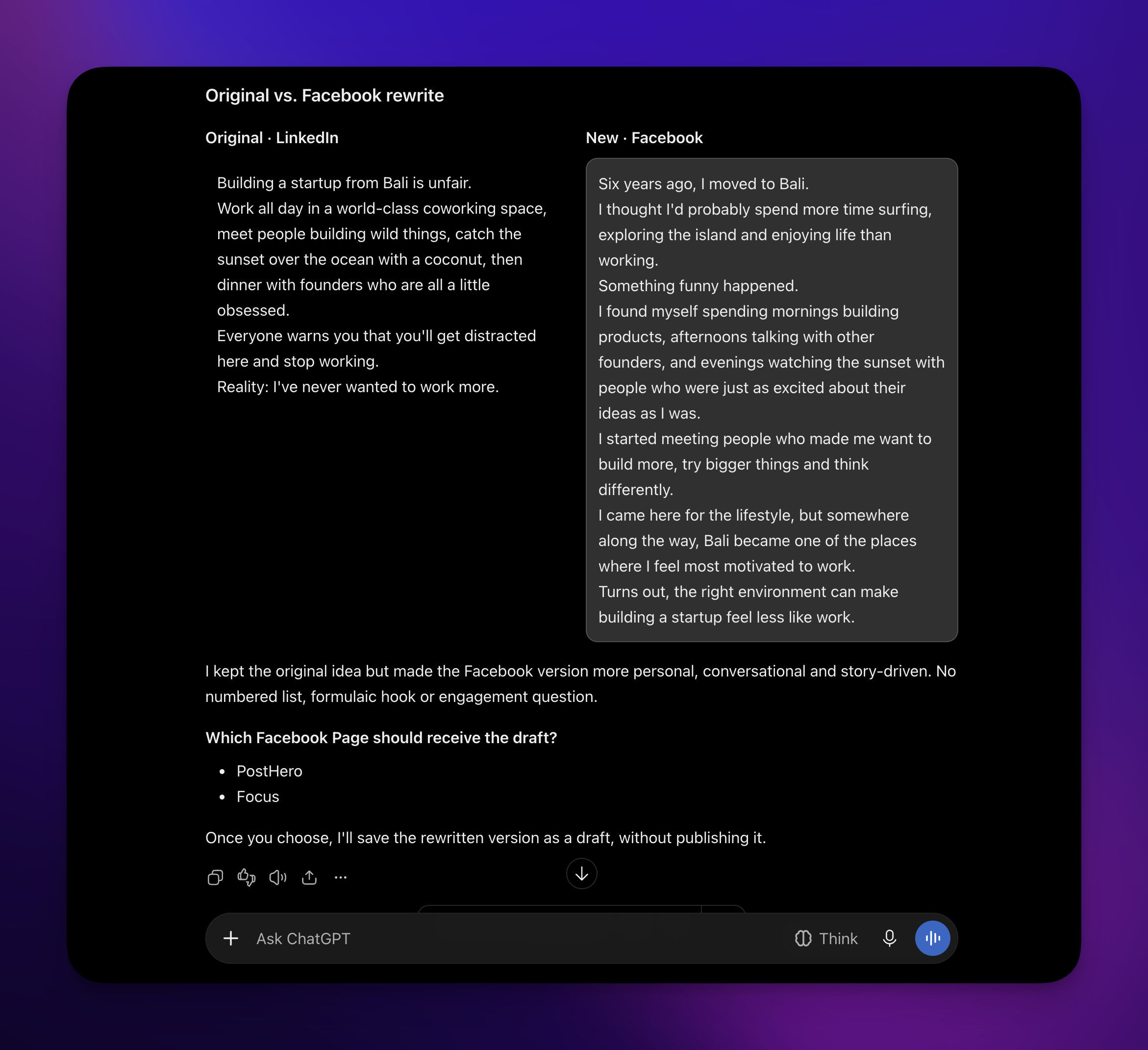
If you already write on LinkedIn, the ideas for your Page exist. PostHero has your LinkedIn posts and their numbers, so ChatGPT can pull one itself and rewrite it for Facebook without you pasting anything in.
Pull my LinkedIn post with the most impressions in the last 30 days. Take the one thing that happened in it and write a new post for my Facebook Page around that: a short story in plain words, no list, no closing question. Put the two side by side for me, then save the new one as a Facebook draft.
Reuse a video
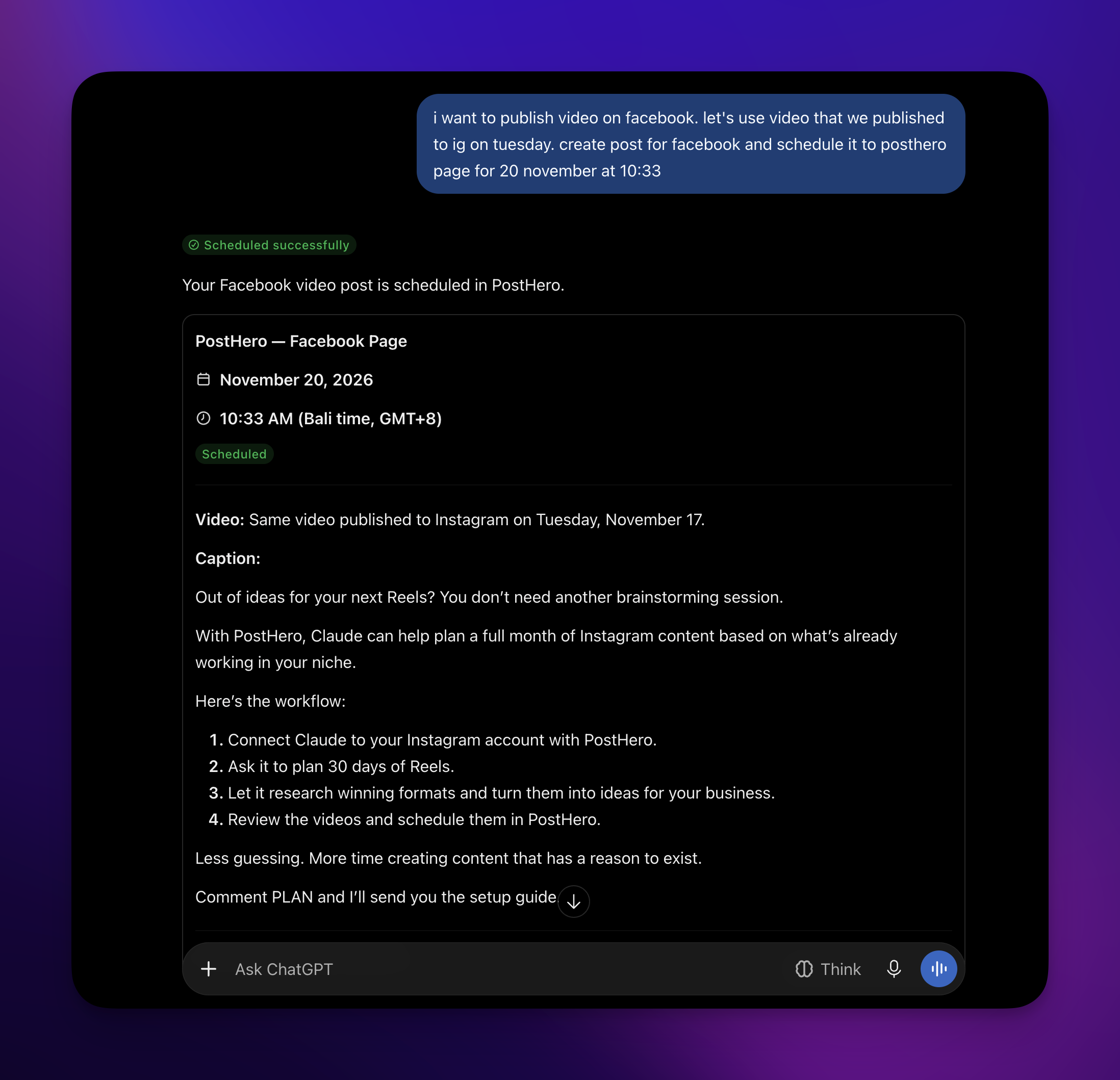
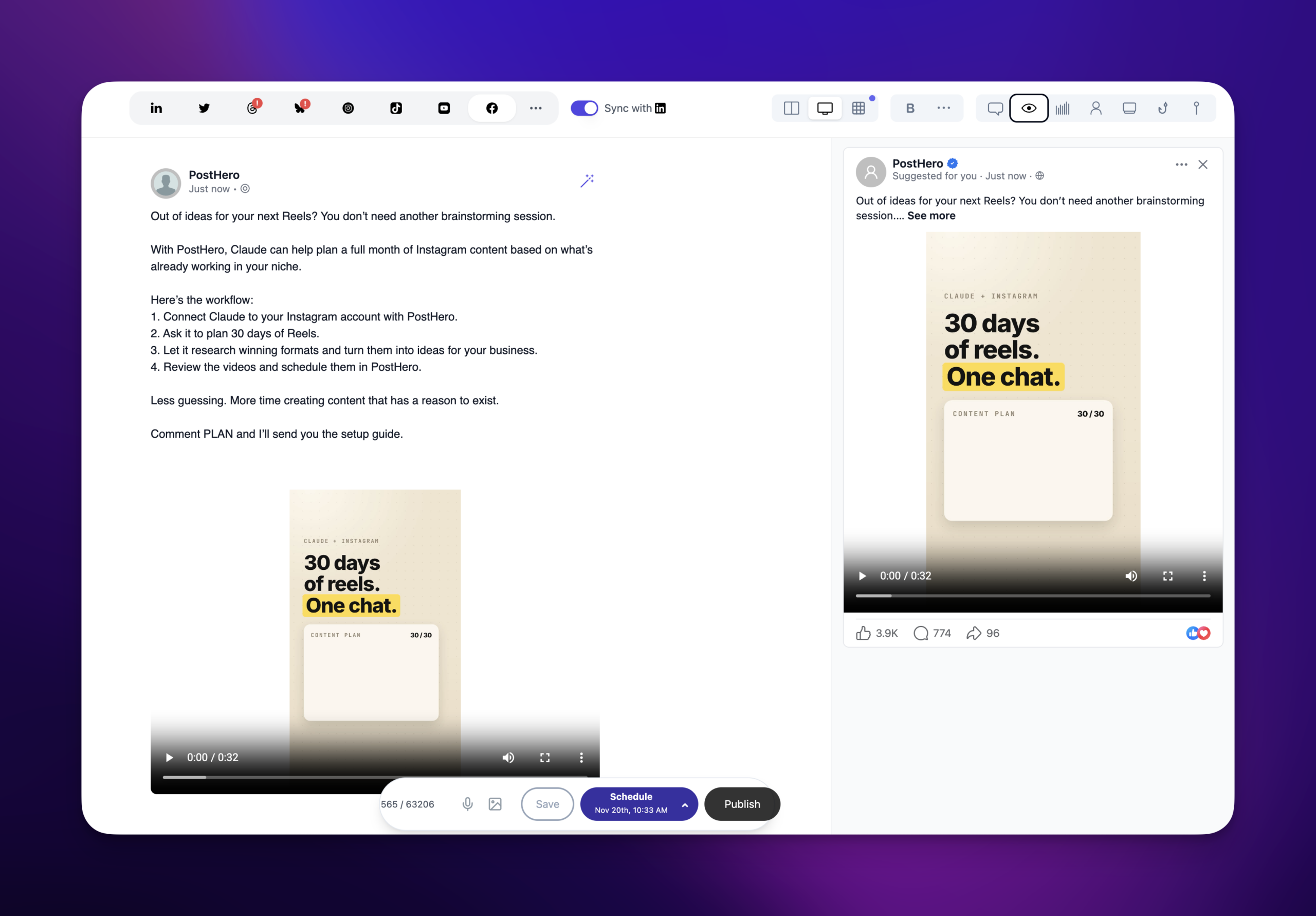
A reel you made in the chat for Instagram sits in your media library, so the same file can go on your Page with a caption written for Facebook. It goes out as a regular Page video, not a Reel.
Use the reel we made for Instagram as a video post on my Facebook Page too. Write a new caption for Facebook: 2-3 casual sentences, no hashtags. Schedule it for [day] at [time].
More than one Page
I run two Pages: [Page A] and [Page B]. Write a separate post for each about [topic], from that Page’s own angle. Save both as drafts and tell me which is which.
Analytics
Show impressions, reach, likes, comments, shares, clicks and engagement rate for my Facebook Page over the last 30 days. Then rank my top 5 posts by reach and tell me what the best ones have in common.
Based on my top Facebook posts this quarter, suggest 3 posts for next week. For each one, tell me which past post it builds on.
Using Claude instead?
Same connector, same Pages, same drafts. In Claude you add PostHero as a custom connector instead of an MCP server in Plugins, and everything after that works the same way. The setup, plus how I’d fix my own Page with it, is in my Claude Facebook guide.
ChatGPT isn’t posting to Facebook: quick fixes
- The connector isn’t on in this chat. Pick PostHero from the + menu in a new chat, or mention PostHero by name in your message.
- ChatGPT says it posted, but nothing happened. Without the connector active, ChatGPT can describe posting without doing anything. Turn it on and ask it to list your accounts first.
- There’s no “Add custom MCP server” option. Your plan or workspace doesn’t allow custom servers. On a work workspace, ask your admin.
- ChatGPT finds no Facebook Page. Either you’re signed in to a different PostHero account than the one with Facebook linked, or the Page wasn’t ticked when Meta asked which Pages to share. Reconnect Facebook in PostHero and tick it.
- You asked for a profile or a Group. No tool can post there through Meta’s API. Use a Page.
- Your image or video won’t attach. Files in the chat can’t go to PostHero. Upload them to your media library and tell ChatGPT which one to use.
FAQ
Can ChatGPT post to Facebook?
Not on its own. With a connector like PostHero, ChatGPT saves posts to your Facebook Page as drafts, schedules them, and publishes once you ask and confirm.
Can ChatGPT post to my personal profile or a Facebook Group?
No, and that’s Meta’s rule. Meta’s API only lets outside tools publish to Pages, and it closed Groups to third-party tools in April 2024.
Is ChatGPT built into Facebook or Messenger?
No. The assistant inside Facebook and Messenger is Meta AI. A ChatGPT-powered bot that answers messages on your Page is a separate setup, usually built with an automation tool.
Can ChatGPT reply to Facebook comments?
It can draft replies if you paste the comments in, and you post them yourself. Through PostHero it sees comment counts but can’t read or answer comments.
Can ChatGPT post Facebook Reels or Stories?
Not through PostHero yet. Videos go out as regular Page videos. Instagram has both formats.
Can ChatGPT see my Facebook Page analytics?
Only through a connector. Without one, it knows the numbers you paste in and nothing more.
Will ChatGPT post to my Page without asking me?
Not with PostHero. Everything starts as a draft, and publishing needs your go-ahead plus one confirmation.
Is it safe to connect ChatGPT to Facebook?
Yes, with a connector that uses Meta’s official login. You approve access on Meta’s own screen and choose which Pages to share. ChatGPT shows a warning when you add a custom MCP server, because OpenAI doesn’t review them, so only add servers from companies you trust.
Does it work with my other platforms?
Yes. The same connector covers LinkedIn, X, Threads, Instagram, YouTube, TikTok and Bluesky. The social media connection guide shows what works on each.
PostHero for ChatGPT
Run your Facebook Page from ChatGPT
Connect in 2 minutes. Ask for a post, read the draft, pick a time. Nothing goes live until you approve it.
7-day free trial. Everything starts as a draft.
Leave a Reply