To make ChatGPT sound human, give it more of you before you ask for a single word. That means your own writing, the real story with its numbers, a few rules about what to avoid, and one edit pass at the end. But if you only ask it to reword a generic draft, you get a second generic draft.
I’m Anton, founder of PostHero. I also edit AI drafts for LinkedIn ghostwriting clients, so I see the same problems in draft after draft. This guide has the 7 fixes I use. Each one comes with a prompt you can copy and a before/after example.
Write and post from ChatGPT in your own voice
- Create a PostHero account and connect your social accounts.
- On chatgpt.com, open Plugins, click the + button and choose Add custom MCP server.
- Name it PostHero, paste https://mcp.posthero.ai/mcp, choose OAuth, confirm the warning and create it.
- Sign in to PostHero, turn it on in a chat and ask: “write a post in my writing style”.
You can skip that for now, because everything below works in plain ChatGPT. The connection matters later, when you want the finished post saved as a draft or scheduled from the same chat.
How to make ChatGPT sound human: the short version
- Paste in a few posts you wrote yourself.
- Give it your notes: what happened, with the numbers.
- Ban the common AI words and patterns.
- Set rules for sentence length and structure.
- Run an edit pass on the draft.
- Save your rules as custom instructions.
- For copy that has to pass a detector, write from a human reference text.
A note on the examples. Every before/after in this guide was written for this article, around one made-up case: a freelancer who lost their biggest client. They show what each fix changes, but none of them is a test result, and what ChatGPT gives you will differ.
What I change most to make AI drafts sound human
When a draft comes in, I look for two things first: the common AI words and the common AI patterns. When I see one, I remove it. We collected the words in a separate article, 122 AI words to avoid, so I won’t repeat the list here. “Quietly” is still the one I see most in newer drafts.
Then I check the copy with an AI detector. I prefer Pangram. And when a piece has to pass detection, I use a different method, which is fix 7.
Removing words is the easy half, though. A draft with every AI word taken out can still read like a machine wrote it, because nothing in it came from a person. So to make ChatGPT sound human, start with what you put in.
7 fixes that make ChatGPT sound human
1. Give it your voice
ChatGPT has a default voice: upbeat and formal, a bit like a press release. Telling it to “be casual” moves it a little, but showing it how you write moves it a lot more.
Paste in posts you wrote yourself, from before you used AI if you have them. Then ask ChatGPT to describe your style before it writes anything. The description is the useful part, because you can correct it and reuse it in the next chat.
Below are 4 posts I wrote myself. Before you write anything, describe my style in 8 bullet points: how long my sentences are, how I open a post, how I end one, words I use a lot, words I never use, how I break lines, how formal I am, and what I never do. Then wait for my topic. My posts: [paste them here]
Example, written for this article. The request was a LinkedIn post about losing my biggest client.
Before (no samples)
Losing a major client can feel like a devastating setback. But in today’s fast-paced business world, every challenge is an opportunity in disguise. Here’s what this journey taught me about resilience, growth, and the power of diversification.
After (with four of my own posts pasted in)
My biggest client left last month. It hurt more than I expected. Here’s what I’d do differently.
The voice is closer now, and the post is still empty. It could be anyone’s client and anyone’s month.
I also watch for drafts that are too polished and too expert, because people don’t write like that on social media. So my standing instruction is to write in the platform’s casual style and not to pitch anything.
2. Give it real material
This fix changed my own content the most, because my best posts start from real source material: what happened and the numbers behind it. So I stopped handing the AI a topic and started handing it my notes.
I write my Threads content in Claude with a weekly system, and the same rule holds there. Between 12 September and 10 November this year, the top post on my account was a thread about moving to Bali six years ago. It got 10,900 impressions out of about 48,000 for the whole period. A model can’t make up that story, but it can help me tell it.
Your notes can be ugly. A voice memo transcript works, and so does a paragraph typed on your phone after a call.
Here are my raw notes on what happened: [paste your notes: what you did, the numbers, what went wrong, what someone said]. Write a LinkedIn post from these notes only. Don’t add a fact or a number that isn’t in my notes. If something is missing for the post to make sense, ask me before you write.
Example, written for this article. The numbers are made up for the illustration.
Before (right voice, no notes)
My biggest client left last month. It hurt more than I expected. Here’s what I’d do differently.
After (with four lines of notes)
In March my biggest client left with a two-line email. They were 60% of my revenue. It took me four months and five smaller clients to replace them. Now I turn down any client that would be more than a quarter of my income.
The only thing that changed between those two versions is the notes: the two-line email and the 60%.
3. Ban the words and the patterns
The words are covered in the 122 AI words list, which has blocks you can paste into ChatGPT. I’d use those as they are.
Patterns are harder to spot, because every word in them is normal. “It’s not X, it’s Y” is one. A question the writer answers in the next breath is another. That article lists six of them.
A model that’s only told what to avoid goes looking for the nearest synonym. Ban “delve” and you get “dig into” instead. So the prompt also has to say what to do.
Rewrite the draft below. Remove these patterns: “It’s not X, it’s Y” contrasts, questions you answer yourself, a summary line at the end, and any sentence that says something matters without saying why. Say the thing directly. Don’t replace a removed phrase with a fancier one: rewrite the sentence or cut it. Draft: [paste your draft]
Example, written for this article.
Before
Losing that client wasn’t a failure, it was a wake-up call. The best part? It forced me to finally diversify.
After
Losing that client showed me how exposed I was. So I went looking for smaller ones.
4. Set structure rules
AI drafts also have a shape. You’ll see long sentences with three things in a row, and a short dramatic line standing alone every few paragraphs. Long dashes are everywhere too, and I ban them in everything AI writes for me, because a comma or a new sentence does the same job.
Structure rules for everything you write in this chat. Keep most sentences under 20 words, and mix short ones with a few longer ones. No em dashes: use a comma or start a new sentence. Never write a list of exactly three: give two items or four. Skip one-line paragraphs for effect. Start with the point and end on the last real point.
Example, written for this article.
Before
When they left, suddenly, without warning and without explanation, I realized that the business I had spent six years building was far more fragile than I had ever allowed myself to believe, and that everything would need to change.
After
They left without warning. I’d spent six years building the business, and one email put most of it at risk. I changed two things that month.
Be careful with “short sentences” as your only rule, though. Ask for nothing else and you get a row of four-word lines, which is its own AI pattern. So the prompt says “most” and asks for a mix.
Structure can also be borrowed. For example, on LinkedIn I find a post that did well and give it to the AI as inspiration. Then I ask for a post about my own case with my own examples. I take the structure but never the words. One post made this way was my best performing LinkedIn post that month. The steps are in the Claude LinkedIn guide.
5. Run an edit pass to make the draft sound human
I don’t ask ChatGPT to “make it sound more human”. That prompt gives it nothing to act on, so it shuffles the words and hands the draft back. Instead, ask it to find the weak sentences first, and to fix only those.
Read the draft below like an editor who has read a thousand AI posts. List every sentence that sounds like AI wrote it, and say why in a few words. Don’t rewrite anything yet. Draft: [paste your draft]
Now rewrite only the sentences you listed. Use plain words and keep my facts. Leave every other sentence exactly as it is. Then show me the full draft.
The second prompt keeps your good sentences safe. Otherwise, ChatGPT rewrites the whole post and you lose the lines that already sounded like you.
There’s one more pass I like, for sentences that are fine on their own and say nothing:
Go through the draft one sentence at a time. Mark every sentence that could appear in somebody else’s post on this topic without changing a word. For each one, either replace it with a detail from my notes or delete it.
Example, written for this article.
Flagged sentence
This experience taught me the importance of building a resilient business.
Rewritten
Now no client pays more than a quarter of my bills.
If your draft is already written and you only want the words checked, the “check my draft” prompt in the AI words article does that against all 122.
6. Save custom instructions that make ChatGPT sound human
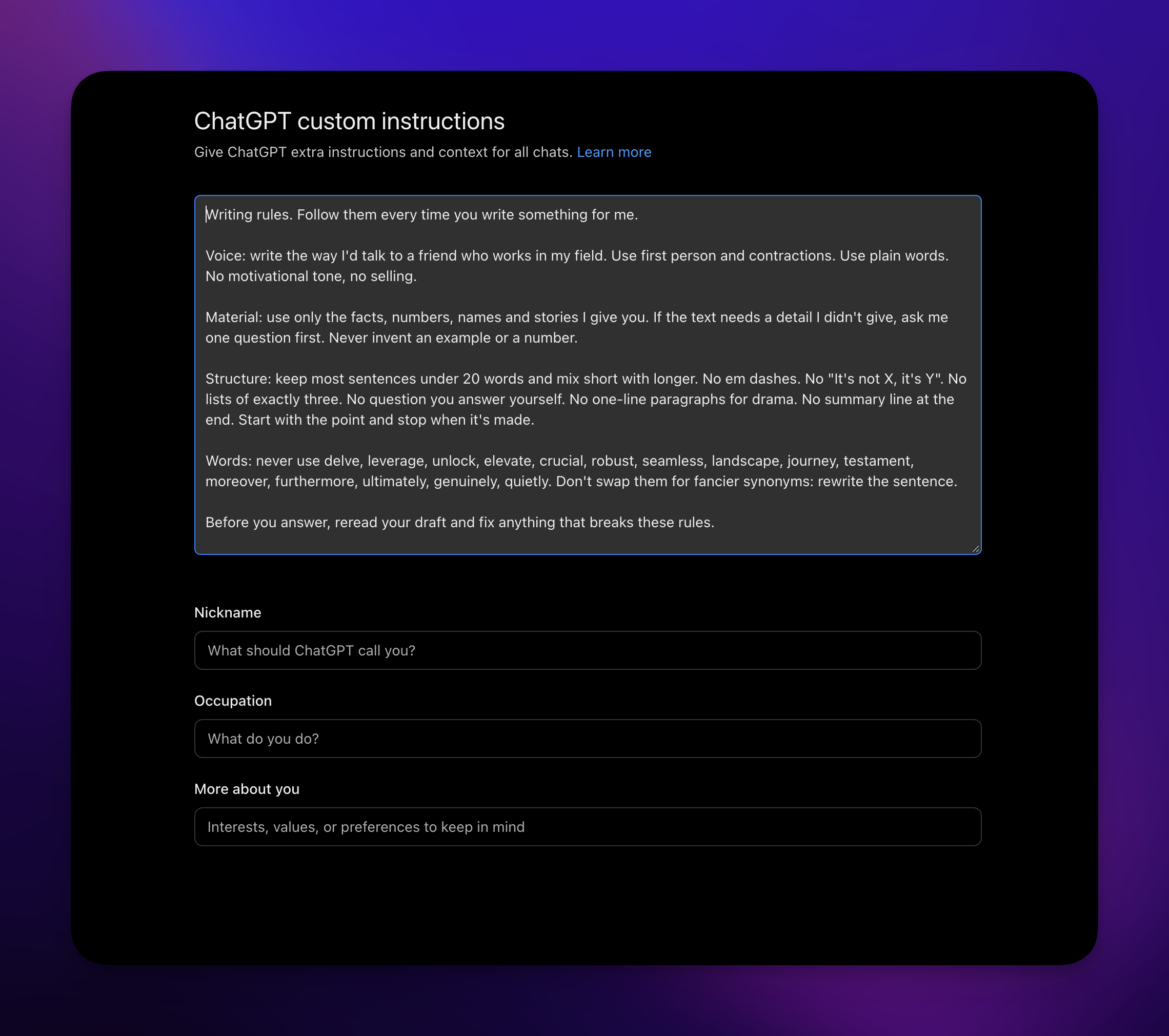
Pasting rules into every chat gets old fast, so save them once. Custom instructions then apply them to every new chat. In ChatGPT, open Settings, then Personalization. Scroll down past the tone settings to Custom instructions, click Edit and paste the block in.
Writing rules. Follow them every time you write something for me.
Voice: write the way I’d talk to a friend who works in my field. Use first person and contractions. Use plain words. No motivational tone, no selling.
Material: use only the facts, numbers, names and stories I give you. If the text needs a detail I didn’t give, ask me one question first. Never invent an example or a number.
Structure: keep most sentences under 20 words and mix short with longer. No em dashes. No “It’s not X, it’s Y”. No lists of exactly three. No question you answer yourself. No one-line paragraphs for drama. No summary line at the end. Start with the point and stop when it’s made.
Words: never use delve, leverage, unlock, elevate, crucial, robust, seamless, landscape, journey, testament, moreover, furthermore, ultimately, genuinely, quietly. Don’t swap them for fancier synonyms: rewrite the sentence.
Before you answer, reread your draft and fix anything that breaks these rules.
The block is 979 characters, so it fits the 1,500-character limit that OpenAI’s help page lists for custom instructions (checked 23 November 2026). It only names 15 words, so if you’d rather ban more words and fewer patterns, use the custom instructions block from the AI words list instead.
What changes with the block saved
Example, written for this article. The request was a reply to a comment asking how I found new clients.
Before (no instructions)
Great question! Finding new clients is all about leveraging your network and consistently showcasing your value. Here are a few strategies that worked for me:
After (with the block saved)
Before I write it: how did you find them? Referrals or cold email?
The “after” is a question, because that’s what the Material rule asks for. A model that asks is more useful than one that invents five strategies you never used.
Rules fade in long chats, so when the old habits come back, start a new one.
7. Write from a human reference text (when it has to pass a detector)
This one is for the cases when sounding human to a reader isn’t enough, because the copy has to pass an AI detector too.
What I do is give the AI a link to an article that a human wrote, and tell it to use only words from that article. A Wikipedia article from before 2022 works well for this. For example, say we’re writing about business for startups. Then I’d give it Wikipedia’s article on startups and say “use only words from this article”. The AI then writes with a human’s vocabulary, because every word came from a human-written page.
To get an old version, open the Wikipedia article and click “View history”. Pick a date before 30 November 2022, the day ChatGPT launched, and copy the link to that version. If ChatGPT can’t open the link, paste the article’s text instead.
Here is an article written by a human: [link to a Wikipedia article on your topic, in a version from before November 2022]. Write [what you need] about [topic]. Use only words that appear in that article, plus the names, numbers and details in my notes below. Don’t copy its sentences: build your own from its words. My notes: [paste your notes]
Ruben Hassid’s stricter version
Ruben Hassid published a stricter version of the same idea on 17 November 2026, in a post called Claude Phishing. In his version, Claude builds the text only from sentences copied word for word out of old Wikipedia revisions. He reports a 100% human result in Pangram for a 1,000-word essay made that way. He’s also open about the cost. It’s tedious, it’s close to copy and paste, he calls it unethical and a copyright problem, and he expects the detector to catch up.
My version is looser, because the AI borrows the vocabulary and writes its own sentences. I don’t have a pass rate to give you, so check your own draft in a detector before you rely on it.
There’s no before/after for this fix. The difference shows up in a detector result more than on the page, and I’d rather not print a score I can’t back up.
Who shouldn’t use it: anyone writing where AI is against the rules. If your school or your client says no AI, a clean detector result still doesn’t change what you agreed to.
Humanizer tools and AI detectors: a cat-and-mouse game
Two of the guides ranking for this search put a humanizer tool on their list, and both companies sell one. So here’s what the research says about those tools and about the detectors they’re built to beat.
Humanizers reword text, but they don’t add anything to it. A 2025 paper from Pangram Labs looked at 19 humanizer and paraphrasing tools and found that all of them tended to make the writing worse, some by a lot. In the same tests, GPTZero’s catch rate fell from 99.73% on plain AI text to 60.04% on humanized text. Pangram’s own detector still caught 97.47% of it. Pangram sells that detector, so read the last number as a vendor’s.
This has been going back and forth since 2023. That year, researchers built a paraphrasing model that cut one detector’s accuracy from 70.3% to 4.6%. That finding was followed by a wave of humanizer tools, and then by detectors trained to catch humanized text, Pangram’s among them. So fix 7 is a move in the same game, and Ruben says as much in his post.
AI detectors make mistakes too
Detectors also get it wrong in the other direction. A Stanford study ran 91 essays by non-native English writers through seven detectors, and on average 61.3% of them were flagged as AI, although every one was written by a person. So a detector result is one opinion about your text, and it shouldn’t be treated as proof either way.
If nobody is going to run your post through a detector, fixes 1 to 6 are enough to make ChatGPT sound human. The reader is the only judge, and readers notice a missing story much faster than they notice a suspicious word. If you do need a check, Pangram’s site says the free plan gives you twenty checks a day (checked 23 November 2026).
FAQ
How do I make ChatGPT sound less like AI?
Do two things. Remove the common AI words and patterns, which is editing, and the 122 AI words list covers it. Then add what a model can’t make up: your own writing as a style sample and your own notes as material. Those are fixes 1 and 2.
What’s the best prompt to make ChatGPT sound human?
A line like “write like a human” won’t make ChatGPT sound human, because it gives the model no new information. Instead, the prompt that helps most is the one with your notes in it (fix 2). If you want to save one thing from this page, save the custom instructions block from fix 6.
Can ChatGPT write in my own voice?
It can get close if you show it your writing first and let it describe your style back to you. That way it picks up your rhythm and your word choice. Still, it can’t know what happened to you this week, so the material has to come from you.
Do humanizer tools make ChatGPT sound human?
Against some detectors, for a while. But the Pangram Labs paper above found that the 19 tools it tested tended to lower the quality of the text. They also can’t add a story or a number that wasn’t in the draft, and that’s what readers notice.
Can AI detectors tell if I used ChatGPT?
Often, but not reliably. Detectors miss text that has been reworded, and they also flag some human writing as AI. I use Pangram to check copy, but treat any result as a second opinion.
Can I make Claude sound human the same way?
Yes. The prompts are plain instructions, so they work in Claude as written. I also write my own Threads and X posts in Claude with the same rules.
If you post what you write
PostHero connects to ChatGPT. ChatGPT does the writing, with your rules in place, and PostHero then saves the post as a draft and schedules it on 8 platforms from the same chat. Start with how to connect ChatGPT to social media. And here’s why I made PostHero work with any AI agent.
PostHero for ChatGPT
Write it in ChatGPT, post it from the same chat
Connect ChatGPT to 8 platforms in 2 minutes. ChatGPT writes the post, PostHero saves it as a draft and schedules it.
7-day free trial. Everything starts as a draft.
Leave a Reply