
A Claude Bluesky setup takes one connector. Connect Claude to Bluesky once, and then it can write, schedule and check your posts and threads without leaving the chat. Setup takes about 2 minutes, because there’s no code or config file involved.
I’m Anton, founder of PostHero. I built our Claude connector, and my own Bluesky account runs through it, together with X and Threads. Below you’ll find the setup first, then what Claude can do on Bluesky. After that, I cover Bluesky’s limits, how the options compare, and the prompts I use.
How to connect Claude to Bluesky
- Create a PostHero account and connect your Bluesky account.
- In Claude, open Customize > Connectors and add a custom connector.
- Name it PostHero and paste https://mcp.posthero.ai/mcp, then sign in.
- Turn it on in a chat and ask: “list my connected accounts”.
What you need for Bluesky specifically
- A Bluesky account. Connect it in PostHero the same way you’d connect any other platform. After that, the Bluesky side is done.
- No code and no config files. Many Bluesky tools for Claude are GitHub projects, so you install and set them up yourself. Here, instead, you paste one URL into Claude and sign in.
- Any Claude plan. The Free plan allows one custom connector, so that’s all you need.
Got more than one Bluesky account? Then connect them all, and Claude sees each one. Also, the same connector covers your other platforms. Here’s how to connect Claude to all your social media.
Can Claude post to Bluesky?
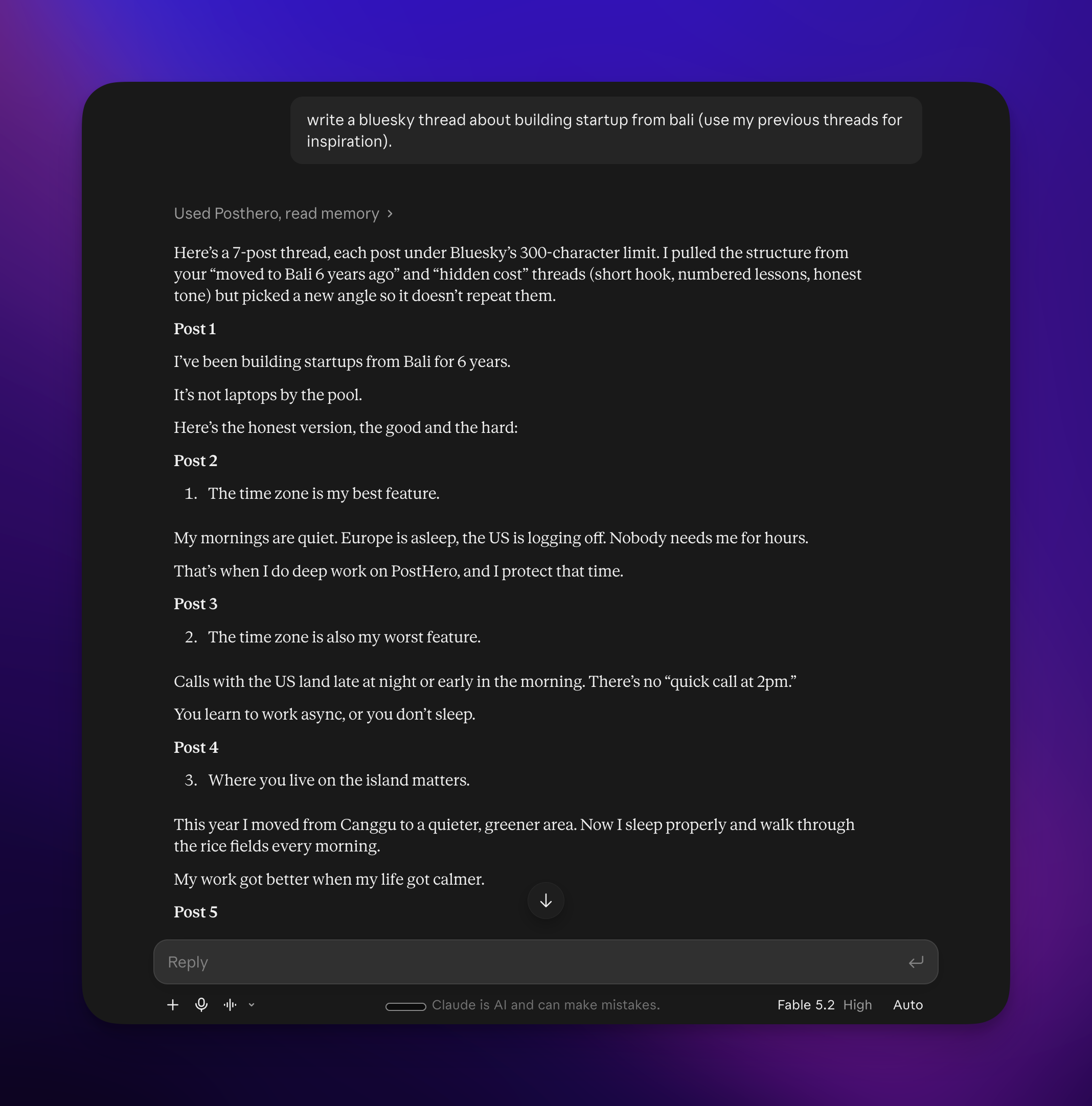
Yes, once it has a connector. On its own, Claude can only write a post for you to copy and paste. With PostHero connected, however, it saves the post as a Bluesky draft and schedules it when you give it a time. It publishes only when you say so and confirm. After that, it reads back how the post did.
Here’s what Claude can do on Bluesky through PostHero:
- Text posts up to 300 characters.
- Threads. Claude writes the whole chain, then saves it as one draft.
- Images or video: up to 4 images per post, or one video. Upload your files to your PostHero media library first, then tell Claude to use them.
- Links. A link in your post is clickable, and it also shows a preview card.
- Scheduling for any date and time you give it.
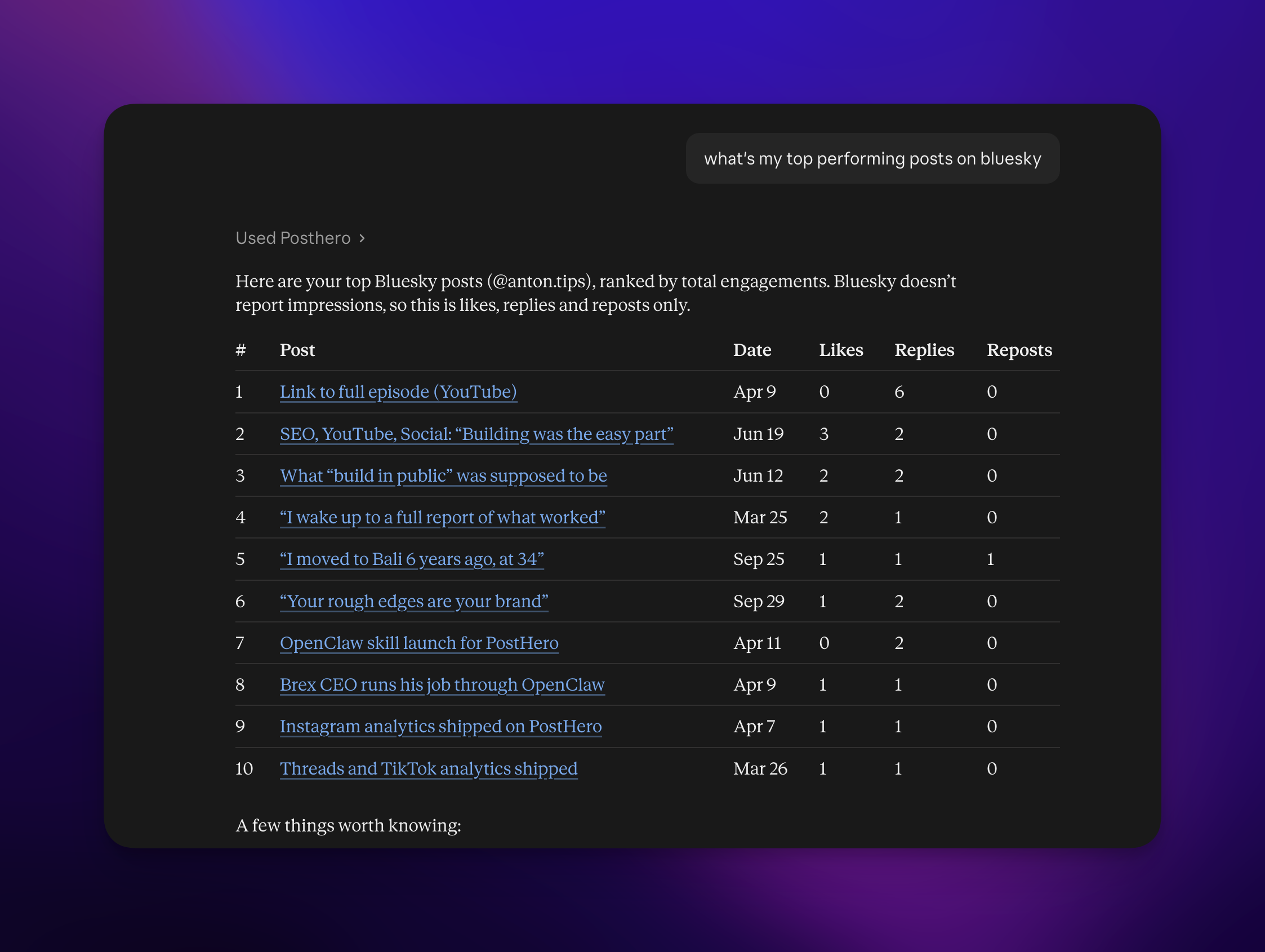
- Analytics: likes, replies, reposts and quotes for a period. You also get your top posts, ranked by the metric you pick.
- Own text per account when one idea goes to several Bluesky accounts.
Two things to know before you start. First, Bluesky analytics here are engagement numbers, so you won’t see impressions the way you do on X or Threads. Second, PostHero’s viral post library (LinkedIn and Instagram) and Instagram audits don’t cover Bluesky.
How I use Claude for Bluesky
Bluesky isn’t a separate job for me. Instead, it rides along with X and Threads: I write one idea in Claude, and then the draft goes to all three.
However, “all three” can’t mean “the same text”. The limits are close but not equal: 280 characters on X, 300 on Bluesky, 500 on Threads. As a result, a post that fits Threads comfortably is often too long for Bluesky. So I ask Claude to write Bluesky its own version, and PostHero keeps each platform’s text inside the same draft.
Save this idea as one draft for X, Bluesky and Threads, with its own text for each: under 280 characters for X, under 300 for Bluesky, and a fuller version of up to 500 for Threads. Show me all three before saving: [idea]
In tone, Bluesky is short and conversational, closer to X than to LinkedIn. So the instruction from my X guide is a good starting point here too: casual, and no pitch.
When an idea needs more than 300 characters, I ask for a thread instead. Otherwise, trimming a real story down to 300 usually leaves a post that says nothing.
One PostHero detail helps when you edit a thread by hand: posts in a thread are separated by two empty lines. So add two empty lines, and you’ve added a post.
What goes wrong
- Pasting a LinkedIn post. A 1,500-character post doesn’t become a Bluesky post just because you cut it. Instead, ask Claude to rewrite the idea from scratch, or to turn it into a thread.
- Writing for Threads, posting to Bluesky. A 450-character post saves fine as a draft, but then it won’t publish to Bluesky. So give Claude the limit in the prompt.
- General AI slop. “Write a Bluesky post about productivity” gets you a post nobody needed. Instead, give Claude something real, such as a thing that happened, a number, or an opinion you hold.
Bluesky rules worth knowing
Bluesky has fewer rules for posting tools than X or Meta. Still, a few matter for anything Claude publishes.
300 characters per post. This is the top reason a draft won’t publish. Bluesky counts what you see, so an emoji is one character. When the idea needs more room, make it a thread instead.
Posting caps you won’t hit. Bluesky’s rate limits allow an account to create up to 1,666 records an hour and 11,666 a day. So a normal posting schedule is nowhere near that.
Don’t repeat yourself across accounts. Bluesky’s Community Guidelines ban spam and posting the same content over and over in ways that disrupt conversations. So when you run several accounts, give each its own version:
Post this idea to both my Bluesky accounts, but write each one its own version: first person and casual for my personal account, shorter and more factual for the brand account. Save both as drafts.
No AI label rule. The Community Guidelines don’t ask you to label posts written with AI.
Keep a human in the loop. Everything Claude makes in PostHero starts as a draft. It schedules only when you give it a time. And it publishes right away only when you say so and confirm once more.
Claude Bluesky connectors, compared
Claude has no built-in Bluesky connector, so every option is a third-party tool or something you run yourself. Bluesky’s API is open, and that’s why so many free servers exist on GitHub. Most of them can post. But they differ in scheduling, analytics and how much setup they ask of you.
| Option | Setup | Schedules | Bluesky analytics | Good to know |
|---|---|---|---|---|
| PostHero | Paste one URL in Claude | ✅ Draft first, then schedule | ✅ Engagement and top posts | Bluesky plus 7 other platforms in one chat |
| Blotato | Connector in Claude | ✅ Yes | ✅ Yes | MCP access isn’t in the free trial |
| OpenTweet | Terminal command in Claude Code | ✅ Yes | ❌ No, X only | No video to Bluesky |
| AnythingMCP | Connector plus setup in its app | ❌ No scheduling tool | ❌ Profile counts only | Reads your timeline and searches posts |
| Upload-Post | Terminal install, Claude Code skill | Not stated for Bluesky | Not stated for Bluesky | 22 platforms, splits long text into threads |
| Open-source servers (GitHub) | Install it and edit a config file | Depends on the server | Depends on the server | Free, good for reading your feed |
Based on each vendor’s own pages, checked 23 November 2026.
Which Bluesky connector should you pick?
Here’s the honest version:
- Pick an open-source server if you’re a developer and mostly want Claude to read Bluesky, such as your feed, a profile or a search. It’s free, and you also control everything.
- Pick OpenTweet if you work in Claude Code and X is your main platform, while Bluesky is a second home for the same posts.
- Pick Blotato if you make your media elsewhere and only want Claude to publish it. But its MCP access starts with a paid plan.
- Pick PostHero if Bluesky is one of several platforms you post on. Then one idea becomes a proper Bluesky version, an X version and a Threads version in the same chat. Also, everything waits as a draft until you approve it.
Copy-paste prompts for Bluesky
Swap the bits in brackets for your own.
Write one post
Write this for Bluesky: casual, like I’m talking to a friend, under 300 characters, no hashtags, no pitch. Keep my words where they sound like me. Show me the draft before saving it: [idea]
Turn a story into a thread
Here’s a story from my week: [story]. Turn it into a Bluesky thread of 4-6 posts, each under 300 characters. The first post has to make sense on its own. Then show me the thread before saving it as a draft.
Adapt from LinkedIn
Here’s my LinkedIn post. Don’t cut it down. Instead, rewrite the idea for Bluesky from scratch: one post under 300 characters, or a short thread if it needs more room. No expert tone, no call to action. Then save it as a Bluesky draft.
Share a link
Write a Bluesky post about this article, with one line on why it’s worth reading and the link at the end. Keep the whole post under 300 characters. Then save it as a draft: [link]
Schedule and review
Schedule the Bluesky drafts we made today: the post on [day] at [time], the thread on [day] at [time], in my time zone. Check what’s already scheduled first, so nothing clashes.
Show me my top 10 Bluesky posts from the last 30 days by likes. What do the best first lines have in common, and what should I post more of?
Using ChatGPT instead?
The same connector works there too. PostHero uses MCP, the standard both Claude and ChatGPT use for connectors. So add the same URL (https://mcp.posthero.ai/mcp) as a custom connector in ChatGPT, and then sign in to PostHero. After that, you’ll see the same Bluesky account, drafts and analytics. Also, every prompt in this guide works as it is. I explain why I built it for any AI agent in PostHero goes agentic.
Why isn’t Claude posting to Bluesky?
- The connector is off in this chat. You turn connectors on for each chat. So click +, open Connectors and turn PostHero on.
- Claude finds no Bluesky account. Either Bluesky isn’t connected in PostHero yet, or you signed in to a different PostHero account. In that case, sign out of the connector, then sign in with the account that has Bluesky.
- The draft saved but won’t publish. Usually one post is over 300 characters. Ask Claude to shorten it, or to split it into a thread instead. It sees the same warning, so it knows what to fix.
- Your thread came out as one long post. Posts in a thread are separated by two empty lines. So ask Claude to save it as a thread, or add the empty lines yourself in PostHero.
- Your image won’t attach. Claude can’t send files from the chat to PostHero. Instead, upload the image to your PostHero media library first, then ask Claude to use it.
- Nothing appeared on Bluesky. That’s on purpose, because Claude saved a draft. Give it a time to schedule, or tell it to publish now and then confirm.
FAQ
Can Claude post to Bluesky on its own?
No. Claude has no built-in link to Bluesky. It can write posts as text, but it needs a connector like PostHero to save, schedule or publish them.
Can Claude write Bluesky threads?
Yes. Ask for a thread, and Claude writes it as separate posts under 300 characters each. Then it saves them as one draft, so you can edit before scheduling.
Can Claude schedule Bluesky posts?
Yes. Give Claude a date and time, and PostHero holds the post until then. Otherwise, it stays a draft.
Is this the same as Attie?
No. Attie is Bluesky’s own AI app, built on Claude, for creating custom feeds by describing them in a chat box. In other words, it shapes what you read. This guide, on the other hand, is about what you post.
Is it free to connect Claude to Bluesky?
On the Claude side, yes, because the Free plan supports one custom connector. PostHero also has a 7-day free trial, so you can test the whole workflow first.
Will Claude post to Bluesky without asking me?
No. Everything starts as a draft. To publish, you need to say so and then confirm once more.
Does it work with my other platforms too?
Yes. The same connector also covers LinkedIn, X, Threads, Instagram, Facebook, YouTube and TikTok. The X guide and the Threads guide are the closest matches to Bluesky. And the guide to connecting Claude to social media shows what Claude can do on each platform.
PostHero for Claude
Run your Bluesky from Claude
Connect in 2 minutes. Write posts and threads in your own words, then approve every one before it goes out.
7-day free trial. Everything starts as a draft.
Leave a Reply