
A Claude Facebook setup needs one thing Claude doesn’t come with: a connector to your Facebook Page. Add one, and Claude can write a Page post, save it as a draft, schedule it and tell you how it did, all from the same chat. Setup takes about 2 minutes and needs no Meta developer app.
I’m Anton, founder of PostHero. I built our Claude connector, and I’ll be honest upfront: Facebook was the channel I neglected the longest. This guide covers the setup, what Claude can and can’t do on a Facebook Page, which Facebook jobs need a different tool, how the options compare, and the prompts I’d start with.
How to connect Claude to Facebook
- Create a PostHero account and connect your Facebook account.
- In Claude, open Customize > Connectors and add a custom connector.
- Name it PostHero and paste https://mcp.posthero.ai/mcp, then sign in.
- Turn it on in a chat and ask: “list my connected accounts”.
What you need for a Claude Facebook setup
- A Facebook Page, not a personal profile. Meta’s API doesn’t let outside tools publish to personal profiles, and it removed publishing to Groups in 2024. So every connector, PostHero included, posts to Pages. If you post as yourself today, create a Page for your business or creator brand first.
- A role on that Page that can create content. Admins have it. If the Page sits in a Meta Business Portfolio, your own Facebook login needs access to the Page there.
- The right Pages ticked when Meta asks. When you connect Facebook in PostHero, Meta asks which of your Pages to share. A Page you leave unticked won’t show up for Claude.
- Any Claude plan. The Free plan allows one custom connector, which is all this needs.
Posting on more than Facebook? The same connector covers 8 platforms. Here’s how to connect Claude to all your social media.
Can Claude post to Facebook?
Yes, to a Page, once it has a connector. Without one, Claude writes the post and you copy it over yourself. With PostHero connected, Claude can do this on your Facebook Pages:
- Text posts, with images or one video attached.
- Video as a regular Page video. PostHero publishes video to Facebook as a normal Page video, not as a Reel.
- Drafts and scheduling. Everything starts as a draft in PostHero. Claude schedules only when you give it a date and time.
- Several Pages at once, each with its own text.
- Analytics: impressions, reach, likes, comments, shares, clicks and engagement rate for a period, plus your top Page posts ranked by the metric you pick.
- One idea across platforms. The same chat can turn a Facebook post into an Instagram, LinkedIn or X version, each with its own text.
Images and videos need to be public links. Claude can’t pass files from the chat to PostHero, so upload your own files to your PostHero media library first, then tell Claude which ones to use.
What a Claude Facebook connection can’t do (through PostHero)
- No Reels or Stories on Facebook yet. If you need those formats, Instagram has both in PostHero, and the Instagram guide shows how Claude makes reels.
- No comment replies or Messenger. Claude sees how many comments your posts got, but it can’t answer comments or messages through PostHero.
- No first comment. PostHero adds a first comment on LinkedIn only, so on Facebook your link goes in the post itself.
- No personal profiles, Groups or ads. The first two are Meta’s rules. For ads, see the next section.
If Reels, Stories or comment replies on Facebook are the main thing you need, PostFast covers them today (more in the comparison below). I’d rather you read that here than find out after signing up.
Which Claude Facebook job do you need?
People search “Claude Facebook” for three different jobs, and they need different tools:
- Posting to your Page (writing, scheduling, checking how posts did): a scheduler connector like PostHero. That’s what this guide is about.
- Running Facebook Ads: Meta has its own ads connectors for AI agents. They work with your ad account, campaigns and reports, not with organic Page posts. Start with Meta’s ads AI connectors help page.
- Deep Page Insights (audience demographics, Page views, long reporting history): a data connector built for reporting. PostHero’s Facebook analytics cover your posts, not every Insights report.
How I use Claude for Facebook
Here’s the embarrassing part. Our own PostHero Facebook Page has a couple of posts on it, both from last December, and both are written like LinkedIn posts: a bold hook, numbered lessons, a question at the end. That’s the most common Facebook mistake, and I made it on my own Page.
On LinkedIn, a tidy list of lessons reads as expertise. On a Facebook Page, where people mostly scroll past friends, family and the groups they care about, the same post reads like an ad. It’s too polished and too expert for where it lands.
What works better is how I use Claude on every other platform. I don’t ask it to “write a Facebook post about social media scheduling”. I give it a rough idea, or something I’ve already written, and ask it to shape that into a post for this Page. Sometimes I only ask it to check my language.
And when I have no idea at all, I ask Claude for one. It’s connected to the tools I work in and knows what my week looked like, so it suggests things like the client problem I complained about after a call, not generic tips. In practice, Claude is my idea bank. A Page is supposed to feel like a real business run by real people, and that kind of specific, lived material is exactly what most Pages are missing.
What goes wrong on Facebook (and the instruction that fixes it)
- General AI slop. A post “about our product” written by AI is the fastest way to teach people to scroll past your Page. Give Claude something that happened: a customer question, a change you shipped, a mistake.
- Cross-posting word for word. Your LinkedIn post, your X thread, your Instagram caption with 20 hashtags: none of them were written for a Facebook Page.
- Too polished. A Page post that sounds like a press release gets treated like one.
My standing instruction is the same idea I use everywhere, tuned for Facebook: write it casually, the way you’d tell a friend, and don’t pitch anything. No “click to learn more”, no “follow our Page”. Variety helps too: a short update one day, a longer story another, a photo or a video when there’s something worth showing.
Turn this into a post for my Facebook Page. Make it sound like I’m telling a friend what happened this week: plain words, no selling, no “learn more” links, no hashtags. If a sentence already sounds like me, leave it alone. Let me see it before it’s saved.
From LinkedIn post to Claude Facebook draft
This is the workflow I’d use to fix my own Page. If you already write on LinkedIn, the ideas for your Facebook Page exist. The mistake is pasting those posts across as they are. The better move is to let Claude keep the idea and rewrite everything around it for Facebook.
You don’t have to copy anything into the chat. PostHero already has your LinkedIn posts and their numbers, so Claude can pull your best-performing one, take the core idea and write a new Facebook Page post from it, then save that as a Facebook draft for you to read.
Most of the post changes in the rewrite. The “5 lessons I learned” list becomes one short story, the polished hook becomes a plain first sentence, and the engagement question at the end goes. What stays is the thing that actually happened.
Find my best LinkedIn post from the last 30 days by impressions. Keep the core idea, but rewrite it from scratch for my Facebook Page: one short story instead of a list, plain words, no hook formula, no question at the end. Show it to me next to the original, then save it as a Facebook draft.
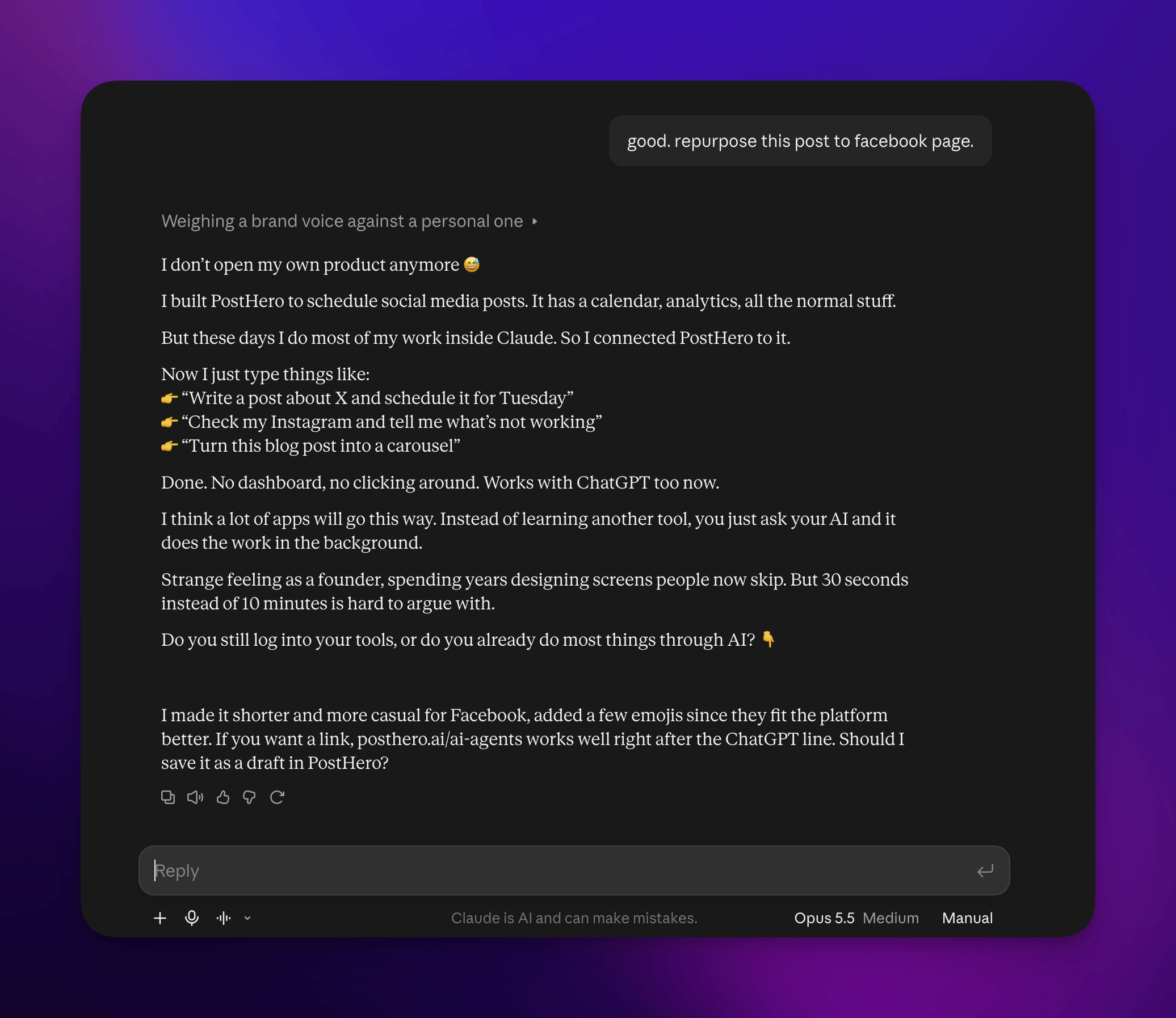
If you run Pages for different businesses, keep them separate: each Page gets its own post from its own material, not one update stretched to fit both. And before scheduling, ask Claude to check what’s already planned so posts don’t pile up at the same time.
Reuse your Claude reel on Facebook
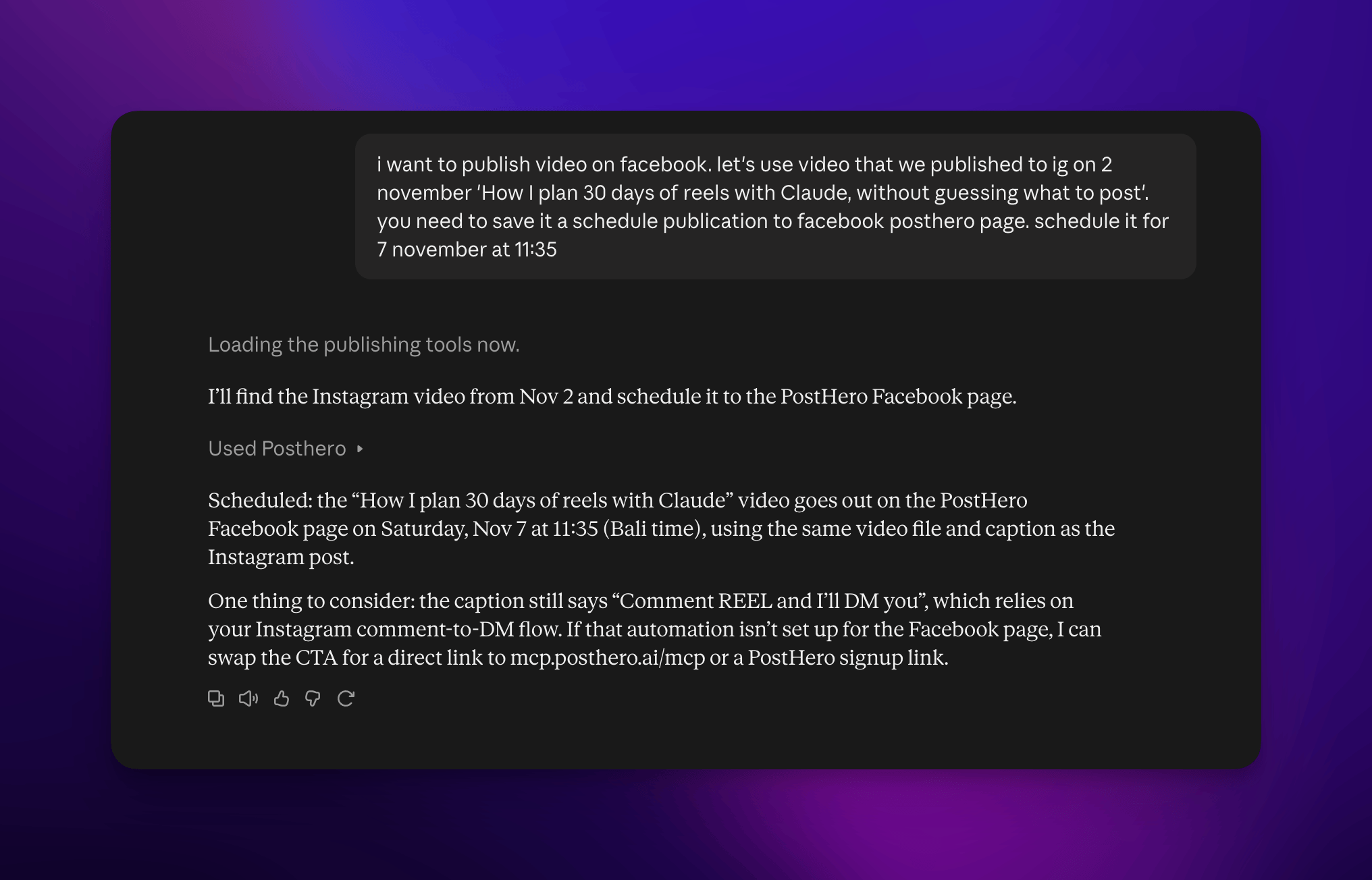
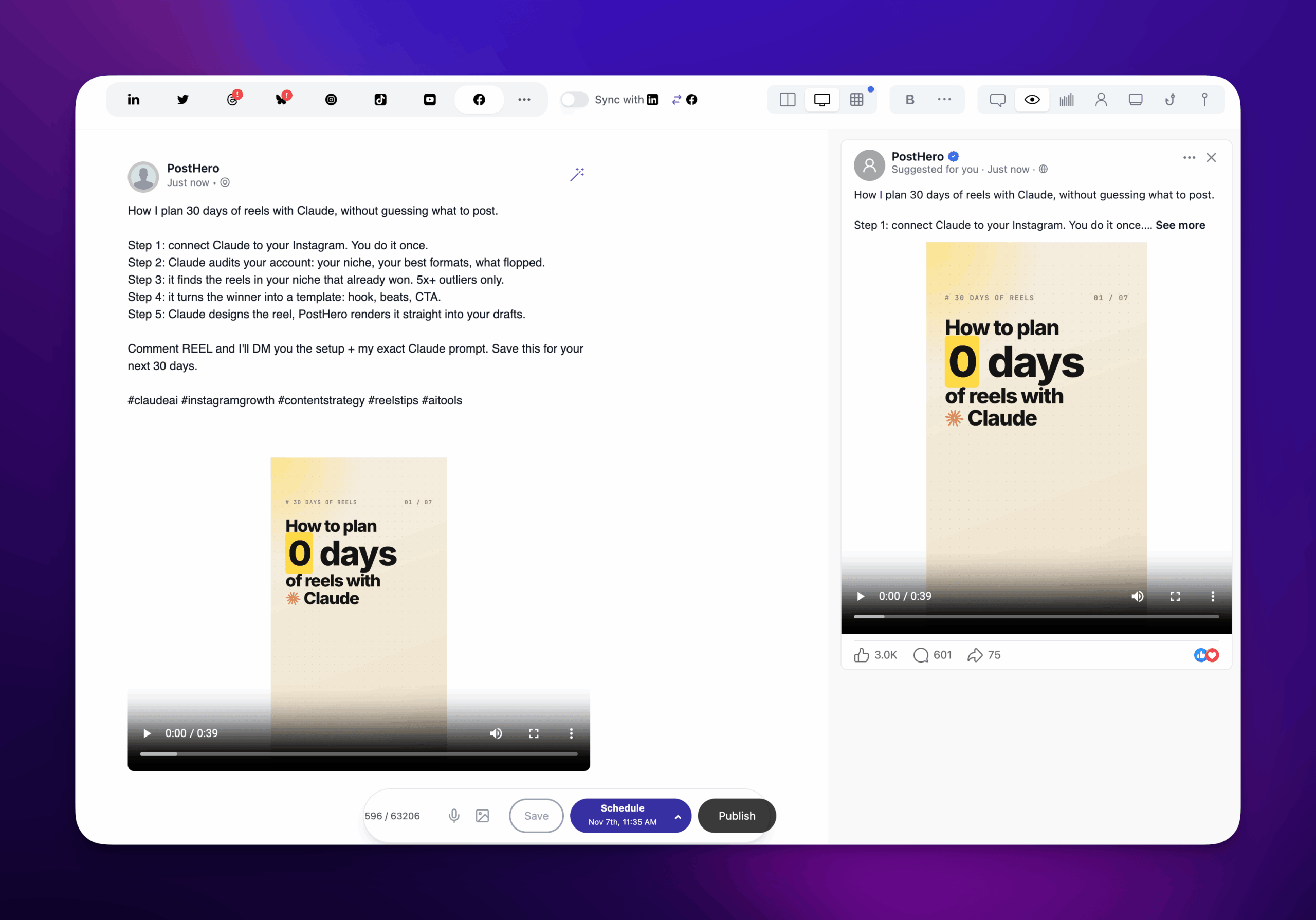
If you already make reels with Claude for Instagram, Facebook is the cheapest extra place to put them. When Claude designs a reel and PostHero renders it, the video lands in your media library. From there, Claude can attach the same video to a Facebook Page post with a caption written for Facebook.
One thing to know: on Facebook, PostHero publishes it as a regular Page video, not a Reel. For most Pages that’s fine, because the point is getting a video you already made in front of a second audience for free. If Reels reach on Facebook is what you’re after, keep that in mind.
The reel itself is where the real work is. My first Claude reels were quite bad. It took studying top creators and breaking down a competitor’s viral reel to get one that did 719 views against my usual 64. The Claude and Instagram guide walks through that process.
Take the reel we made for Instagram and save it as a Facebook Page video draft too. Write a new caption for Facebook: casual, 2-3 sentences, no hashtags. Don’t schedule it yet.
Claude Facebook connectors, compared
There’s no Meta-made connector for posting to Pages from Claude, so every Claude Facebook option is either a third-party connector or something you build on Meta’s Graph API. They differ most in which Facebook formats they handle and what else they cover.
| Option | Networks | Facebook Reels / Stories | Facebook analytics | Stands out for |
|---|---|---|---|---|
| PostHero | 8 | ❌ Not yet (Page video only) | ✅ Post metrics | Own text per Page and platform, reels made in Claude |
| PostFast | 11 | ✅ Both | ✅ Post metrics | Comment replies from Claude |
| Planoly | Several | ✅ Both | ❌ None yet | Visual planner, one Page per workspace |
| Blotato | 9 | ✅ Both | ✅ Post metrics | Flat price, MCP on paid plans only |
| Meta’s ads connectors | Meta ads | ❌ No Page posting | ✅ Ad reports | First-party, for ad accounts |
| DIY with the Graph API | If you build it | If you build it | Full control, needs a Meta app and App Review |
Based on each vendor’s own pages, checked 4 November 2026.
The honest version:
- Pick PostFast if Facebook is a main channel and you need Reels, Stories and comment replies there from Claude.
- Pick Planoly if you already plan visually in Planoly and run one Page per workspace.
- Pick Blotato if you make your media elsewhere and want Claude to publish it across many networks at a flat price.
- Pick Meta’s connectors or the Graph API if you’re working on ad accounts, or you want to build and own the whole thing.
- Pick PostHero if Facebook is one of several platforms for you, and you want Claude to write a real version per Page and per platform, design reels and carousels for Instagram, and keep everything as a draft until you say go. That’s the job I built it for.
Copy-paste Claude Facebook prompts
Swap the brackets for your own details.
Find something worth posting
Look at what we’ve talked about over the last week and suggest 5 posts for my Facebook Page. Each one has to come from something that actually happened: a customer question, something we shipped, a mistake. No general tips. One line each.
Write and check
Here’s a rough idea for my Facebook Page: [idea]. Write two versions: a short update of 2-3 sentences and a longer story of about 150 words. Plain and casual. I’ll pick one to save as a draft.
Fix the grammar and anything that reads awkwardly in this Facebook post, but keep my wording. Don’t make it sound more professional: [post]
Adapt from another platform
Here’s my latest Instagram caption. Rewrite it as a Facebook Page post: drop the hashtags and emojis, add the context someone who never saw the reel would need, and keep it under 100 words. Save it as a Facebook draft.
Schedule and check results
Check what’s already scheduled, then schedule the Facebook drafts we made today for [days] at [time], my time zone. Don’t put two posts at the same time.
Show my top 5 Facebook Page posts from the last 3 months by reach. What do the best ones have in common, and what should I post more of?
Using ChatGPT instead?
PostHero works in ChatGPT as well. Both Claude and ChatGPT use MCP for connectors, so you add the same URL (https://mcp.posthero.ai/mcp) as a custom connector in ChatGPT and sign in. You’ll see the same Facebook Pages, drafts and analytics. The casual, no-pitch instruction matters just as much there, because ChatGPT’s default Page post is at least as polished as Claude’s. Why I built PostHero to work with any agent is in PostHero goes agentic.
Why isn’t Claude posting to Facebook?
- Your Page isn’t on the list. It wasn’t ticked when Meta asked which Pages to share, or your role on the Page can’t create content. Reconnect Facebook in PostHero and tick it.
- The connector is off. Connectors switch on per chat: click +, open Connectors and turn PostHero on.
- You tried a profile or a Group. No tool can post there through Meta’s API. Use a Page.
- Your image won’t attach. Files in the chat can’t go to PostHero. Upload them to your media library and give Claude the link.
FAQ
Can Claude post to Facebook on its own?
No. Claude has no built-in Facebook connection. It can write a Page post as text, but saving, scheduling or publishing it needs a connector like PostHero.
Can Claude post to my personal profile or a Group?
No, and that’s Meta’s rule, not PostHero’s. Meta’s API only lets outside tools publish to Pages.
Does Claude Facebook posting support Reels and Stories?
Not through PostHero yet. Videos go out as regular Page videos, and Stories aren’t supported on Facebook. Instagram has both.
Is it free to connect Claude to Facebook?
On Claude’s side, yes: the Free plan supports one custom connector. PostHero has a 7-day free trial, so you can test the whole workflow before paying.
Will Claude post to my Page without asking?
No. Everything starts as a draft. Publishing right away needs your explicit go-ahead plus one confirmation.
Does it work with my other platforms?
Yes: LinkedIn, X, Threads, Instagram, YouTube, TikTok and Bluesky, from the same connector. The guide to connecting Claude to social media covers every platform, and the X guide covers threads and posting to several accounts.
PostHero for Claude
Run your Facebook Pages from Claude
Connect in 2 minutes. Turn your LinkedIn posts and reels into Facebook posts, and approve everything before it goes out.
7-day free trial. Everything starts as a draft.
Leave a Reply