Google “Claude YouTube” and most results are about analytics: connect your channel, ask Claude why last month’s views dropped. Useful, but that skips the harder part, which is making the video and getting it onto your channel. Add one connector and Claude can design a short vertical video, post it as a YouTube Short with a title, upload a regular video you edited yourself, and pull your channel numbers, all in the same chat. Setup takes about 2 minutes and needs no Google Cloud project.
I’m Anton, founder of PostHero. I built our Claude connector, and short videos are the part of it I’ve spent the most time on. This guide covers the setup, what Claude can do on YouTube, YouTube’s own rules for apps that upload for you, how the options compare, and prompts you can copy.
How to connect Claude to YouTube
- Create a PostHero account and connect your YouTube channel.
- In Claude, open Customize > Connectors and add a custom connector.
- Name it PostHero and paste https://mcp.posthero.ai/mcp, then sign in.
- Turn it on in a chat and ask: “list my connected accounts”.
What you need for YouTube specifically
- A YouTube channel. You link it to PostHero on Google’s own sign-in screen, so Claude never sees your Google password.
- No Google Cloud project. Building this yourself means a developer project, an OAuth consent screen, upload quota and YouTube’s API audit (more on why that audit matters below). PostHero carries all of that.
- Any Claude plan. The Free plan allows one custom connector, and that’s all this needs.
- A video and a title for every upload. YouTube has no text-only posts, and it won’t publish a video without a title. Claude can make the video, or you can upload your own file to your PostHero media library and tell Claude to use it.
- A phone-verified channel if you want custom thumbnails or videos longer than 15 minutes. That’s a YouTube rule, not ours, and it takes a minute at youtube.com/verify.
Several channels? Connect each one and tell Claude which to use. The same connector also covers seven other platforms, so one chat can run all of them: here’s how to connect Claude to all your social media.
Can Claude upload to YouTube?
Yes, with a connector. Out of the box Claude can only write a title, a description or a script for you to paste into YouTube Studio. Connected to PostHero, it can save a YouTube upload as a draft, schedule it, or publish it after you confirm. It can also make the video itself.
What Claude can do on YouTube through PostHero:
- Shorts: vertical videos up to 3 minutes, with a title.
- Regular videos of any length your channel allows, from a file in your media library.
- Titles up to 100 characters, descriptions up to 5,000, and tags.
- Privacy: public, unlisted or private.
- Custom thumbnails on regular videos (1280×720). Shorts don’t take one through YouTube’s API.
- Short vertical videos made in the chat. Claude designs every scene, PostHero renders the video, and it lands in your media library ready to post.
- Scheduling for any date and time you give.
- Analytics: reach, likes, comments, shares and subscribers for a period, and your top videos ranked by the metric you choose, including watch minutes.
What it can’t do yet: add videos to playlists, set the “made for kids” or altered-content labels, read or reply to comments, or edit a video that’s already live. The viral library and competitor tracking cover Instagram for now, and it’s organic only, so no YouTube ads.
From a Claude-made video to a YouTube Short
Every other Claude YouTube guide I found assumes your video already exists. Upload-Post, Blotato and Creator OS will all publish a file for you. vidIQ can cut clips from a long video and rewrite titles. None of them start from “I have an idea and no video.”
With PostHero it works in three steps:
- Claude designs the video. You describe the idea, Claude writes a storyboard scene by scene and shows it to you. You can add background music and a voiceover before it renders.
- PostHero renders it. About a minute later you have a short vertical video in your media library. PostHero doesn’t design anything: it renders exactly what Claude designed and you approved. Most other tools do the design inside their own editor; here the chat is the editor.
- Claude posts it to YouTube. The same file becomes a YouTube Short draft with a title and a description written for YouTube. The same video can also go out as an Instagram reel and a TikTok, each with its own caption.
The title is the step people skip. Reels and TikToks live on the caption and the first second; a Short also shows a title, and YouTube search reads it. So ask Claude for three title options under 60 characters and pick one, rather than letting it reuse the Instagram caption’s first line.
Regular videos work differently, because Claude isn’t going to film your 20-minute tutorial. Upload the edited file to your media library and let Claude do the parts nobody enjoys: the title, a description with chapters from your transcript, tags, the thumbnail you made, the publish time. Talking-head Shorts are the same story. Claude can’t film you, but it can write the filming script (hook, beats, on-screen text, B-roll ideas) and attach it to the draft, so it’s waiting for you when you pick up the phone.
What I’ve learned making short videos with Claude
The part I like most on YouTube is the reuse. You make the video once in the chat, then send it out as a Short with its own title, an Instagram reel and a TikTok, each with a caption written for that platform, without opening YouTube Studio once.
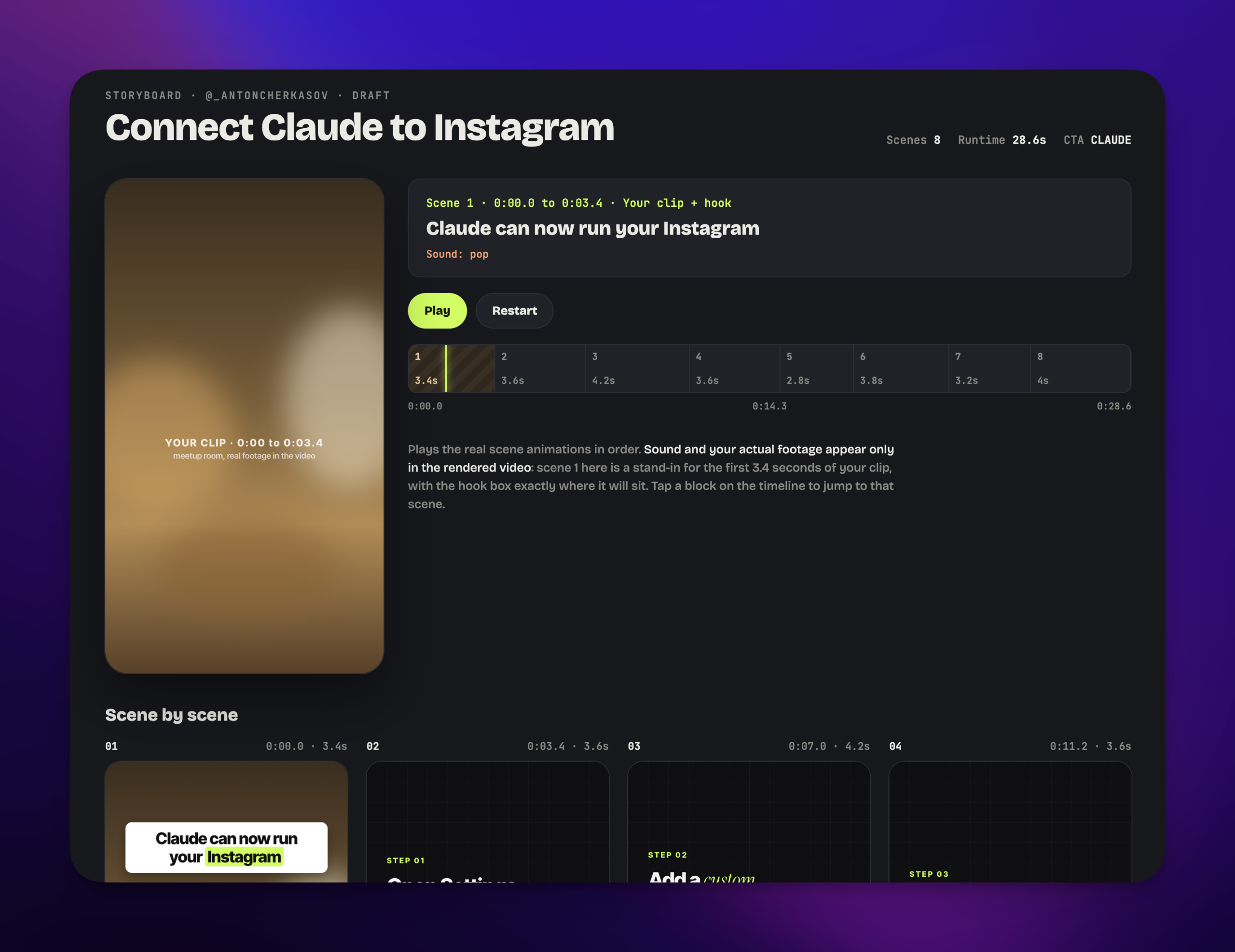
Most of my Claude-made videos so far went to Instagram, so here’s some data from there. My first ones were quite bad. Not broken, just forgettable. What fixed them was studying creators whose videos actually get watched, and those lessons went back into how the connector renders. The biggest jump came from copying structure, not content: I had Claude break down a competitor’s viral reel scene by scene, then build mine on that skeleton. It got 719 views against my usual 64, about 11x. You can run the same breakdown on any Short you can describe to Claude. The guide to making reels with Claude walks through that workflow step by step.
And here’s my bigger bet. Video editing is changing fast, and I’m sure that before long most top creators will edit with Claude, ChatGPT or another model, because with the right instructions, prompts and skills it already replaces a lot of what expensive editing software does. Today, for something really complicated (multi-camera cuts, color grading, a high-stakes sponsored piece), a dedicated editor is still the better tool. That gap is closing every month.
A few things I’d tell anyone starting:
- Basic prompts give basic videos. “Make a YouTube Short about my niche” is where most bad results come from. Give Claude a specific idea, a structure that already works, or a real thing that happened to you.
- Write the title for search, the video for the scroll. The first second has to stop the thumb. The title has to match what someone would type.
- Don’t port posts from other platforms. A LinkedIn post turned into on-screen text is still a LinkedIn post.
- Expect a few attempts. Good videos take several rounds. That’s a skill you build, not a sign the tool doesn’t work.
Here’s the standing instruction I’d start with for YouTube:
For anything going to YouTube: give every video a plain, searchable title under 60 characters, the words someone would actually type, no clickbait and no ALL CAPS. Keep on-screen text short enough to read in a second. Descriptions start with one line saying what the video is about. Show me everything before you save it.
YouTube rules worth knowing
YouTube has stricter rules for apps that upload on your behalf than most platforms. A few of them shape how a Claude YouTube workflow should run.
Unaudited apps upload private, permanently. Google’s videos.insert reference says every video uploaded through an unverified API project created after 28 July 2020 is restricted to private viewing, whatever privacy you asked for. You can’t appeal it; the fix is re-uploading through an audited app. This is the trap in most DIY “YouTube MCP” setups on GitHub: the upload works, the video exists, and nobody can see it. PostHero’s YouTube app has passed Google’s API audit, so your privacy setting is the one that applies.
There’s no Shorts button in the API. YouTube decides whether something is a Short from the file: vertical or square, up to 3 minutes. Tell Claude it’s a Short and PostHero sends it that way, but a horizontal 4-minute file will still come out as a regular video.
Labels you set in YouTube Studio. YouTube asks creators to say whether a video is made for kids, and to disclose realistic altered or synthetic content (a realistic AI voice of a real person, realistic generated footage). PostHero doesn’t set either label. If a video needs one, have Claude upload it as private or unlisted, set the label in YouTube Studio, then make it public. A text-and-motion video like the ones Claude designs usually isn’t what the synthetic-content label is for.
Custom thumbnails need a verified channel. Without phone verification YouTube ignores the thumbnail. And Shorts thumbnails can’t be set through the API at all, so make your first frame do that job.
Uploads use quota. Every app gets a daily upload allowance from Google. You won’t feel it posting a few videos a day, but don’t plan to push your whole back catalogue through Claude in one afternoon.
New uploads can take a while to process, especially long videos. If a video shows up blurry or not at all, give it a few minutes.
Claude YouTube connectors, compared
There’s no built-in YouTube connector in Claude, so every option is a third-party tool or something you build. They split into two camps: tools that read your channel data and tools that publish. Only a few do both, and only one makes the video.
| Option | Makes the video | Uploads new videos | Stands out for |
|---|---|---|---|
| PostHero | ✅ Claude designs, PostHero renders | ✅ Shorts and videos, draft first | Video made and posted from one chat, plus analytics, 8 platforms |
| Upload-Post | ❌ Bring your own | ✅ Yes | Playlists, subtitles, in Claude’s directory |
| Blotato | From its templates | ✅ Yes | Publishing to 9 networks |
| Creator OS | ❌ Bring your own | ✅ Yes | Pinned first comment, comment replies |
| vidIQ | Clips from long videos | ❌ Edits existing ones only | Keyword research, competitor outliers |
| Coupler.io, Windsor.ai | ❌ No | ❌ No | YouTube Analytics reporting |
| DIY MCP from GitHub | ❌ No | ⚠️ Private until Google audits it | Transcripts and search, free |
Based on each vendor’s own pages, checked 10 November 2026.
The honest version:
- Pick vidIQ if you want Claude to research keywords, study competitors and fix titles on videos that are already live. It’s the strongest research option here, and it pairs fine with a publishing tool.
- Pick Coupler.io or Windsor.ai if you only need YouTube Analytics in Claude for reporting.
- Pick Upload-Post or Creator OS if you need a specific YouTube field PostHero doesn’t set yet: playlists and subtitles (Upload-Post) or a pinned first comment (Creator OS).
- Pick PostHero if you want Claude to handle your YouTube posting, whether the video comes from your editor or from the chat. Upload your edited videos and Shorts and let Claude write the titles, descriptions and tags, set the thumbnail and privacy, and schedule them. Or have Claude make the video first, then send the same file to YouTube, Instagram and TikTok, and check what worked, all from one chat.
Copy-paste prompts for YouTube
Swap the bits in brackets for your own.
The whole thing in one prompt
This is the one I use myself: idea to storyboard to drafts on three platforms.
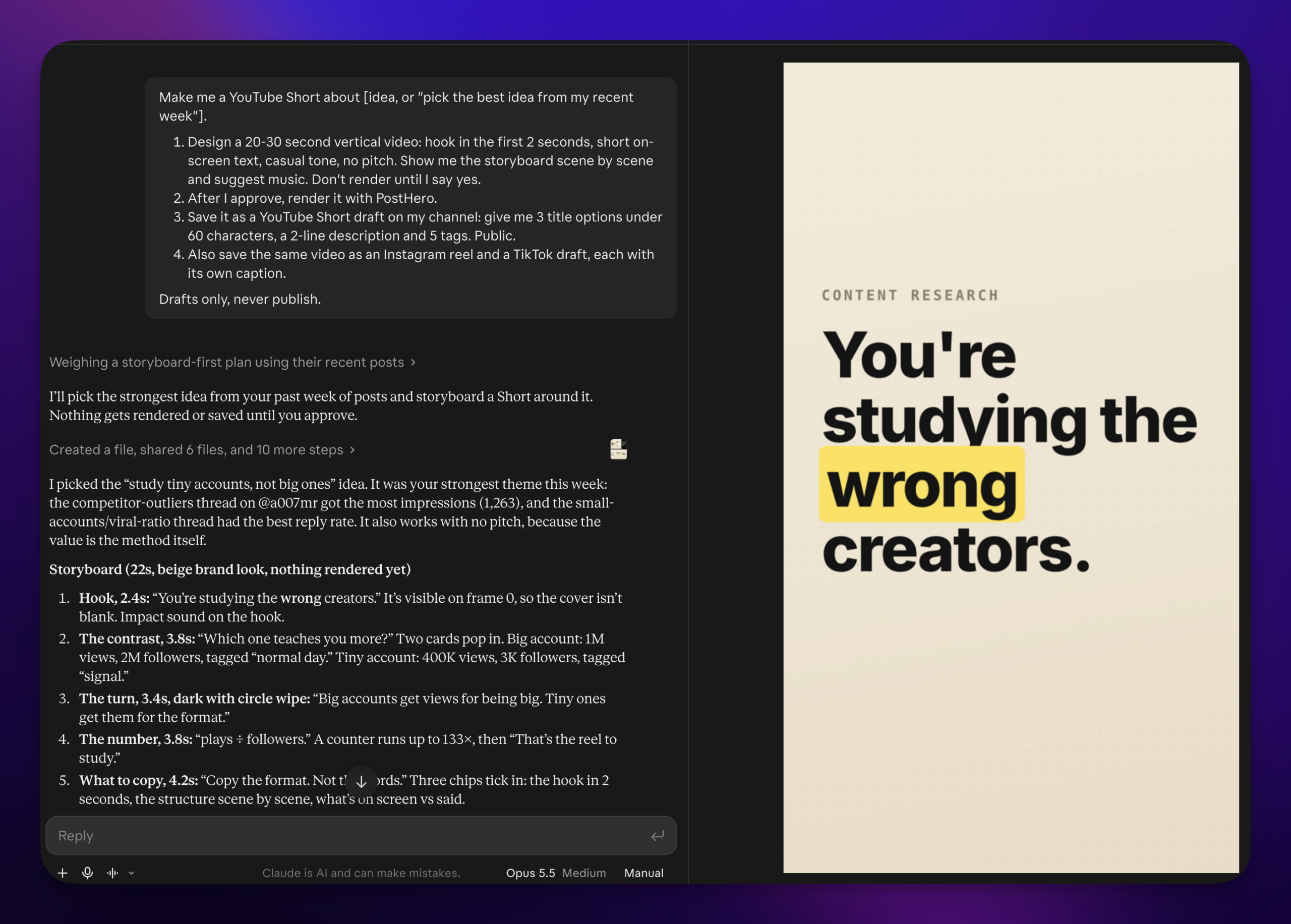
Make me a YouTube Short about [idea, or “pick the best idea from my recent week”].
1. Design a 20-30 second vertical video: hook in the first 2 seconds, short on-screen text, casual tone, no pitch. Show me the storyboard scene by scene and suggest music. Don’t render until I say yes.
2. After I approve, render it with PostHero.
3. Save it as a YouTube Short draft on my channel: give me 3 title options under 60 characters, a 2-line description and 5 tags. Public.
4. Also save the same video as an Instagram reel and a TikTok draft, each with its own caption.
Drafts only, never publish.
Find ideas
From what we’ve talked about lately, give me 5 ideas for YouTube Shorts. Each should come from something that really happened to me, with a hook for the first 2 seconds and a title someone would actually search for. One line each.
Make a Short
Design a 30-second vertical video for a YouTube Short about [idea]. Show me the storyboard scene by scene first, with the on-screen text for each. Suggest background music, and only render it with PostHero after I say yes.
Here’s a Short that did well in my niche: [describe it or paste the transcript]. Break down why it works scene by scene, then design my own video on the same structure about [my topic]. Don’t copy its words.
Post it to YouTube
Save the video we just made as a YouTube Short draft for [channel]. Give me 3 title options under 60 characters, a 2-line description and 5 tags, public. Show me everything before you save.
Use the same video for a YouTube Short, an Instagram reel and a TikTok. Write each one its own caption for that platform, and give the Short a title. Save all three as drafts.
Upload a regular video
Use from my PostHero media library as a regular YouTube video. Here’s the transcript: [paste]. Write a title under 70 characters, a description with chapters starting at 0:00, and 10 tags. Use [thumbnail file name] as the thumbnail, set it to unlisted and schedule it for [day, time, timezone]. Show me everything first.
Check what’s working
Show me my top 5 YouTube videos from the last 30 days by watch minutes. What do the best ones have in common, and what should my next 3 Shorts be?
Using ChatGPT instead?
It works there as well: add the same address (https://mcp.posthero.ai/mcp) as a custom connector in ChatGPT and sign in to PostHero. The prompts above work as they are. Why I made PostHero work with any AI agent is in PostHero goes agentic.
Why isn’t Claude posting to YouTube?
- The connector is off in this chat. Connectors are switched on per conversation. Click +, open Connectors and turn PostHero on.
- Claude can’t find your channel. You’re probably signed in to a different PostHero account than the one where you linked YouTube. Sign out of the connector and back in with the right one.
- The draft saved but won’t publish. YouTube needs a video and a title. A description on its own won’t go out. Claude sees the same warning and can fix it.
- Your video won’t attach. Claude can’t pass files from the chat to PostHero. Upload the video to your PostHero media library, then tell Claude to use it.
- Your Short came out as a regular video. YouTube decides that from the file. Make sure it’s vertical or square and no longer than 3 minutes.
- The thumbnail didn’t show up. Your channel needs phone verification, and Shorts don’t take custom thumbnails through the API.
- It posted but isn’t on your channel yet. YouTube can take a while to process a new upload, longer for long videos. Check the privacy setting too: unlisted and private videos don’t appear on your channel page.
FAQ
Can Claude upload videos to YouTube on its own?
No. Claude has no built-in access to YouTube. It needs a connector like PostHero to save, schedule or publish uploads.
Can Claude make YouTube Shorts?
Yes. Claude designs short vertical videos scene by scene, and PostHero renders them, with optional music and voiceover. Then Claude posts the video as a Short with a title. For videos you film yourself, Claude writes the script and attaches it to the draft.
Can Claude analyze my YouTube channel?
Yes. Through PostHero, Claude sees your channel’s reach, likes, comments, shares and subscribers for any period, and ranks your top videos by the metric you pick. For keyword research and competitor channels, vidIQ’s connector goes deeper.
Will Claude post to YouTube without asking me?
No. Everything starts as a draft. Publishing needs your go-ahead plus one confirmation, and you can always upload as unlisted or private first.
Is it free to connect Claude to YouTube?
On Claude’s side, yes: the Free plan includes one custom connector. PostHero has a 7-day free trial, so you can test the whole workflow first.
Does it work with my other platforms?
Yes. The same connector covers LinkedIn, X, Threads, Instagram, Facebook, TikTok and Bluesky. The guide to connecting Claude to social media covers each platform, the Instagram guide goes deeper on reels and carousels, and the TikTok guide covers posting the same videos there.
PostHero for Claude
Make your next YouTube Short in Claude
Connect in 2 minutes. Claude designs the video, PostHero renders it, and nothing goes live until you approve it.
7-day free trial. Everything starts as a draft.
Leave a Reply